Feature
CRM Reports That Answer Real Questions
Nine reports built from the leads your team is already working. No setup, no query builder, no waiting for the numbers.
How It Works
Reporting in AliveCRM
Pipeline
Where Every Lead Sits Right Now
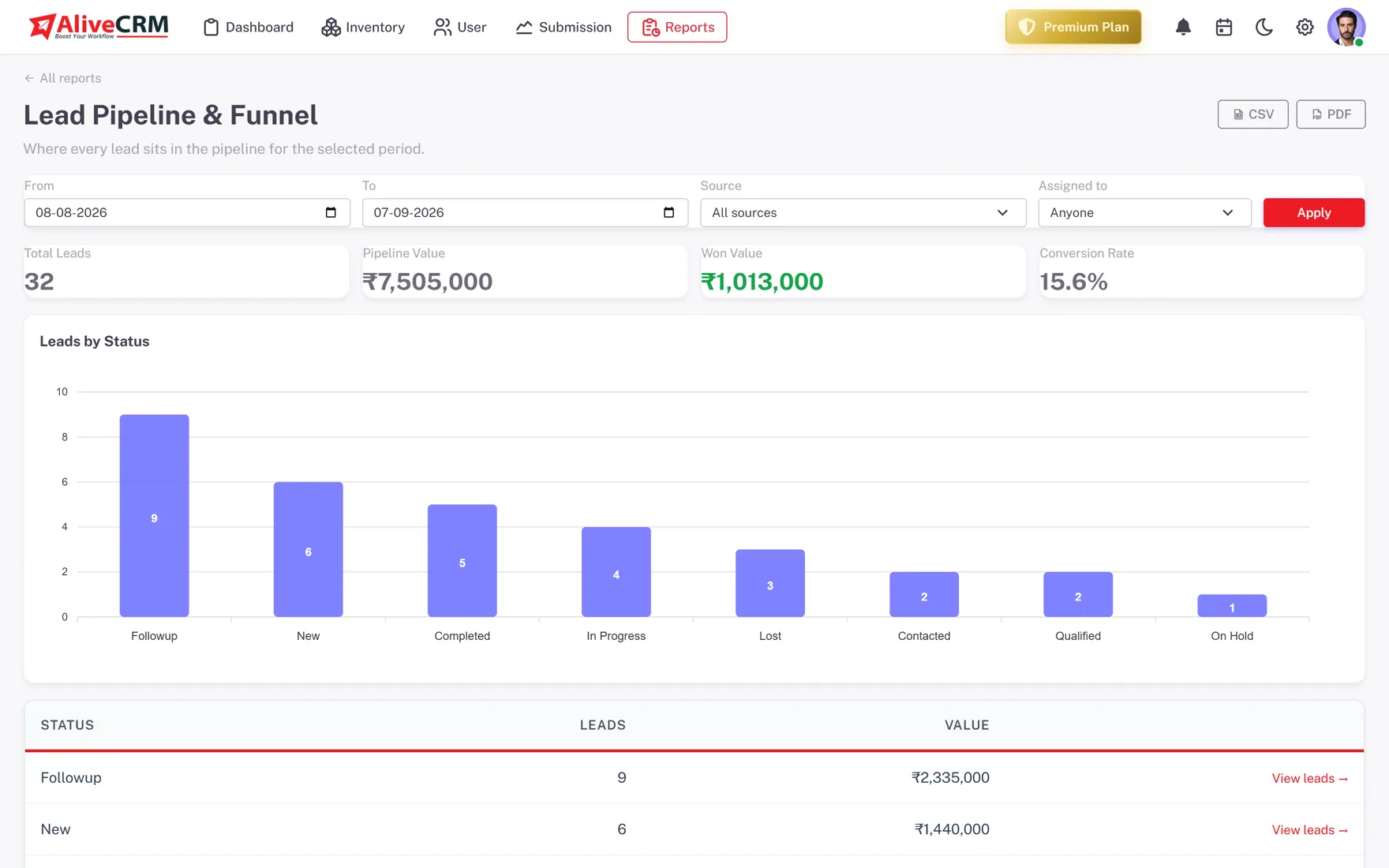
The lead pipeline report shows total leads, pipeline value, won value and conversion rate for the period, plus a stage-by-stage count so you can see where leads stall. The conversion funnel report adds stage-to-stage drop-off based on real status-change history, not a guess.
- Pipeline value and won value for the date range
- Lead count and value per status
- Stage-to-stage drop-off from real transitions
- Filter by source or owner
Channels
Which Sources and Forms Actually Convert
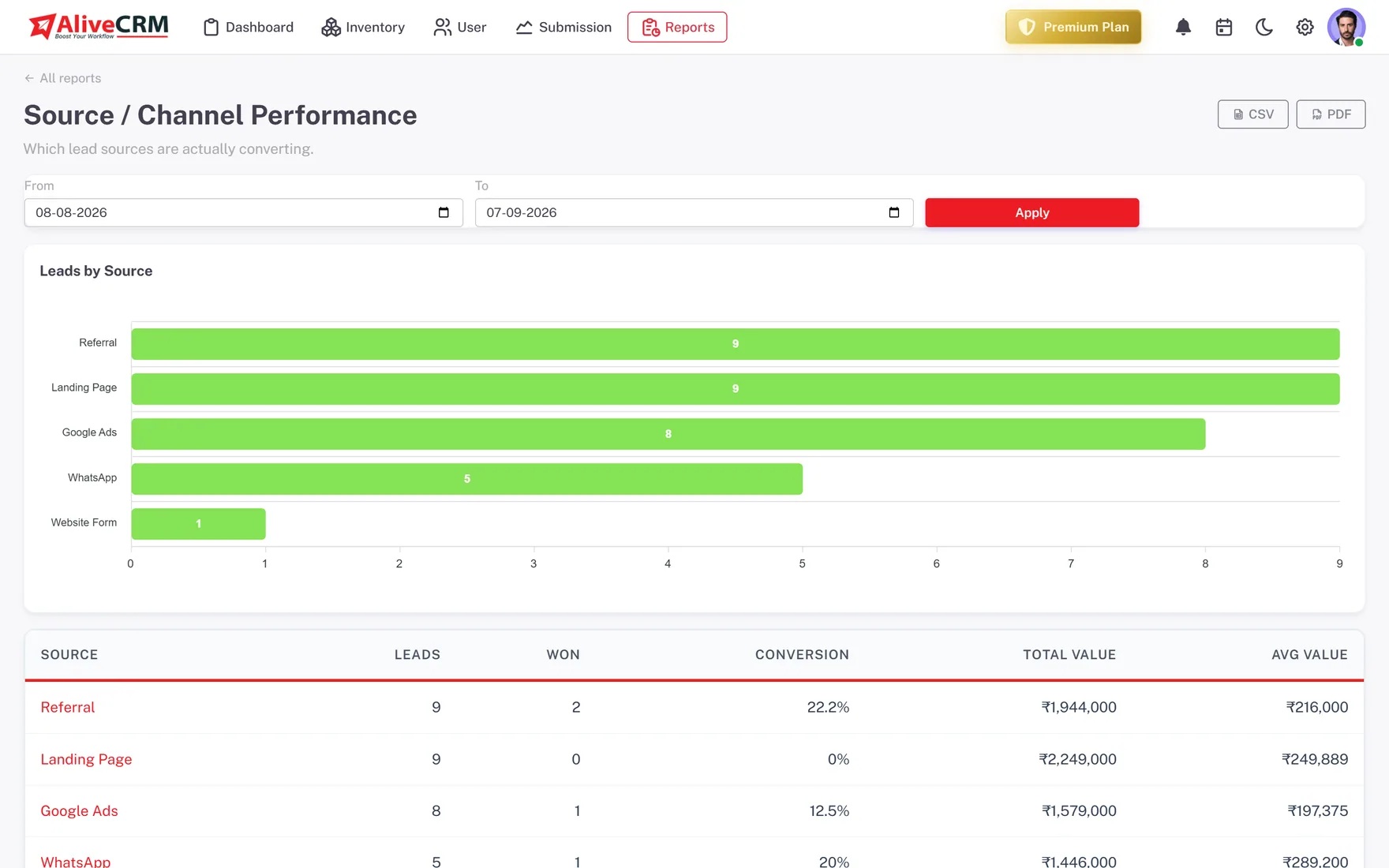
Source performance ranks every channel by lead volume, won count, conversion rate and total value, so you can tell a busy channel from a paying one. Form performance does the same per lead-capture form.
- Leads, won and conversion per source
- Average and total value per channel
- Submissions and conversion per form
- Spot the forms and channels to cut
Team
Rep Performance and Follow-Up Discipline
The sales-rep report is a leaderboard of assigned leads, won count and won value for the month. Follow-up compliance shows, per rep, how reliably reminders are cleared before they go overdue, so a slipping process is visible early.
- Assigned, won and won value per rep
- Conversion rate per rep
- Reminders cleared on time vs overdue
- Overdue follow-ups surfaced on the dashboard
Rahul Sharma
Example Technologies
Catalog
Leads per Product, Service and Project
If you route enquiries to specific products, services or projects, the catalog reports break leads and conversion down by each one. The user-activity report shows who is actually logging in and working.
- Leads and status per product, service or project
- Project report with status breakdown
- Login and session activity per user
Rahul Sharma
Example Technologies
The Detail
What You Can Answer With AliveCRM Reports
Most CRM reporting fails in one of two ways: it needs a data analyst to build a query, or it produces charts nobody trusts because the underlying data was never kept up to date. AliveCRM takes a narrower approach. Every report is built from the same records your team touches every day, the lead, its status, its owner, its source and its follow-up history, so the numbers move as the work happens.
The nine reports
- Lead pipeline and funnel: where leads sit, pipeline and won value, and stage-to-stage drop-off
- Source and channel performance: which channels bring volume and which bring revenue
- Sales-rep performance: assigned, won, won value and conversion rate per person
- Follow-up and reminder compliance: how reliably each rep clears reminders on time
- Web-to-lead form performance: submissions and conversion per form
- Project report: every project broken down by status
- Product and service catalog report: what you sell, by category and status
- User login and session report: who on the team is actually using the CRM
- Conversion funnel: stage-to-stage drop-off based on historical status transitions
Dates, filters and export
Each report takes a from and to date so you can look at a week, a month or a quarter, and most add a source or owner filter. Every report exports to CSV for a spreadsheet or PDF for a meeting, with no reformatting.
Why it matters
The point of reporting is not a dashboard, it is a decision: which channel to spend more on, which rep needs support, which stage is leaking. Because the reports are close to the work, the answers are current when you need them, not a month late.
In Practice
What You Get
Pipeline value and conversion
Source and form ROI
Rep leaderboard and compliance
CSV and PDF export
See What Is Bringing You Leads
Nine reports, built from the leads your team is already working.
FAQ
Frequently Asked Questions
No. The reports are built from your leads, statuses, sources and follow-up history, which the CRM records as your team works. Pick a report and a date range and it is ready.
Yes. Every report exports to CSV for a spreadsheet or PDF for a meeting.
From real status-change history on each lead, not a snapshot. That means the stage-to-stage drop-off reflects how leads actually moved through your process.
The core pipeline and source reports are available on every plan; the full set including rep performance and follow-up compliance is on the paid plans. See the pricing page for the current split.