

 India
Capture incoming business enquiries
Collect form submissions and import supported lead records.
Start your 7-day trialAliveCRM for Android is on Google Play
Manage every website enquiry, sales lead and customer follow-up in one organized platform.
AliveCRM helps Indian businesses capture enquiries through website forms, automatically assign leads to team members, schedule follow-ups, track sales opportunities and create quotations and invoices.
Whether you manage a small business, sales agency, real estate company, software business or service organization, bring your leads and sales activities together in one CRM.
Prices in ₹ · Web CRM and Android app (iOS coming soon) · Monthly and yearly plans
Many Indian businesses receive enquiries through websites, landing pages, phone calls and their sales teams.
When contact details and follow-ups are maintained in spreadsheets, notebooks or individual employee records, it becomes harder to understand which leads are new, who is handling them and what action is required next.
AliveCRM brings these activities into a single lead management platform. Capture website enquiries, organize lead sources, assign employees, manage follow-ups and prepare customer quotations using a structured workflow.
Collect form submissions and import supported lead records.
Choose automatic or manual assignment rules according to your team's responsibilities.
Manage notes, customer interactions and reminders without losing visibility over the next action.
Prepare quotations and invoices using supported item, tax and company-information fields.
Learn how lead management software for Indian businesses can simplify everyday sales coordination.
Many growing businesses start with spreadsheets and manual reminders. These methods may work initially, but can become difficult to coordinate when several employees handle enquiries.
Discover how AliveCRM works and how its lead capture, assignment and follow-up modules help organize everyday activities.
AliveCRM provides a connected workflow for handling these common challenges.
AliveCRM combines the essential tools required to capture enquiries, coordinate employees and track sales activity.
Organize enquiries using custom statuses, lead sources, categories, search and filters.
Explore Lead Management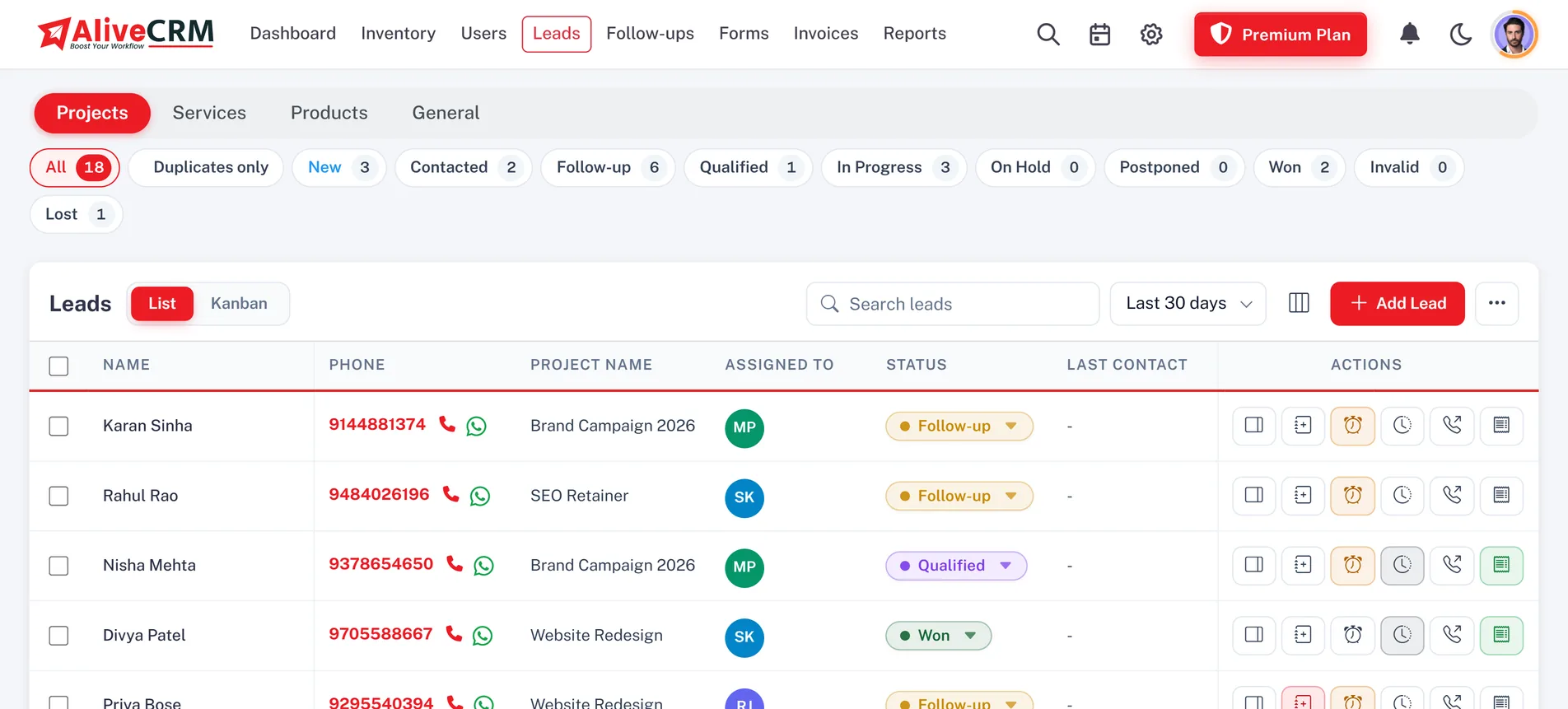
Build customizable forms and embed them into your business website or landing pages.
Explore the Form Builder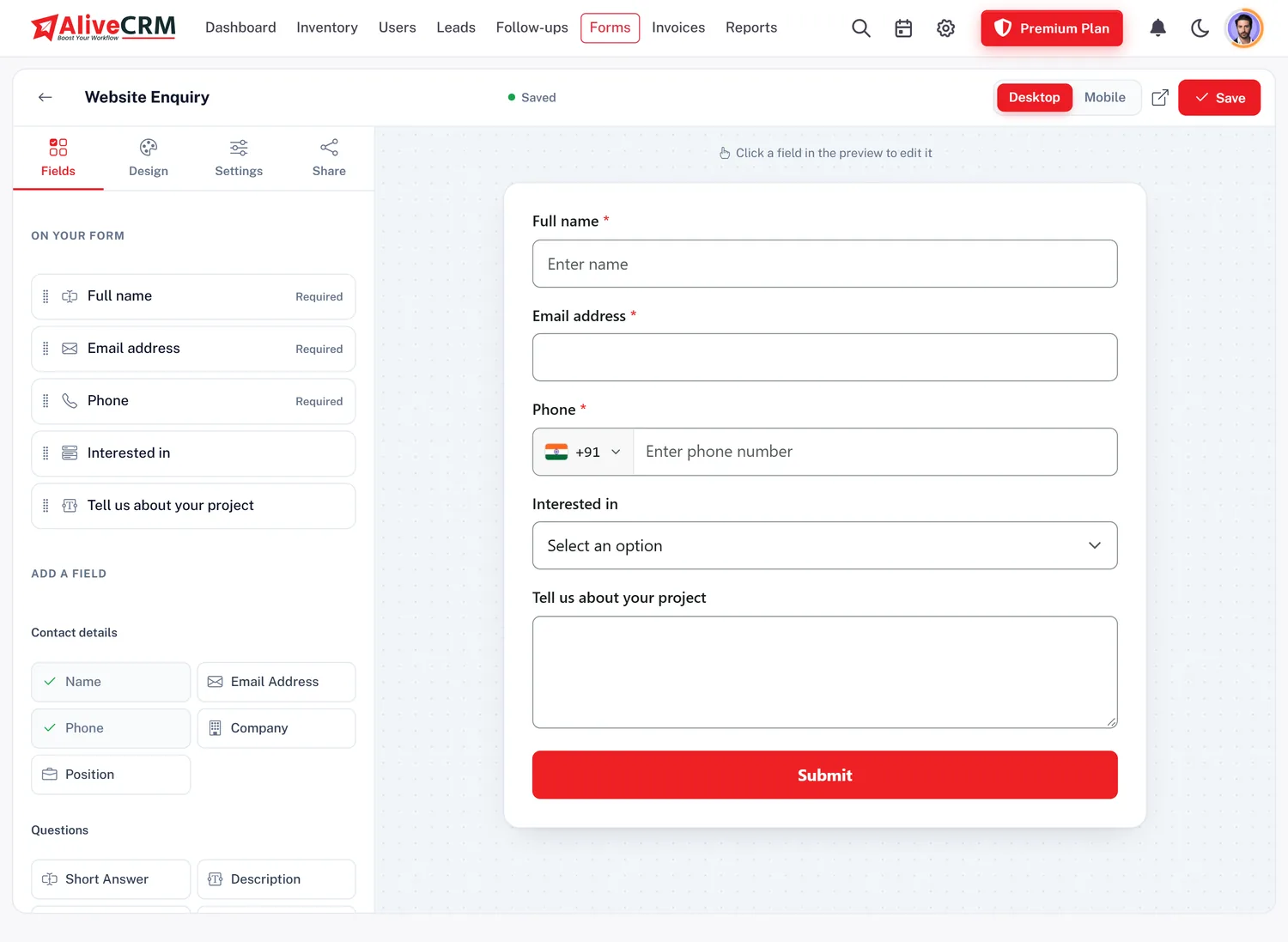
Distribute leads through round-robin, least-busy, random or fixed-user rules. On Basic and up.
Track reminders, pending calls, contact histories and next actions.
Organize opportunities by status and review your sales pipeline visually.
Explore Pipeline Tracking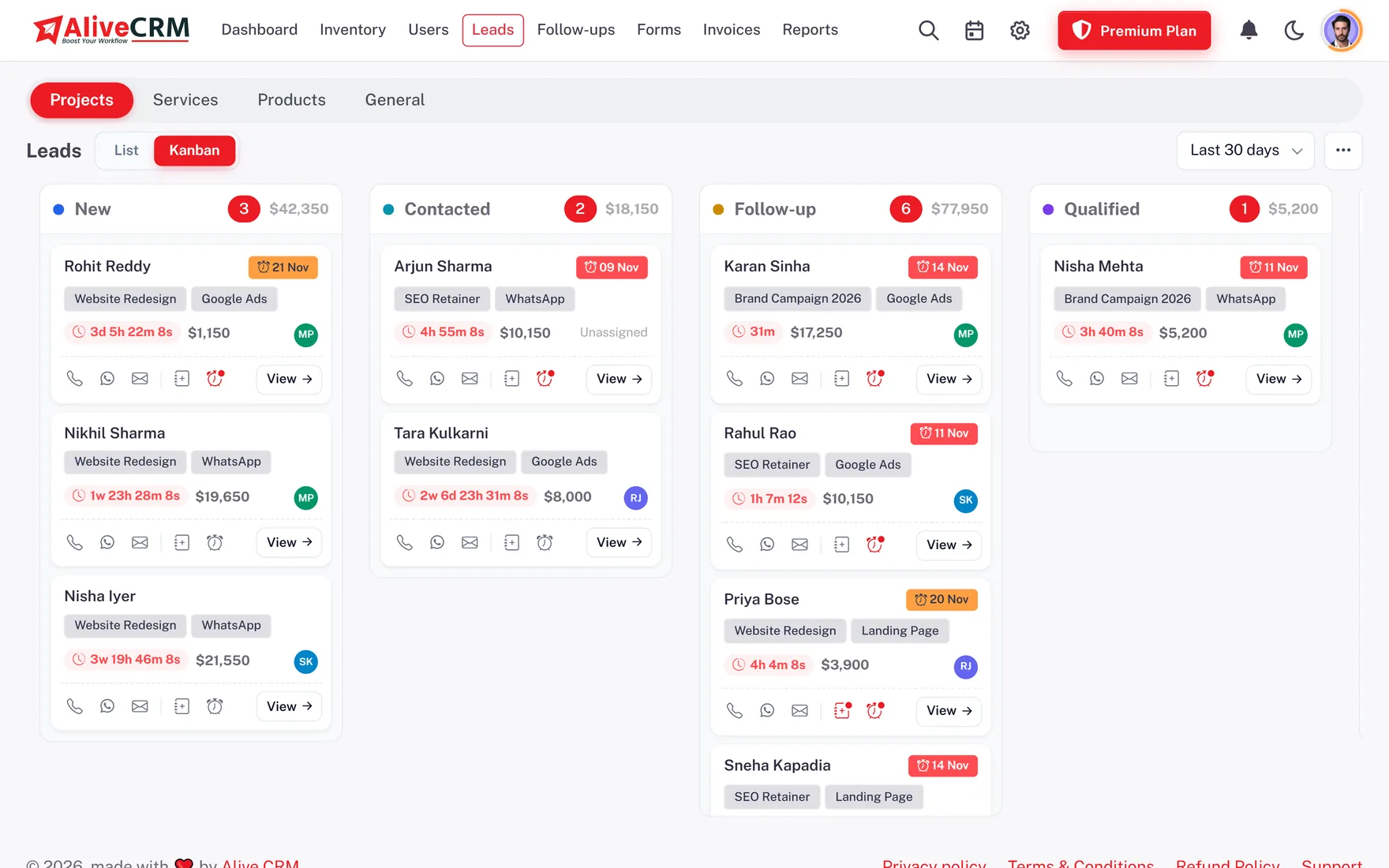
Create quotations with CGST, SGST or IGST and convert them into invoices. On selected paid plans.
Create users, configure access permissions and restrict visibility to assigned records.
Review enquiry sources, lead activity, sales pipeline and available employee reports, exportable to CSV and PDF.
Organize your products, projects and services with categories and eligible team members.
Explore InventoryManage supported leads, reminders, contact activities and reports on the AliveCRM Android app. iOS is coming soon.
Numbers and names in the tiles are example data.
AliveCRM helps Indian businesses organize the steps that follow a new customer enquiry. Every step is saved on the same lead record, so your team always knows what happened and what comes next.
Example data
Receive form submissions from your website or import existing leads using supported spreadsheet formats.
Assign lead sources, categories and relevant product, project or service details.
Route leads through configured assignment rules or assign them manually.
Review the lead, update its status, add notes and record supported communication activities.
Set reminders for pending conversations, calls, meetings or other agreed actions.
Generate supported sales documents while keeping the lead record connected.
Monitor enquiry progress, team activity and available sales reports.
Explore the complete CRM workflow for Indian businesses.
Your business website may receive requests for quotations, service enquiries, product information or project consultations. AliveCRM collects these submissions directly in a structured lead management system.
Use the form builder to create enquiry forms, configure fields and embed them into your website. When a prospective customer submits the form, the details appear in your company's CRM according to its configured workflow.
For example, an Indian software company can create separate forms for website development, custom software and mobile app enquiries, then route each submission to the relevant sales employees. Explore the website lead capture form builder and website enquiry management.
Explore Lead Capture Forms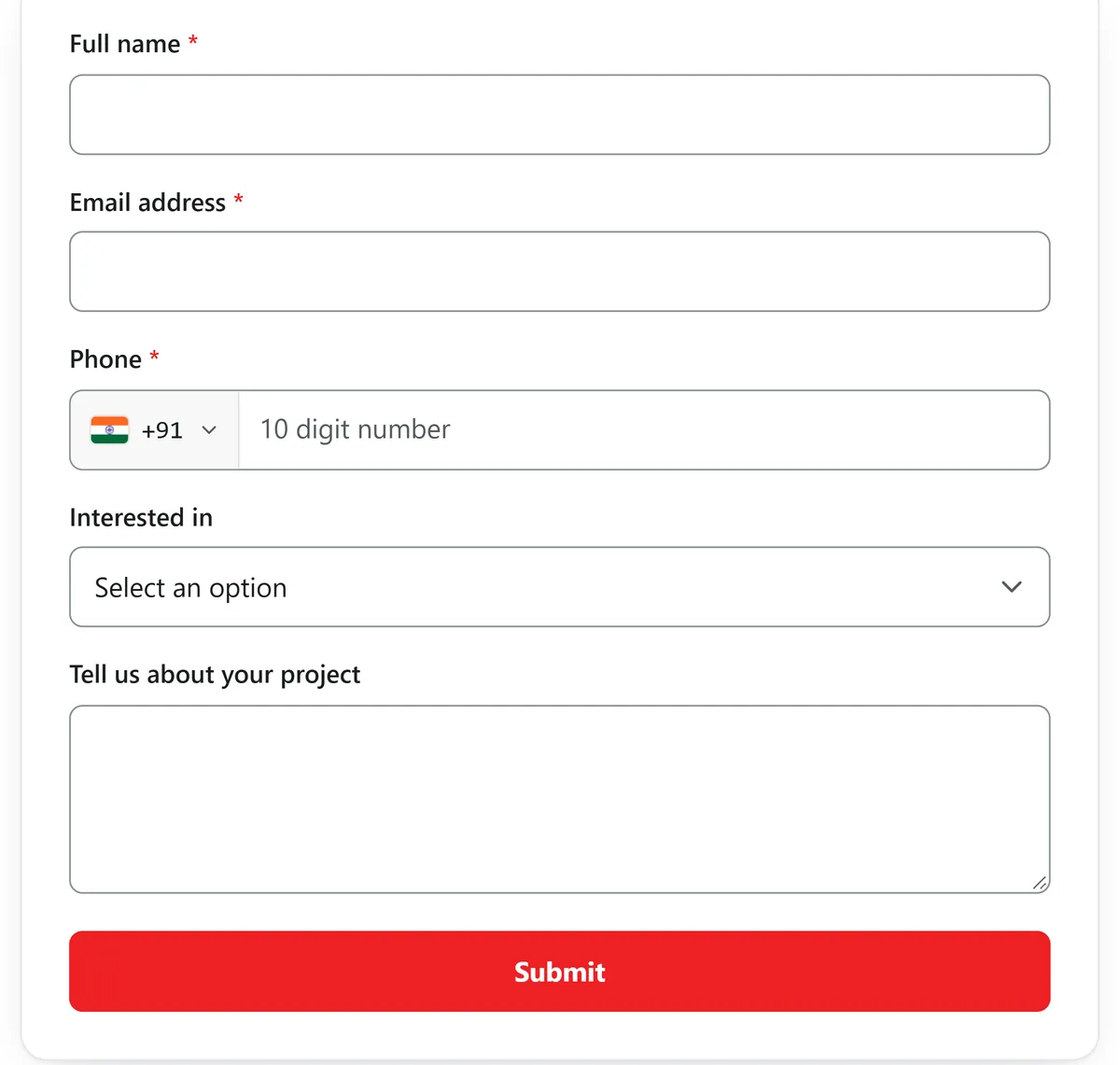
Create forms for contact pages, service pages, project enquiries or landing pages.
Associate forms with relevant products, projects or services.
Apply assignment settings so eligible team members can handle incoming leads.
Review form-related enquiries and applicable usage limits from the CRM.
For a business receiving several enquiries each day, assigning responsibility manually can become time-consuming. AliveCRM provides configurable lead assignment methods that route incoming enquiries to eligible team members, on Basic and up.
Distribute leads to assigned employees in rotation.
Route a new lead to the eligible employee with the fewest open leads.
Assign enquiries randomly among eligible employees.
Direct enquiries to the employee responsible for the related workflow.
Keep control over assignments when the business prefers manual routing.
Assignment rules can be applied to individual products, projects and services, so different enquiry categories go to different employees. Learn more about automatic lead assignment software and sales team management.
Explore Lead DistributionFor many Indian sales teams, customer conversations include phone calls, WhatsApp messages, scheduled meetings and reminders. Managing these activities across employees needs clear ownership and a reliable record of what happens next.
AliveCRM helps users track lead statuses, maintain notes, review contact history and manage scheduled follow-ups. Reminders come with Basic and up, and the calendar with Advance and Premium.
Review enquiries requiring attention during the current day.
Identify scheduled activities that are still pending.
Plan the next customer contact and manage follow-up dates.
Review interaction details and notes on each customer enquiry.
Access reminders and lead information through the Android app.
AliveCRM provides click-to-call and WhatsApp contact actions on each lead. It is not an automated WhatsApp marketing or messaging integration.
Learn about sales follow-up management and CRM calendar and reminders.
Explore Follow-Up ManagementFor many Indian businesses, preparing a quotation is a regular step after discussing a customer's requirements.
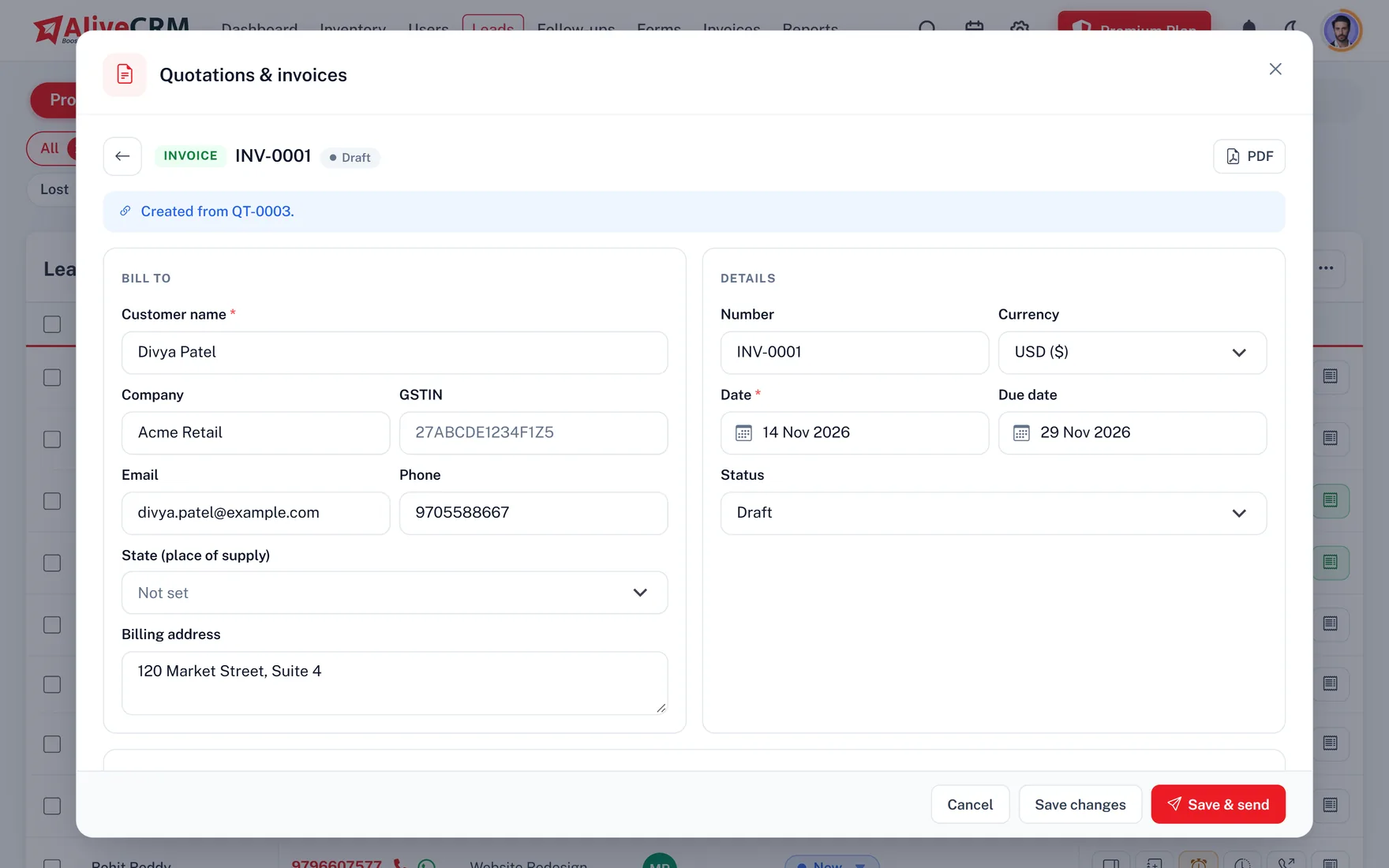
On selected paid plans, authorized users can create quotations from lead records, add product or service details, set quantities and rates, apply discounts and add GST, split into CGST and SGST or IGST by place of supply. A quotation can then be converted into an invoice, keeping sales information connected.
Add line items, quantities, rates and discounts.
CGST and SGST or IGST from the place of supply, with HSN or SAC codes per line.
Generate an invoice from the corresponding quotation.
Reuse configured company details, GSTIN and bank information.
Generate professional PDFs for sharing and recordkeeping.
Track Draft, Sent, Paid and Cancelled statuses.
AliveCRM calculates CGST and SGST or IGST and shows HSN or SAC codes you enter, but it alone does not make every invoice GST-compliant. Tax invoices need the particulars set out in Rule 46 of the CGST Rules, and some businesses have further obligations, so check your invoice format with your accountant.
Learn more about GST-ready CRM quotations and invoices.
Explore Quotations & InvoicesIndian sales teams often work across customer meetings, site visits, service locations and offices. The AliveCRM Android app lets your team access lead information and manage activities away from the computer. The iOS app is in App Store review.
Search, filter and update customer enquiries.
Call or message a lead straight from its record.
Review pending activities and schedule customer callbacks.
Monitor statuses and move leads through pipeline stages.
Create or manage sales documents according to your plan and permissions.
Receive lead, assignment and reminder notifications.
View the records and functions your company role allows.
The Android app includes call-related features, such as call tracking, that iOS may not support because of platform restrictions.
Explore the AliveCRM mobile app for Indian sales teams and mobile lead management features.
Whether your company receives a few enquiries each week or runs a team processing many leads a day, a structured workflow helps organize customer information and responsibilities.
Manage enquiries, follow-ups and sales activities without relying entirely on spreadsheets.
Capture and track website enquiries using embedded forms and centralized lead records.
Assign enquiries, define employee permissions and monitor follow-up activities.
Organize product enquiries and associate them with the relevant products.
Track project enquiries, assigned team members, customer communication and quotation requirements.
Manage service enquiries, booking-related submissions and follow-up activities.
Different industries manage different types of customer enquiries. AliveCRM provides configurable lead records, categories and workflows that support several business scenarios.
Organize property enquiries, assign sales representatives and manage follow-ups or scheduled site visits.
Manage project enquiries, website development requests, software service leads and sales quotations.
Organize enquiries from agency websites and landing pages, assign responsibilities and monitor client follow-ups.
Track course enquiries, prospective student follow-ups and admissions-related leads.
Organize product-related enquiries and customer requests linked to your inventory.
Manage service requests, client enquiries, quotations and follow-up activities in one place.
Capture customer service enquiries, assign responsible employees and track pending visits or requests.
These are uses of general CRM features, not claims of specialized industry certifications or integrations.
Business owners and sales managers need to understand how enquiries are progressing and which activities need attention.
AliveCRM provides dashboards and reports that help authorized users review business activity and monitor sales metrics. Reports vary by subscription package and user permissions: the pipeline report is on every plan, and the full set comes with Advance and Premium.
Explore CRM reports and analytics.
Explore Sales Reports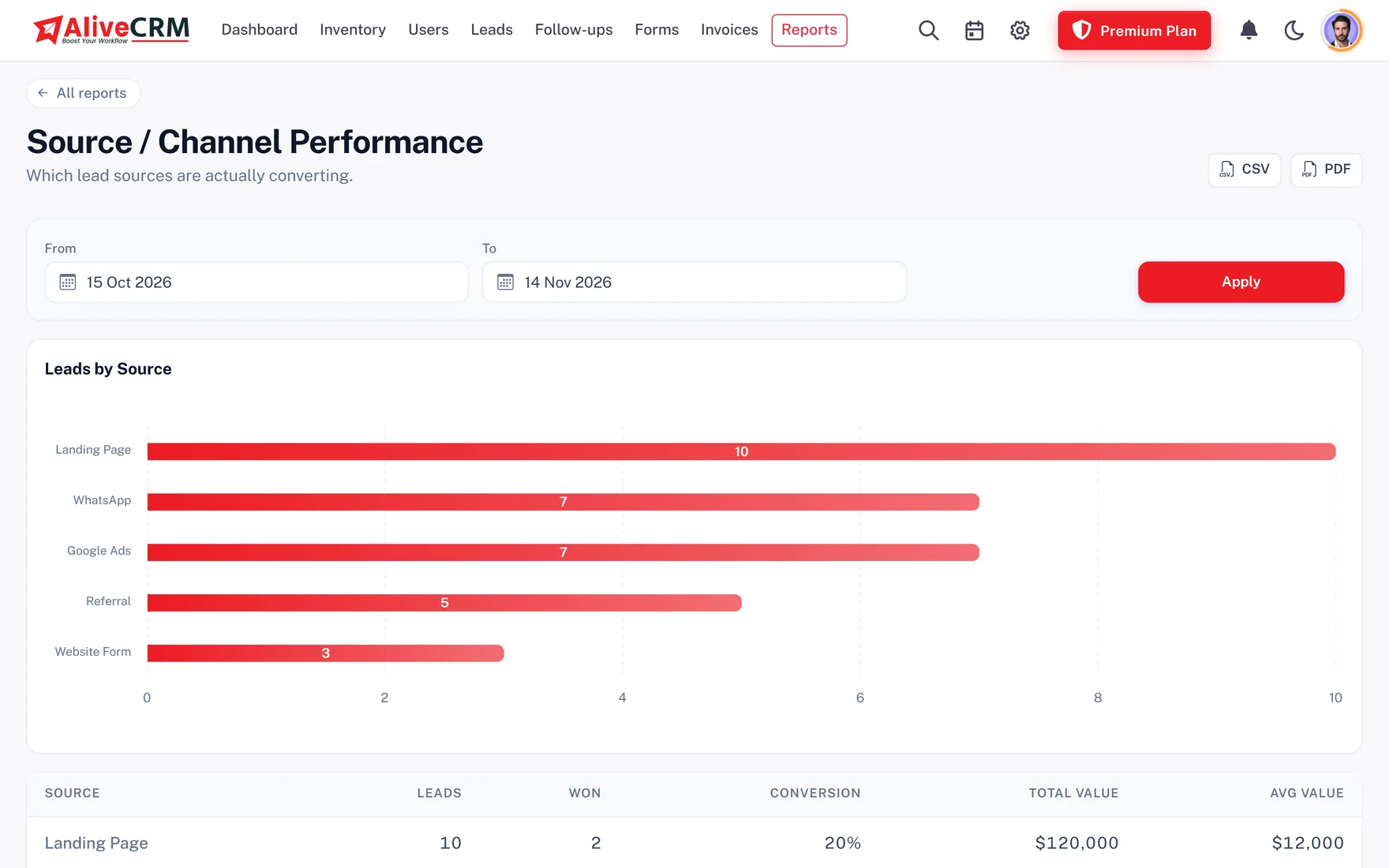
Review enquiries across configured lead statuses.
See which recorded sources bring in your enquiries.
Review leads, assignments and activity per team member.
Monitor pending reminders and follow-up completion.
View opportunities across the stages of your sales workflow.
Review lead submissions from company forms and their usage.
AliveCRM is designed around the activities that follow a business enquiry. Rather than using separate processes for collecting leads, assigning responsibility and preparing sales documents, businesses can manage them in one platform.
Bring website form submissions into the CRM.
Route enquiries to eligible employees using configurable rules.
Manage customer reminders, notes and interaction history.
Organize different enquiry types using business categories and structured records.
Prepare quotations and invoices with Indian tax fields.
Control which team members can access and manage particular functions and records.
Work from the web CRM and the Android app. iOS is coming soon.
Review Indian pricing with monthly and yearly billing options.
AliveCRM is a SaaS product by Alive Inc., a technology company based in Navi Mumbai, Maharashtra, serving customers in India and internationally. Learn more about AliveCRM.
Choose an AliveCRM subscription package based on your team size, required features and lead management needs. Every plan is shown in Indian Rupees (₹), with monthly and yearly billing.
Explore the product and its features before choosing a paid package.
Review users, form limits, lead allowances and feature entitlements.
Select the payment term that suits your business.
View package details, payment history and upgrade options from your company account.
₹0 for 7 days
No payment at sign-up
₹1,899/mo
₹19,499/yr billed yearly
₹2,849/mo
₹29,999/yr billed yearly
₹4,749/mo
₹48,990/yr billed yearly
After the trial, pick Basic, Advance or Premium to keep your leads and forms. Prices are in Indian Rupees. Applicable GST, supported payment methods and recurring billing are confirmed at checkout.
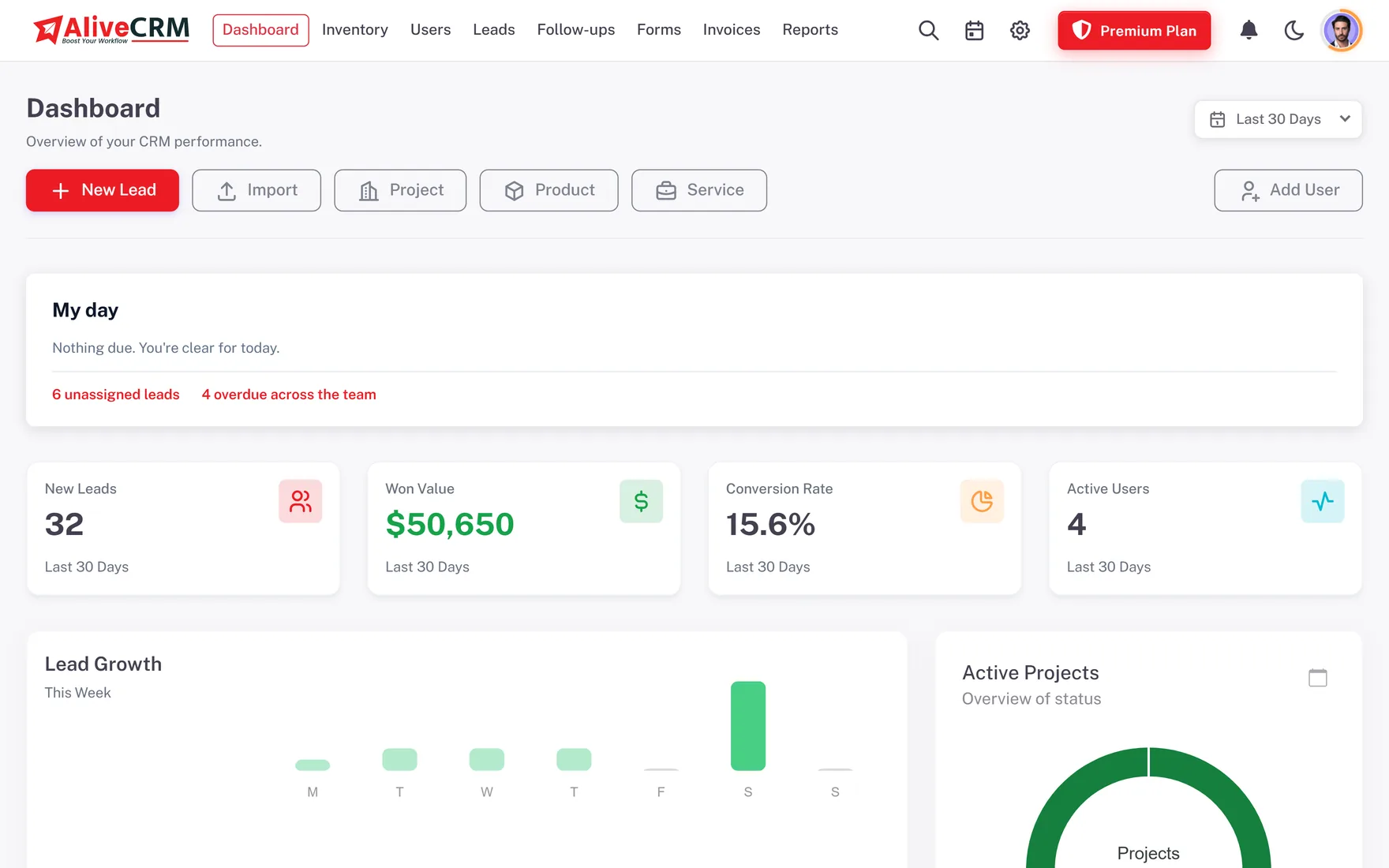
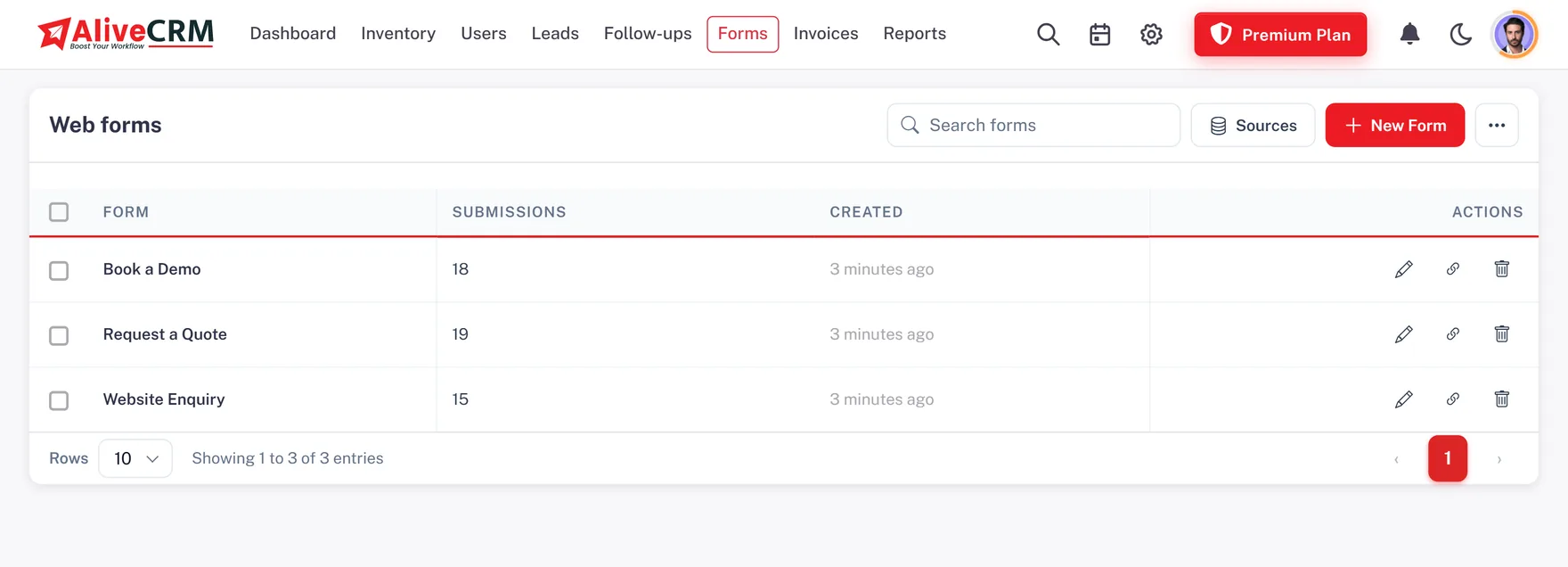
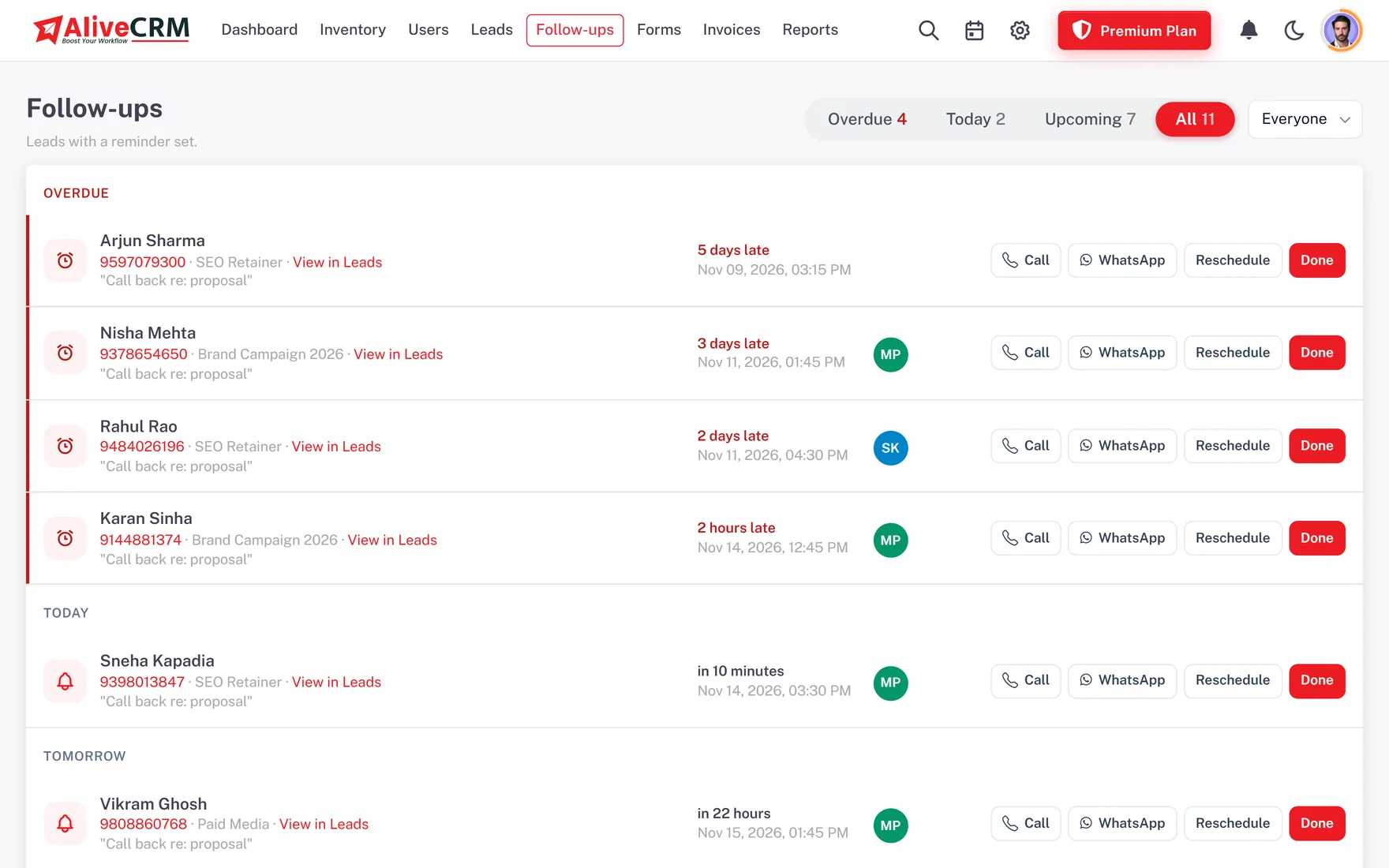
Explore the dashboards and tools for managing enquiries, employees, follow-ups and sales documents. Screens below are real, filled with demonstration records.
Lead summaries, activity and reporting.
Contact records, statuses and employee assignments.
Custom form creation and embed settings.
Lead status tracking and Kanban views.
Pending reminders and upcoming activities.
₹ sample documents with GST fields.
AliveCRM is developed under Alive Inc., an India-based technology company providing website, software and application development services, based in Navi Mumbai, Maharashtra.
The product focuses on helping companies organize incoming business enquiries, manage sales activities and keep visibility across their lead management workflow. Accounts are protected with role-based permissions and optional two-factor sign-in, and each company's data is kept separate from every other.
AliveCRM is lead management software built in India for Indian businesses: it collects your enquiries, hands each one to the right employee, tracks every follow-up and turns deals into GST quotations and invoices.
Yes. Shops, clinics, agencies and service firms across India can start with one form and a few users, then add more as enquiries grow.
Yes. Indian businesses see every plan in rupees, billed monthly or yearly, on the pricing page.
Yes. Try it for 7 days with Advance plan features for your team. No card or UPI payment is needed to start.
Yes. Add a form to your website, a property listing or a campaign landing page; each enquiry lands in your CRM with its source, ready for your sales team.
Yes, on Basic and up. Share enquiries among your sales executives by turn, by workload, at random, or send them all to one person, per form.
Yes. Roles can be limited to their own records, so each employee sees and works only the leads assigned to them.
Yes, on Basic and up. Set a reminder on any lead, see overdue, today and upcoming follow-ups, and get notified on the web and the Android app.
Yes, on selected paid plans. Add line items, discounts and GST split into CGST and SGST or IGST, include your GSTIN and bank details, and send or download PDFs. AliveCRM does not file returns or generate e-invoices, so check the Rule 46 invoice particulars that apply to your business.
Subscriptions in rupees are paid through a supported Indian payment gateway. The payment methods available, such as UPI, cards or netbanking, are shown at checkout.
Your field and sales staff can use the Android app from Google Play today; the iPhone app is in App Store review. Call tracking works on Android only.
Yes. Save your Excel sheet as CSV and import it with the template; repeated phone numbers or emails are flagged, and your leads can be exported again as CSV, Excel or PDF whenever you need.
Yes. Capture property enquiries with forms, assign them to sales representatives, and track follow-ups and site visits.
Yes. Create forms per client or campaign, keep every enquiry in one pipeline, assign account owners and compare lead sources in reports.
Yes. Set your own lead statuses, move leads on the Kanban pipeline and see the status history on every lead.
Yes. List your flats, courses, services or products in inventory, link a form to each and send every enquiry to the right executive.
Yes. Upgrade from your account settings at any time; the billing terms are shown before you confirm.
Your account locks until you choose a paid plan. Your leads and forms are kept, so you can continue where you left off.
Yes. AliveCRM is built by Alive Inc., a technology company in Navi Mumbai, Maharashtra.
Use Book a demo on this page, email info@aliveinc.in or call +91 80909 08020.
Bring website enquiries, sales activities and quotation workflows together with AliveCRM.
Explore CRM features, review INR pricing or request a product demonstration for your business.