Feature
Share New Leads Across the Team Automatically
Every form submission is handed to the next person in the rotation and they are notified at once, so no lead sits waiting for someone to claim it.
How It Works
Lead Distribution in AliveCRM
Rotation
Round-Robin Across Your Active Team
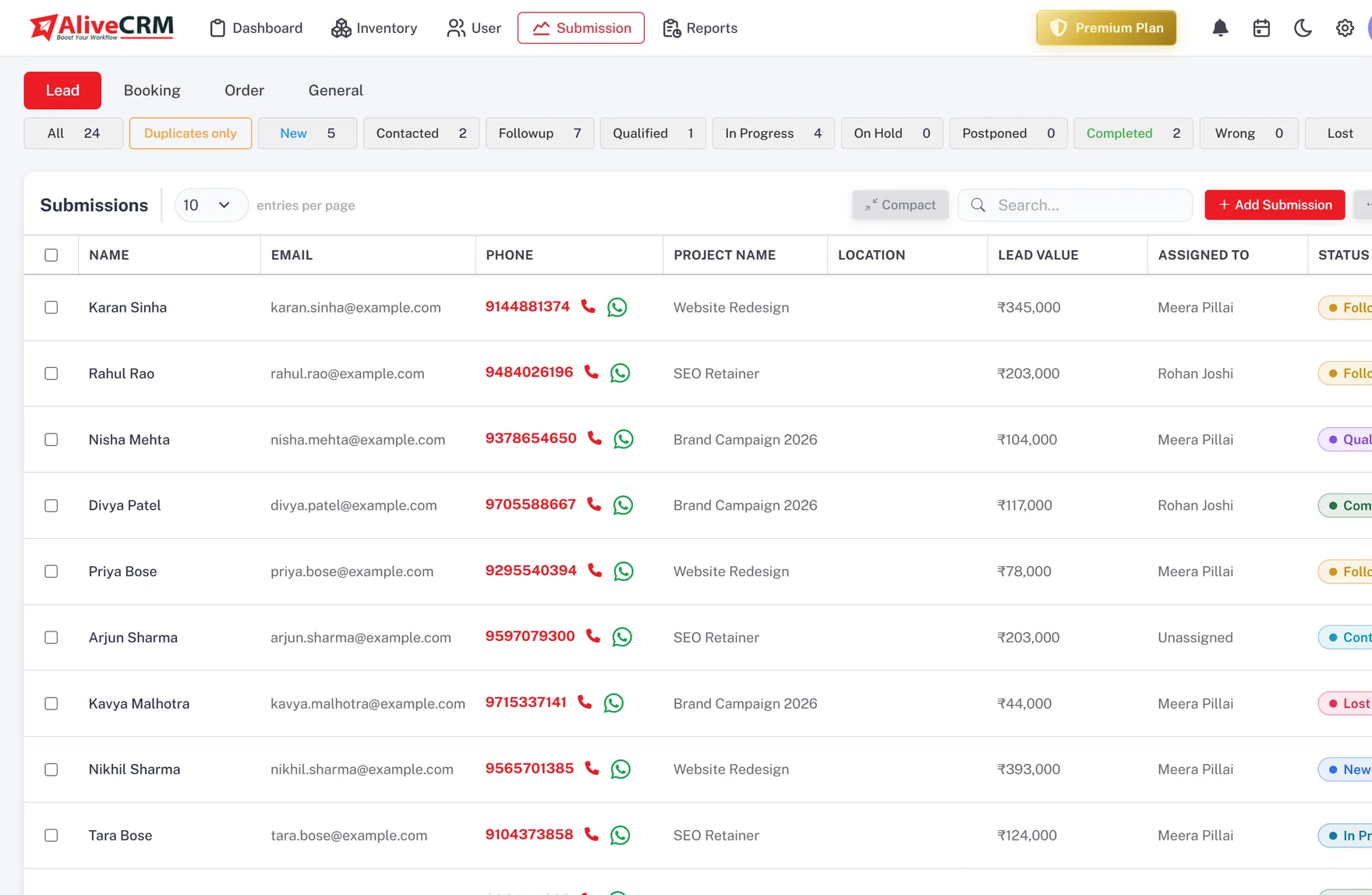
When a lead comes in from a website form, AliveCRM passes it to the next person in a fixed rotation of your active team members. The rotation pointer is shared, so two leads arriving seconds apart still go to two different people, and over a week the load comes out even.
- Every active team member is in the rotation
- Leads split evenly, not dumped on one inbox
- Assignment happens at the moment of capture
- Admins and inactive users are skipped
Notify
The Assignee Knows Straight Away
The person the lead is handed to gets an in-app notification with the name, email and source, and the form owner and company admins are notified too. Nobody has to watch a shared queue to catch new work.
- In-app notification to the assignee on arrival
- Form owner and admins notified as well
- Lead shows its owner on the list and the pipeline card
Rahul Sharma
Example Technologies
Fallback
A Lead Is Never Left Unassigned
If the rotation has nobody to hand a lead to, for example before you have added your reps, AliveCRM assigns it to an active admin so it still lands on someone. When you add team members they join the rotation automatically.
- Falls back to an active admin when the team is empty
- New users join the rotation with no configuration
- No lead ends up with no owner
Rahul Sharma
Example Technologies
Override
Reassign by Hand Whenever You Need To
Automatic distribution sets the first owner; it does not lock it. A manager can reassign a lead to a specialist, cover for someone who is away, or move a batch of leads, and the change is logged on the lead.
- Reassign a single lead or several at once
- Ownership change recorded in the lead history
- Distribution outcomes show in the sales-rep report
Rahul Sharma
Example Technologies
The Detail
Why Automatic Distribution Matters
The gap between a lead arriving and a person owning it is where most leads are lost. If new enquiries land in a shared inbox or an unassigned list, the fast responders cherry-pick, the rest go cold, and no one is accountable for the ones that slip. A rotation closes that gap by making ownership automatic and immediate.
What round-robin actually solves
Round-robin is not about being clever, it is about being fair and being fast. Every lead has an owner within a second of being captured. The work is spread evenly instead of piling onto whoever happens to be watching. And because the assignment is a fact on the record rather than a race, you can measure response time per rep and hold the process to a standard.
How AliveCRM does it
AliveCRM keeps one rotation per company across all active, non-admin users, ordered consistently. Each incoming web lead advances the pointer and takes the next owner. A short lock around the step means a burst of submissions is still distributed one per person rather than several to the same rep. If there is no one to assign to, an active admin picks it up.
When to reassign
The rotation gives you a sensible default, not a rigid rule. Reassign when a lead clearly belongs with a product or regional specialist, when someone is on leave, or when a manager is rebalancing workloads. The automatic step means those are the exceptions you handle, not the whole job.
In Practice
What You Get
Even round-robin rotation
Owner set at capture
Assignee notified in-app
Manual reassignment any time
Give Every New Lead an Owner Immediately
Round-robin distribution the moment a form is submitted, with a manual override when you need it.
FAQ
Frequently Asked Questions
Web leads are shared on a round-robin rotation across your active team members. Each new lead goes to the next person in the order, so the load stays even. It is not weighted by territory, product or source.
The automatic rotation runs for leads captured through website forms. A lead you create by hand in the CRM is assigned by you at the point you add it.
The lead is assigned to an active admin so it still has an owner. Once you add team members they are included in the rotation automatically, with no setup.
Yes. Reassign one lead or several at once from the lead list; the change is recorded in the lead history and reflected in the sales-rep report.
Lead Distribution is the automatic round-robin that gives a new web lead its first owner. Lead Assignment covers working with ownership after that: reassigning, viewing a rep's leads, and keeping accountability clear.