

CRMFeature

Custom Lead Statuses and Sources for Indian Businesses

Use the words your team already uses for each stage, and know which channel every enquiry came from, so reports in the owner's review make sense.

The short answer

Can I name my own lead stages and sources?

Yes. In AliveCRM every company sets its own custom lead statuses and sources. Each lead type has its own status list, and each status gets a colour, a place in the order, an optional default flag for new leads and a won or lost flag. Sources are your own list too, so a lead can say Website, Google Ads, Referral, Walk-in or Exhibition.

A real estate team talks about site visits, a coaching institute about demo classes and counselling, a manufacturer about samples and dealer approval. Good lead management software in India should speak that language instead of forcing generic stages on everyone.

What happens when stages are vague

  • Executives write "call back" or "interested" in the notes instead.
  • Service bookings are pushed through sales stages that do not fit.
  • Each manager counts closed deals differently.
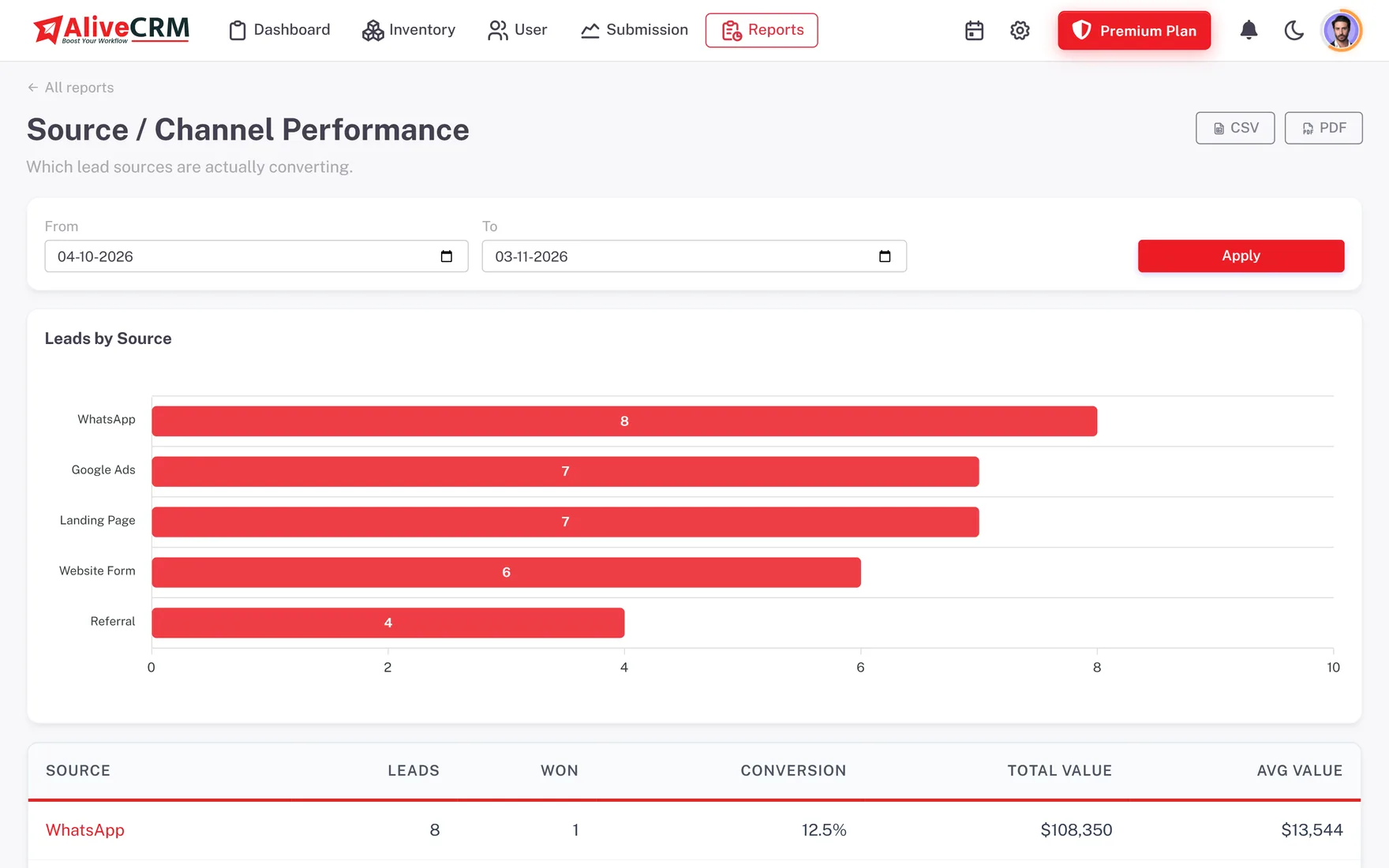
  • Nobody can say whether ads or referrals bring better enquiries.
How It Works

Set Up Once, Use on Every Lead

A short setup shapes the pipeline, follow-ups and reports that follow.

  1. 01Choose Lead Type
  2. 02Name Statuses
  3. 03Add Sources
  4. 04Team Uses Them
  5. 05Reports Compare
Lead Types

A Separate Stage List for Each Kind of Work

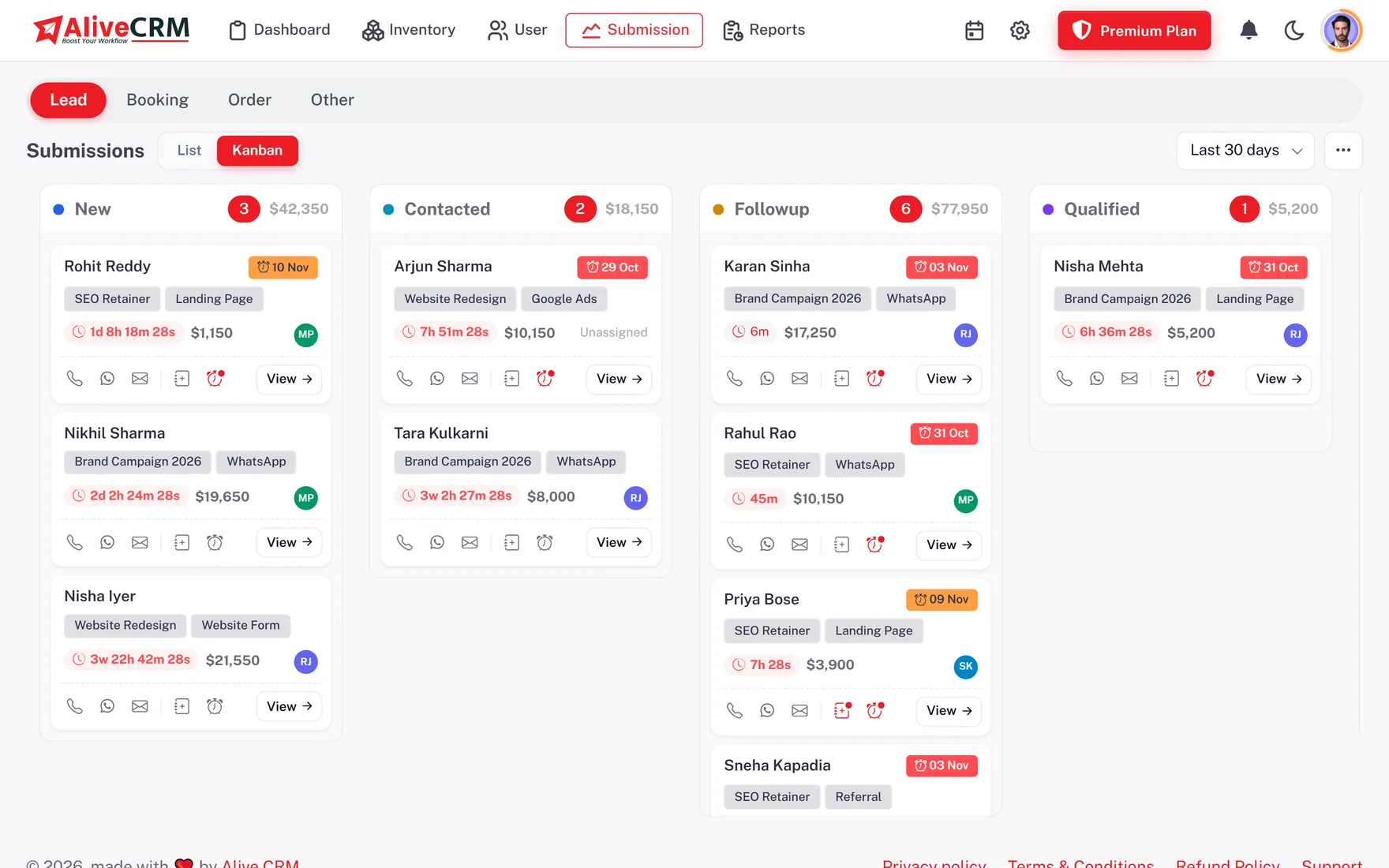
AliveCRM handles four submission types: project leads, service bookings, product orders and general enquiries. Each has its own status list. A builder can move project leads from New to Site Visit Planned to Negotiation, while a clinic moves bookings from Requested to Confirmed to Completed. Each list drives its own Kanban board, so the pipeline always reflects the work in front of the team.

  • Lists for leads, bookings, orders and general
  • Add, rename or remove statuses
  • Each list drives its own board
See the sales pipeline
A Separate Stage List for Each Kind of Work
Details

Colours, Order, Defaults and Outcomes

Give each status a colour so it stands out in the lead list and on the board. Drag statuses into the order a lead usually travels. Choose one default for every new enquiry, and mark the statuses that mean won or lost. Those flags keep conversion counts consistent, so the monthly figure the owner sees is calculated the same way for every executive and every city team.

See CRM reports
  • Colour per status
  • Drag to reorder
  • Default for new leads
  • Won and lost flags
Day One

Ten Ready Statuses to Start With

New accounts begin with ten statuses: New, Contacted, Followup, Qualified, In Progress, On Hold, Postponed, Completed, Wrong and Lost. Completed is flagged as won, and Wrong and Lost as lost. You can start taking enquiries the same day and refine the stages after a week of real use, once you see which words your team actually needs.

See lead management in India
  • Ten defaults at signup
  • Won and lost already set
  • Edit them any time
Sources

Know Where Every Enquiry Came From

Create sources such as Website, Google Ads, Facebook, Referral, Walk-in or Exhibition, each with a description and an on or off switch. Every web form is tied to a source, so form leads are labelled automatically. When you add a phone enquiry by hand or import a sheet, you pick the source. Retire an old channel by switching it off; past leads keep their label.

  • Your own source list
  • Forms label leads automatically
  • Switch off old sources, keep history
See the website enquiry form builder
Know Where Every Enquiry Came From
Who It Is For

Who Gets Most From Custom Stages

Builders and developers

Track site visits, negotiation and booking as stages, and see which channel brings serious buyers.

Clinics

Move appointment bookings through Requested, Confirmed and Completed without mixing them with package enquiries.

Education institutes

Stages like Counselling Done and Fee Discussed show where each admission enquiry really stands.

Owners spending on ads

Consistent sources show whether ads, referrals or walk-ins deserve next month's budget.

Honest limits

What Statuses and Sources Do Not Do

Statuses do not change on their own; there are no rules that move a lead after a set time or when a customer replies. Sources are labels you choose, not automatic tracking of ad campaign parameters, and there is no connector that brings portal leads in with their source. Imported leads need sources that already exist, and an unknown status in a file falls back to your default.

FAQ

Frequently Asked Questions

Can I use stages like Site Visit Planned or Demo Class Booked?

Yes. Status names are yours to write. Add Site Visit Planned, Quotation Sent, Demo Class Booked or any stage your team uses, give it a colour and drag it into position. Different lead types can have different lists, so service bookings and sales enquiries never share stages that do not suit them.

Can I write status names in Hindi?

Status and source names are plain text, so you can write them in Hindi or another language if your team prefers. Most businesses keep them short and in English so everyone, including new joiners from other states, reads them the same way on the list and the board.

What statuses does a new account start with?

Ten: New, Contacted, Followup, Qualified, In Progress, On Hold, Postponed, Completed, Wrong and Lost. Completed is marked as won, while Wrong and Lost are marked as lost. Rename, recolour, reorder or remove any of them whenever your sales process changes.

How do I record leads from IndiaMART or JustDial as a source?

Create a source with that name, for example IndiaMART, and pick it when you add those enquiries by hand or fill the Source column in a CSV import. There is no automatic connector to these portals, but a consistent source label still lets reports compare them with your website and referrals.

Why should I mark statuses as won or lost?

The flags tell AliveCRM which outcomes are conversions and which are lost deals. Reports and the pipeline then count results the same way for every executive, even if different teams use different names for the final stage, which keeps the numbers in a monthly review fair.

Can I stop using a source without losing history?

Yes. Switch the source off and it no longer appears when adding new leads, but older leads keep their original label. Last year's reports still show where those enquiries came from, even after you stopped that ad campaign or exhibition stall.

Shape Your Stages in a Few Minutes

Start a 7-day trial, no card needed, rename the default statuses and add your sources. Pay in rupees when you pick a plan.

Book a demo

See forms, leads and follow-ups set up for your team on a live call. Leave your details and we will reach out to pick a time.