

 India
CRM Software Features Built for Growing Indian Businesses
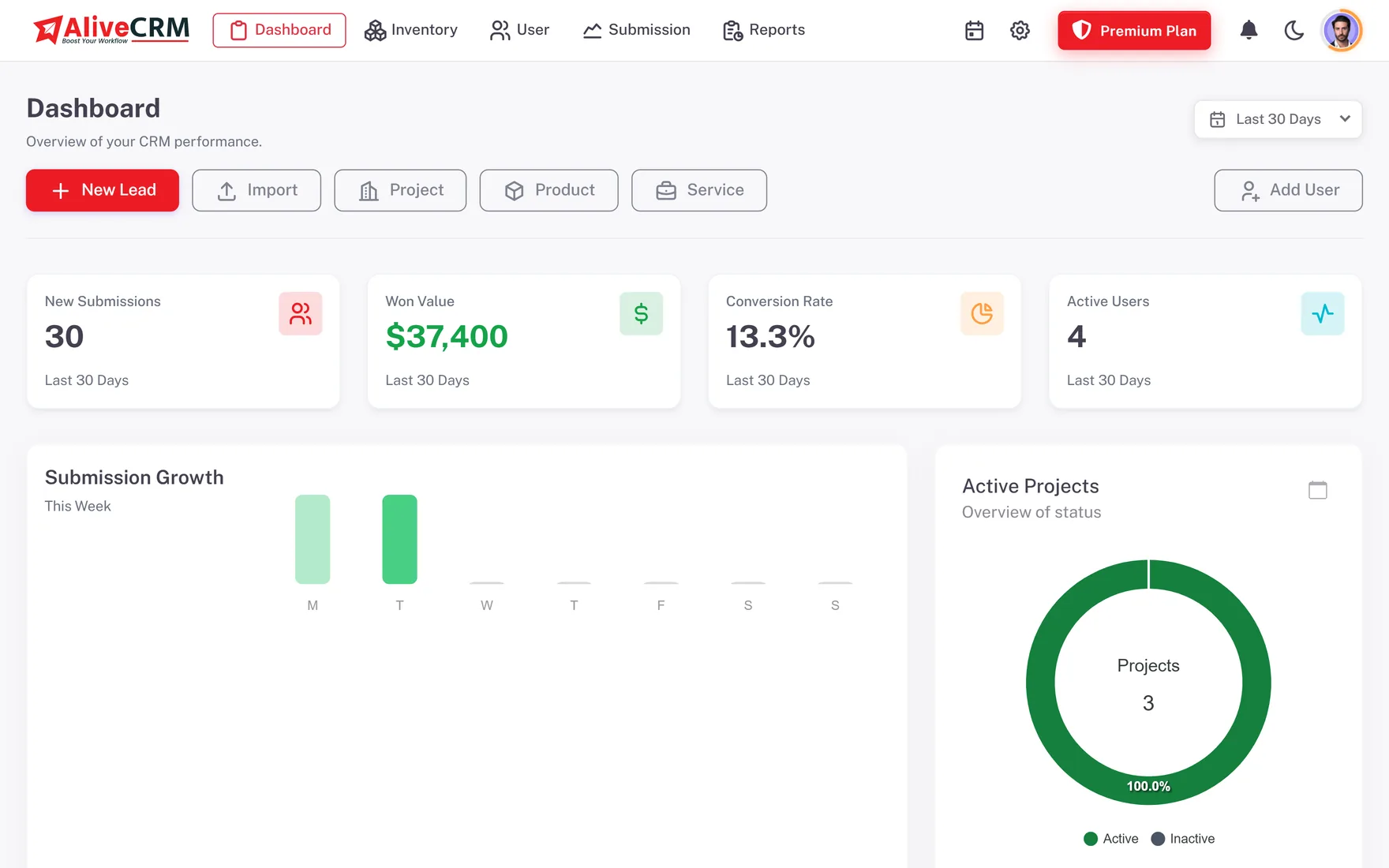
Manage website enquiries, assign leads to your sales employees, track customer follow-ups and prepare quotations and invoices in one CRM. Move your product enquiries, project leads and service bookings out of spreadsheets, notebooks and personal phones.
INR Pricing · Website Enquiry Forms · Employee Lead Assignment · GST on Quotations · Android App
Product Features
Everything Your Business Needs to Manage Leads, Employees and Follow-Ups
Whether you run an IT company, a marketing agency, a real estate business or a service company, every enquiry needs to be organised and handled the same way. AliveCRM brings capture, assignment, follow-up and quotations into one system, so you stop keeping a separate sheet for every employee.
Assignment & Follow-Ups
Sales & Business Management
Team Productivity
Reports & Mobile CRM
Plans in Rupees
Lead Capture & Organisation
Collect Website Enquiries and Organise Your Business Leads
Indian businesses get requests for product prices, service consultations, project quotations and callbacks every day. AliveCRM collects them in one place and keeps each one moving.
Lead Management
Keep customer details, status, source, notes and activity for every enquiry. Employees see the leads their role allows, while the owner keeps sight of the whole pipeline.
Explore lead management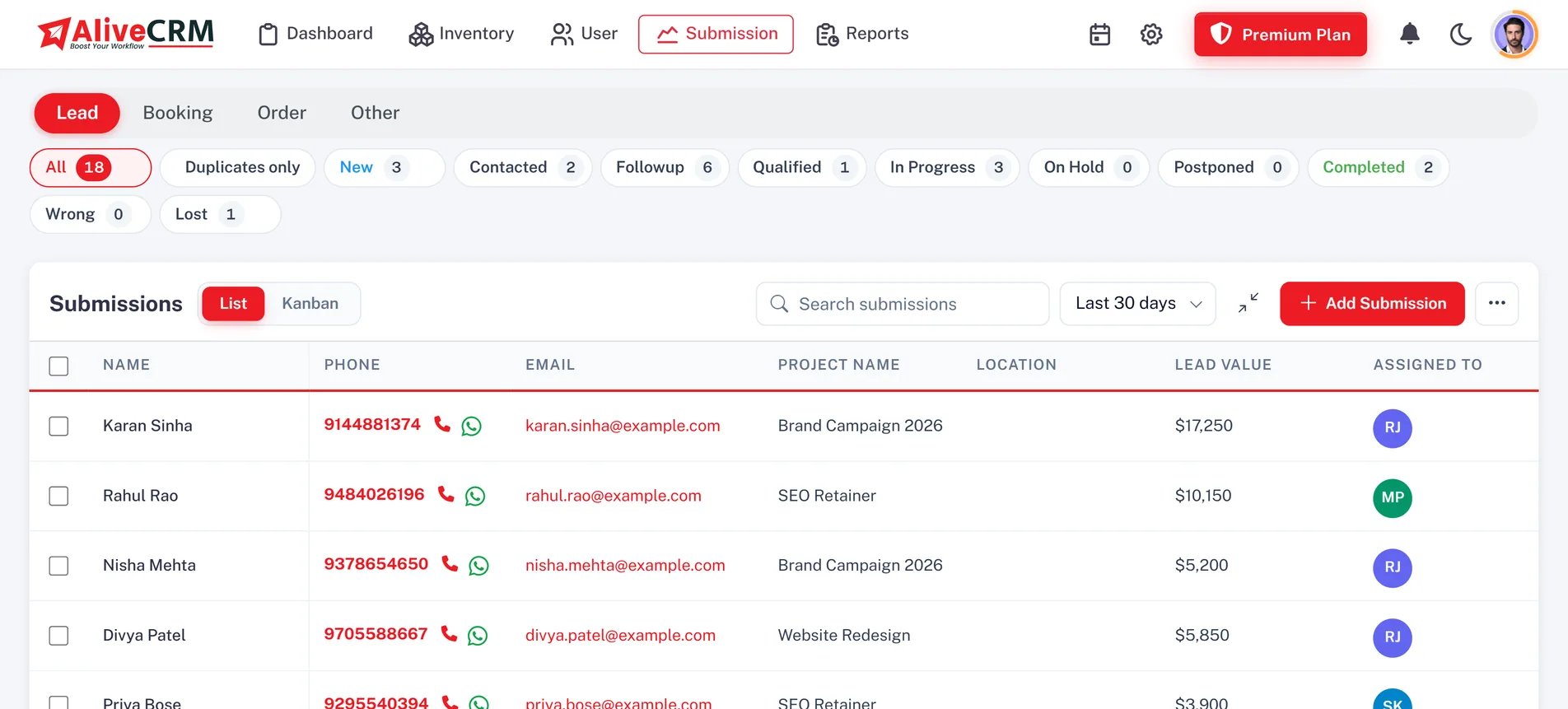
Website enquiry forms
Website Lead Capture Form Builder
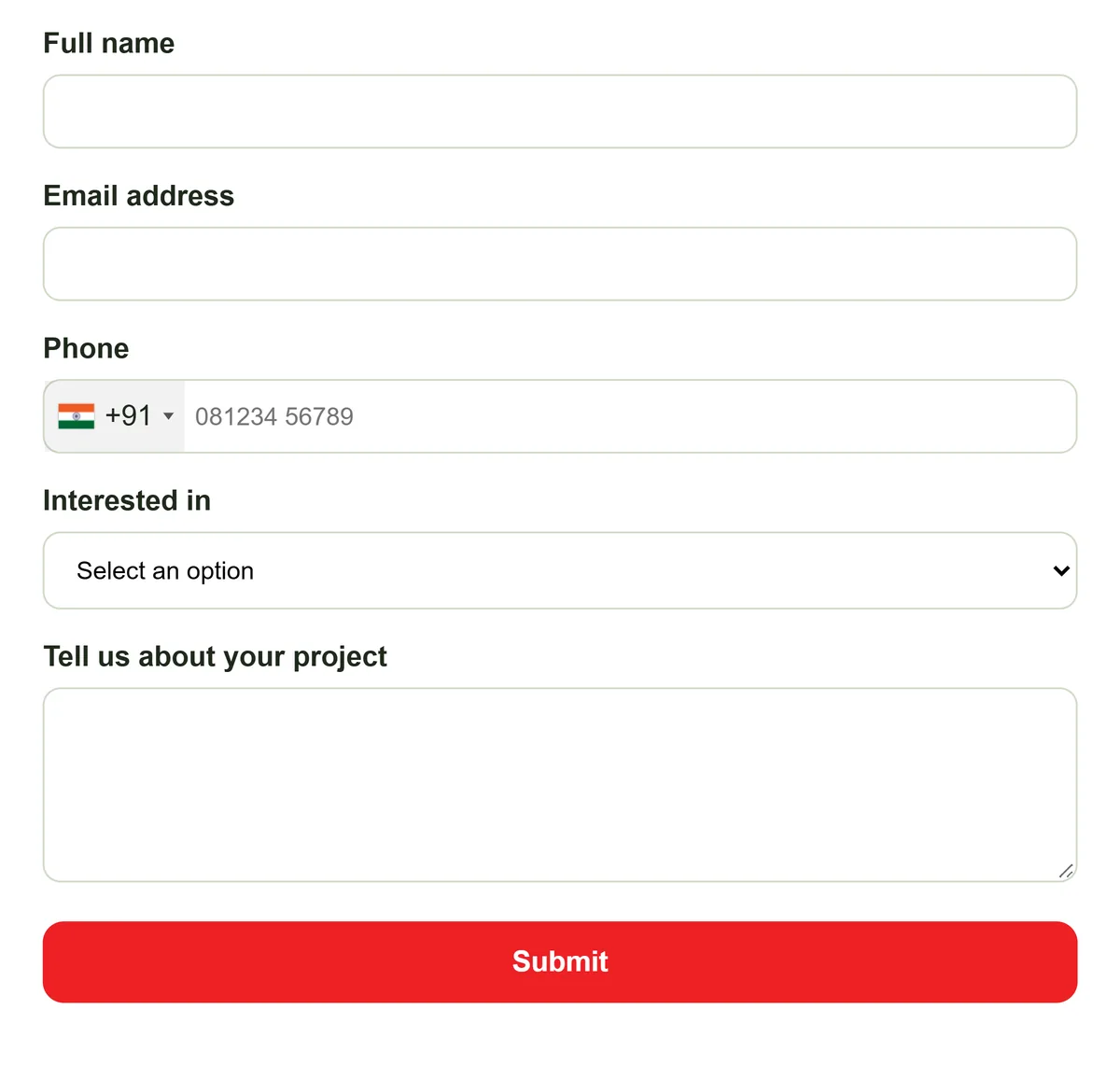
Build enquiry forms and embed them on your website, service pages and landing pages. A software agency can keep separate forms for website development, mobile apps and custom software, so every enquiry arrives already sorted.
Explore the form builder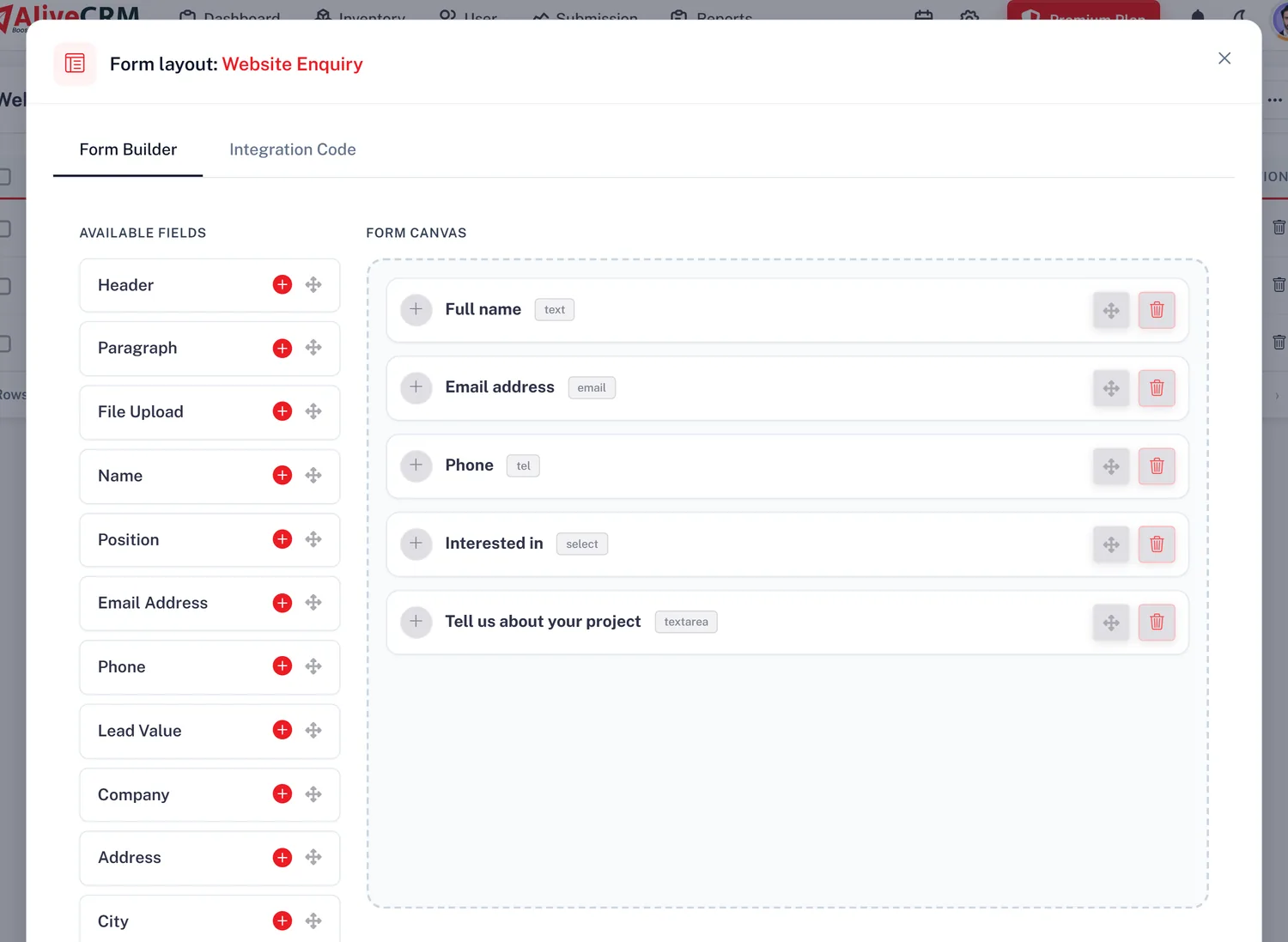
Bring In Your Old Excel Leads
Save your Excel lead sheet as CSV and import it with the template, up to 2,000 rows at a time. Repeated phone numbers and emails are flagged. Export leads again as CSV, Excel (.xls) or PDF.
Explore lead importCustom Lead Statuses & Sources
Set statuses that match how you sell. A real estate company might use new enquiry, contacted, site visit planned and follow-up pending, with sources such as website, referral and walk-in.
Explore statuses and sourcesAutomatically Assign New Enquiries to Your Sales Employees
When several employees share incoming enquiries, assigning each one by hand eats into the day. On selected paid plans, AliveCRM assigns new web-form leads to the employees linked to each product, project or service. A property company can route each project's enquiries to its own sales team.
- Round-robin rotates new leads through the team in turn
- Least busy sends the lead to the employee with the fewest open leads
- Balanced and random spread leads evenly or by chance
- Fixed person sends every lead for that item to one owner
- Off keeps assignment manual when management prefers to decide
Round-robin Selected
Least busy Fewest open leads
Balanced Even spread
Random By chance
Fixed person One owner
Off Manual
Follow-Up Management
Never Lose Track of Pending Sales Follow-Ups
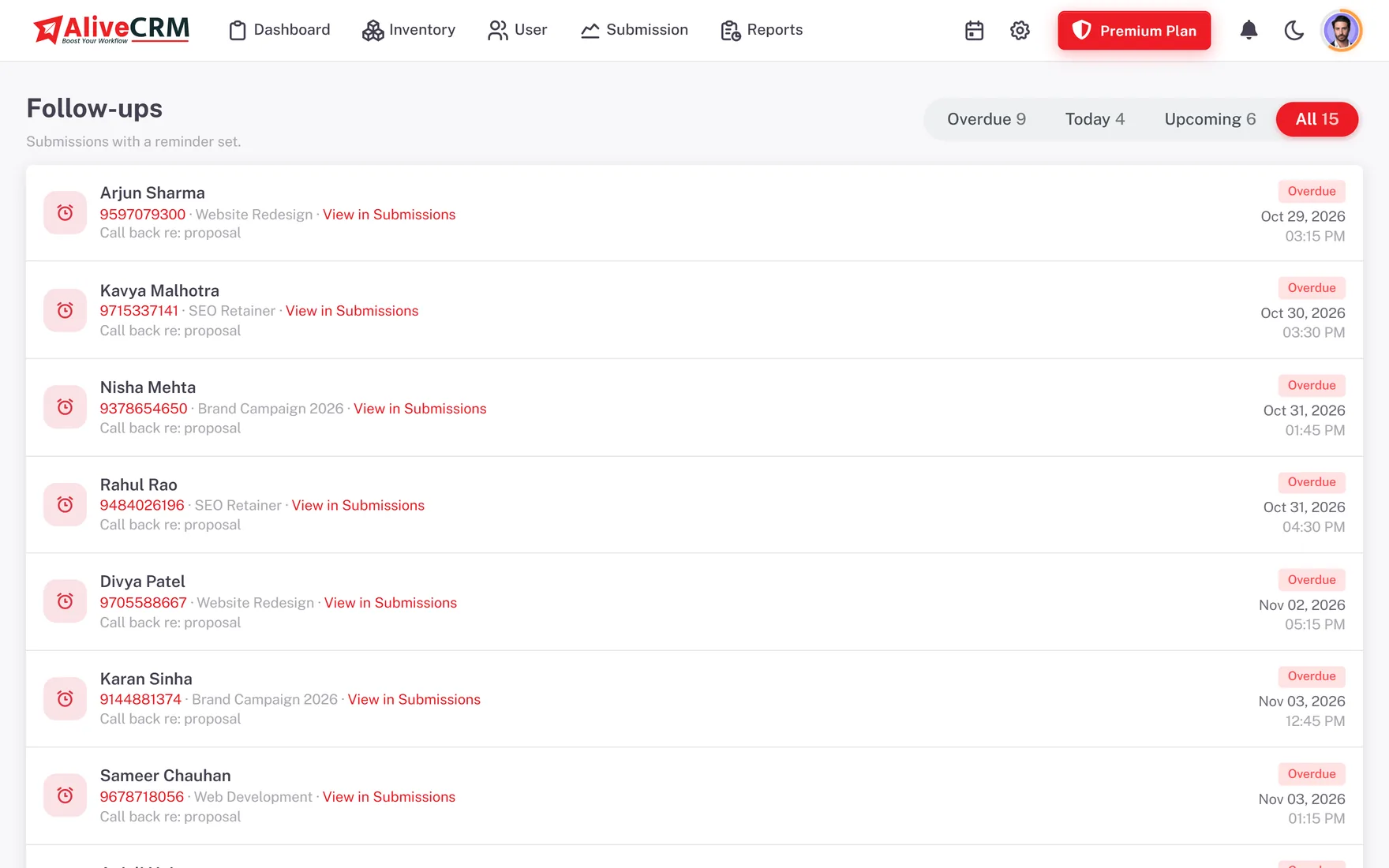
Calls, meetings and callbacks pile up fast. A service company's sales executive can open a pending enquiry, call the customer and set the next reminder from the same lead record.
- Today's, overdue and upcoming follow-ups in one list
- In-app and mobile push reminders, plus SMS to your team on plans that include it
- Contact history logs every call and WhatsApp tap on the lead
- A team calendar for meetings and site visits
Sales Pipeline & Kanban
Track Your Sales Enquiries Through Every Stage
See every enquiry by status on a Kanban board and drag a card to move it on. A software company might use enquiry received, requirement discussion, quotation sent and follow-up pending, while a builder might use new lead, contacted, site visit scheduled and negotiation. The stages are yours to name.
Explore the sales pipeline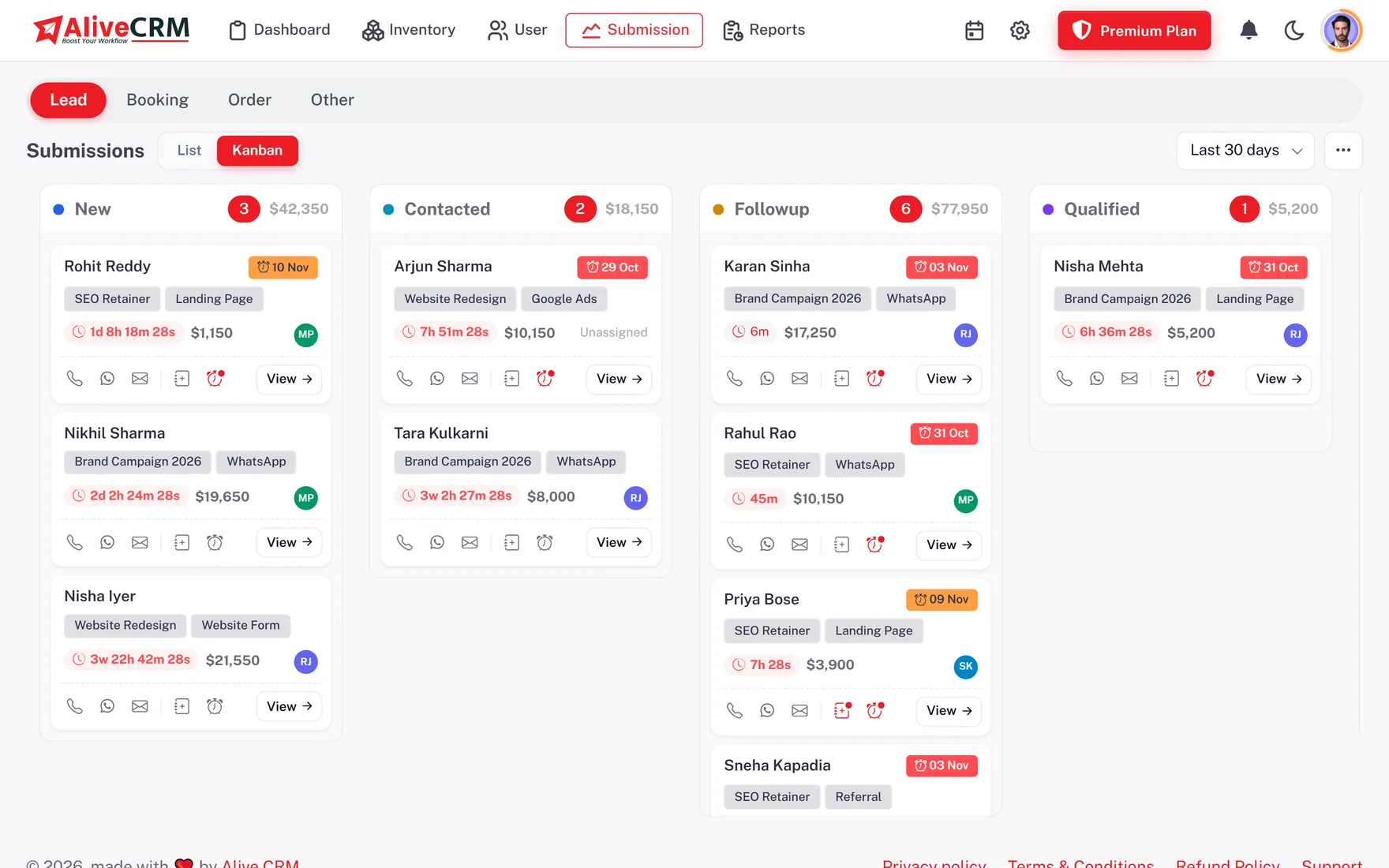
GST Quotations & Invoices
Create Customer Quotations and Invoices With GST
Prepare a quotation straight from the lead, then turn it into an invoice when the customer agrees. Available on selected paid plans.
- Line items with quantities, rates and discounts in ₹
- One GST rate per document, with a label you can rename
- Your company GSTIN and bank details on every PDF
- Draft, sent, paid and cancelled status on each document
AliveCRM shows GST on your documents, but it does not split CGST and SGST, add HSN codes, generate e-invoices or file returns. Check the Rule 46 invoice particulars that apply to you with your accountant.
Explore GST quotations and invoices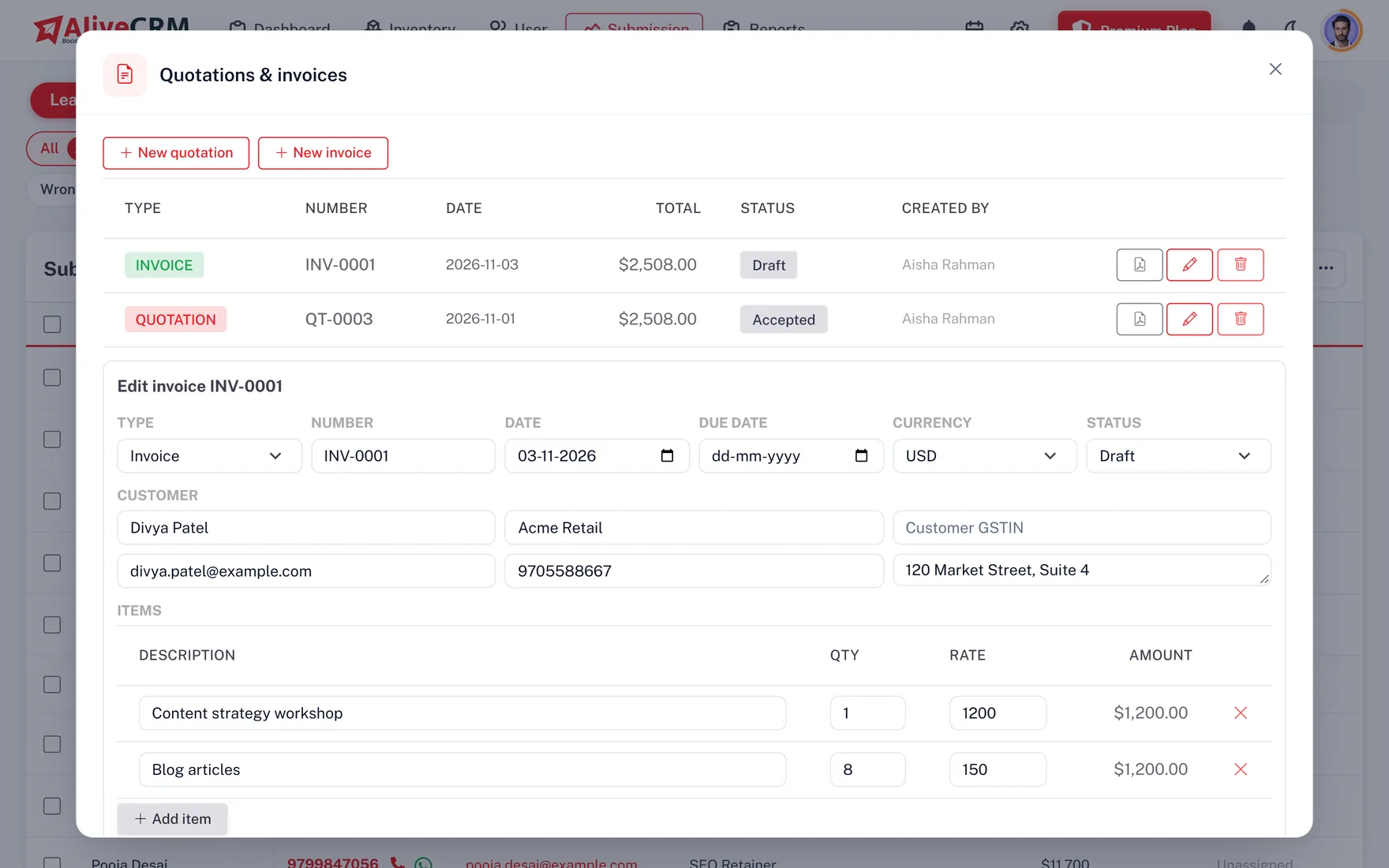
Active
CategoryResidential
Sub-category2 & 3 BHK
Team3 Assigned
AssignmentRound-robin
Manage Different Business Enquiry Types in One CRM
A builder gets property enquiries, an IT company gets project requirements and a service provider gets booking requests. AliveCRM links every lead to the product, project or service it is about, with its own team.
- Products with images, categories and a unique SKU per company
- Projects and services linked to the leads they bring in
- Parent and child categories, such as web, app and software services
- A team and an assignment rule for each item
Control Which Employees Can Access Your Business Leads
A sales executive may only need their assigned enquiries, while a manager needs the whole team's reports. Give each employee a role and every module follows it.
- View, add, edit and delete permissions for each module
- Self-only access keeps an employee to their own leads
- Deactivate an employee who leaves, and keep their lead history
- Optional two-factor sign-in for extra account protection
OwnerFull Access
Sales ManagerLeads, Reports
Sales ExecutiveOwn Leads Only
AccountsQuotations, Invoices
Calling, WhatsApp & Notifications
Manage Customer Contact Activities From Your Lead Records
Phone calls and WhatsApp are how most Indian enquiries get closed. AliveCRM keeps those conversations tied to the lead, so nothing lives only on one employee's phone.
Click-to-Call
Tap a lead's number to call from your phone or computer, and the call is recorded in the lead's contact history.
WhatsApp Contact Action
One tap opens a WhatsApp chat with the customer, with saved message templates in the mobile app. WhatsApp follow-up
Android Call Tracking
The Android app can log calls and show caller ID for your leads, subject to phone permissions. Call tracking
Contact History
Every call and WhatsApp tap is logged on the lead, so a manager can see when a customer was last contacted and by whom.
Reminder Notifications
In-app and push alerts for new leads, assignments and due follow-ups. Lead notifications
What WhatsApp Covers
AliveCRM opens one-to-one chats that an employee sends. It does not use the WhatsApp Business API, so there are no broadcasts, chatbots or automated campaigns.
Reports & Sales Analytics
Review Leads, Employee Activity and Your Sales Pipeline
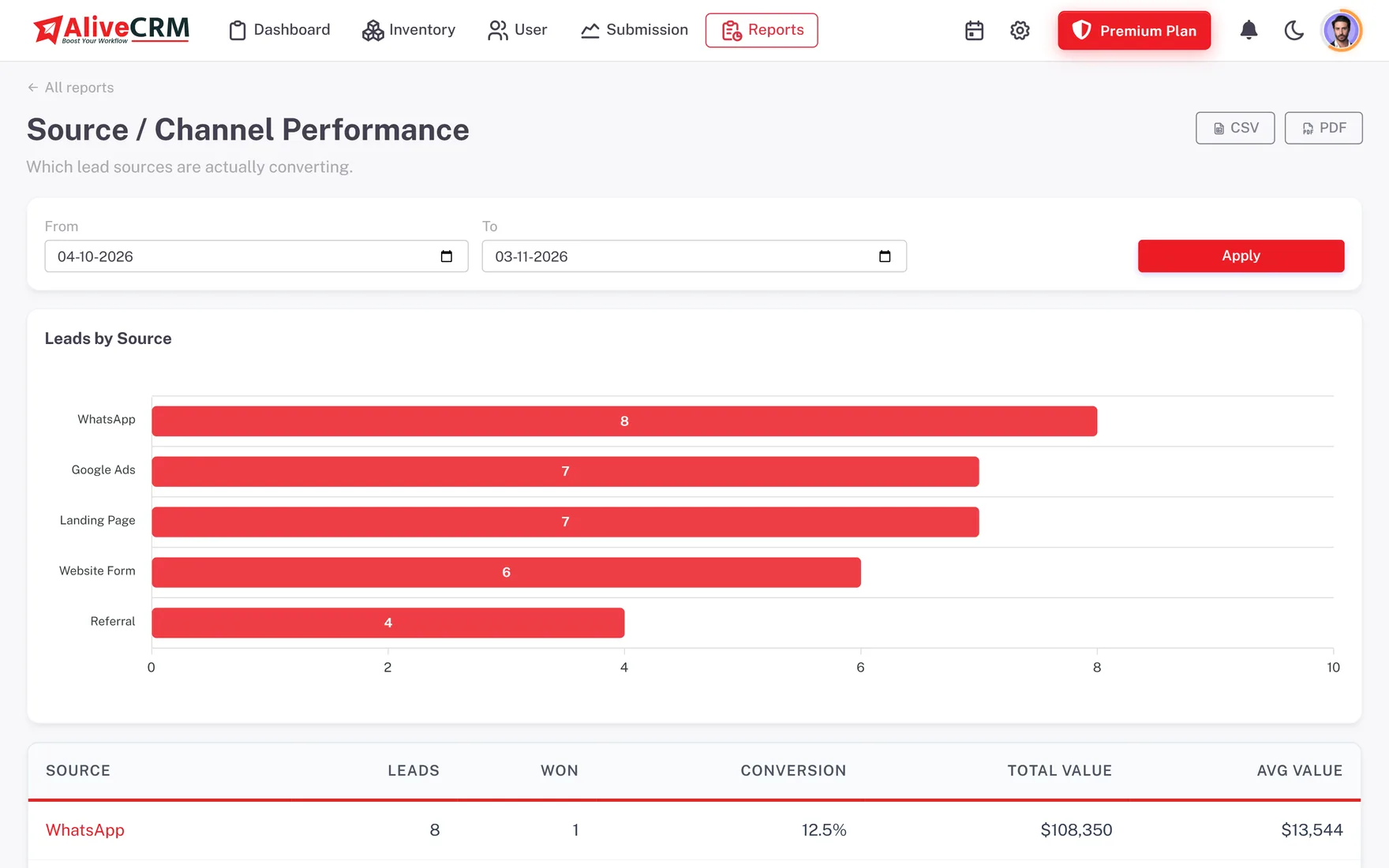
Reports cover the lead pipeline, conversion funnel, lead sources, sales employees, follow-up compliance, form performance, projects and categories. Pick a date range and export where your role allows. Some reports are available on selected paid plans. Figures below are illustrative sample data.
Explore sales reportsLeads by Source
Top Sales Executives
Priya Nair · 44 assigned · 18 won41%
Amit Deshmukh · 39 assigned · 14 won36%
Kavya Reddy · 33 assigned · 11 won33%
AndroidOn Google Play
iOSComing soon
Push remindersIncluded
Call tracking & caller IDAndroid only
Manage Sales Work While Travelling, Visiting Sites or Meeting Customers
A property executive can check enquiries and reminders between site visits, and a service engineer can see assigned bookings at the customer's location. The Android app is on Google Play now, and the iOS app is coming soon.
- Leads, Kanban board and follow-ups on your phone
- Tap to call or WhatsApp, with saved message templates
- Push notifications for new leads and reminders
- Call tracking and caller ID on Android
Setup & INR Plans
Set Up Your Company, Team and Lead Workflow
Guided Setup
A guided product tour walks you through the main screens, and a Getting Started card on your dashboard ticks off each step: company profile, your products, projects or services, a first enquiry form, your employees and their roles. Statuses, sources and assignment rules can change whenever your process does.
Plans Priced in Rupees
Start with a 7-day trial, no card needed, then pick a monthly or yearly plan priced in INR. Plans set your users, forms and lead limits. If you go over a form's lead limit, the extra leads are kept locked, not lost, until you upgrade.
View INR pricing
Solutions & Industries
Flexible CRM Features for Indian SMEs, Agencies and Service Companies
Configurable lead types, categories, assignment rules and follow-ups let one CRM fit very different businesses.
Real Estate Businesses
Manage property enquiries, assigned representatives and site visit follow-ups.
Explore real estate CRMIT & Software Companies
Organise project enquiries, development service leads and quotation requests.
Digital Marketing Agencies
Handle leads from your own website, landing pages and client campaigns.
Explore CRM for agenciesProfessional & Field Services
Route service enquiries to the right employee and keep every booking followed up.
Explore CRM for service businessesWebsite Enquiry Management
Capture website form submissions and work them in one shared pipeline.
Explore website lead managementSales Teams
Give every employee clear ownership of their enquiries and follow-ups.
Explore sales team CRM
Product Preview
Explore the AliveCRM Dashboard and Sales Tools
Book a demo and we will walk through the parts that matter to your business, using sample Indian data:
- Dashboard, lead list, filters and the Kanban pipeline
- Enquiry form builder, submissions and employee assignment
- Follow-up reminders and contact history
- Quotations in ₹ with GST, roles, reports and the Android app
Bring Your Daily Sales Operations Into One Connected CRM
AliveCRM focuses on the work that starts when a customer contacts your business: capturing the enquiry, assigning an employee, following up and sending the quotation. Sources, categories, permissions and assignment rules adapt to how you work, so you do not need a separate system for every employee or department. AliveCRM is a product of Alive Inc., a technology company in Navi Mumbai, Maharashtra. Learn more about AliveCRM.
FAQ
Frequently Asked Questions About AliveCRM Features in India
What features does AliveCRM provide for Indian businesses?
AliveCRM covers the path from enquiry to invoice: website enquiry forms, lead management, CSV import of your Excel leads, custom statuses and sources, automatic lead assignment, follow-up reminders, WhatsApp and call actions, a Kanban sales pipeline, quotations and invoices with GST, employee roles, reports and an Android app. Some features are on selected paid plans.
Can I capture leads from my business website?
Yes. Build a form in the form builder and paste a short snippet into your website or landing page. Each submission arrives as a lead with its source and page recorded, linked to the product, project or service it is about. Forms accept enquiries typed in Hindi or any regional language.
Can I import leads from Excel?
Yes, through CSV. Save your Excel sheet as CSV, fill in the import template headers and upload up to 2,000 rows per file. Repeated phone numbers and emails are flagged for review. You can export leads again as CSV, Excel (.xls) or PDF whenever you need.
Can I assign new enquiries automatically to employees?
Yes, on selected paid plans. Web-form leads can be assigned by round-robin, least busy, balanced, random or to one fixed person, or you can keep assignment manual. Rules are set per product, project or service, using the employees you link to each item.
Can I restrict employees to their assigned leads?
Yes. Turn on self-only access in a role, and employees with that role see only the leads assigned to them, on the web and on the Android app. Managers and owners can keep full visibility through their own roles.
Can I create GST quotations and invoices?
Yes, on selected paid plans. Add line items, discounts and one GST rate to the document, show your GSTIN and bank details, convert the quotation to an invoice and download a PDF in rupees. AliveCRM does not split CGST and SGST or add HSN codes, so check your invoice format with your accountant.
Does AliveCRM automatically file GST returns?
No. AliveCRM prepares quotations and invoices with a GST line, but it is not accounting or tax software. It does not file GST returns or generate e-invoices, so keep using your accounting system and accountant for compliance.
Does AliveCRM support WhatsApp?
Yes, for one-to-one chats. One tap on a lead opens WhatsApp with that customer, saved templates fill in their details on the mobile app, and the tap is logged in contact history. It does not use the WhatsApp Business API, so there are no broadcasts or automated messages.
Is there an Android app and an iPhone app?
The Android app is on Google Play now, with leads, follow-ups, push reminders, call tracking and caller ID. The iOS app is coming soon. Until then, iPhone users can use AliveCRM in the phone's browser.
Is pricing available in Indian Rupees?
Yes. Indian customers see plans priced in INR with monthly or yearly billing, and every new account starts with a 7-day trial with no card needed. See the pricing section on the India homepage for current plans.
What happens if my company exceeds its lead limit?
Leads that arrive over a form's limit are not lost. They are kept in a locked state, and they unlock as soon as your company moves to a plan with a higher limit.
Does AliveCRM support multiple branches?
There is no separate branch module. Many businesses organise each branch or city team through roles, self-only access and assignment pools linked to that branch's projects or services, which keeps each team to its own enquiries.
Get Started With AliveCRM India
Manage Your Enquiries, Sales Employees and Follow-Ups in One CRM
Bring website leads, employee assignments, customer reminders and quotations into one organised platform. Start your 7-day trial or book a demo for your business.