Retail and D2C

CRM for D2C and Retail Brands in India

Your website handles retail orders. AliveCRM handles the bulk, dealer, distributor and corporate gifting enquiries that need a call, a GST quotation and a follow-up.

The short answer

What does a CRM do for an Indian D2C brand?

Indian D2C and retail brands get two kinds of buyers. Shoppers pay at checkout. Bulk buyers, resellers, distributors and HR teams planning Diwali gifts want to talk first. AliveCRM is a CRM for D2C and retail brands in India that captures these enquiries as Orders, links each to the product in your catalogue, gives it to one salesperson and keeps the follow-up going until a GST invoice is raised.

These high value enquiries usually arrive on WhatsApp, Instagram DMs and the contact page, and end up in a founder's phone. When the founder is busy, the dealer who wanted 200 units hears nothing and orders from someone else.

Enquiries that do not fit the checkout

  • Dealer and distributor applications for a new city.
  • Corporate gifting for Diwali, New Year or employee onboarding.
  • Bulk orders from cafés, hotels, offices or institutions.
  • Custom sizes, colours or private label requests.
How It Works

From Bulk Enquiry to GST Invoice

One Order record holds the buyer, the product and every conversation.

  1. 01Enquiry
  2. 02Product
  3. 03Salesperson
  4. 04GST Quote
  5. 05Deposit
  6. 06Invoice
Products

Each Enquiry Tied to a Product Line

Add your products with SKU codes and prices, and group them into categories like Skincare, Kitchenware or Gift Hampers. An enquiry for a product is saved as an Order linked to it, so you can see whether dealers ask more about your bestsellers or your new range. The catalogue is for sales tracking only: stock levels stay in your store or warehouse software.

See Product Enquiry Management
  • Products with SKU codes and prices
  • Categories and subcategories
  • Orders linked to each product
Capture

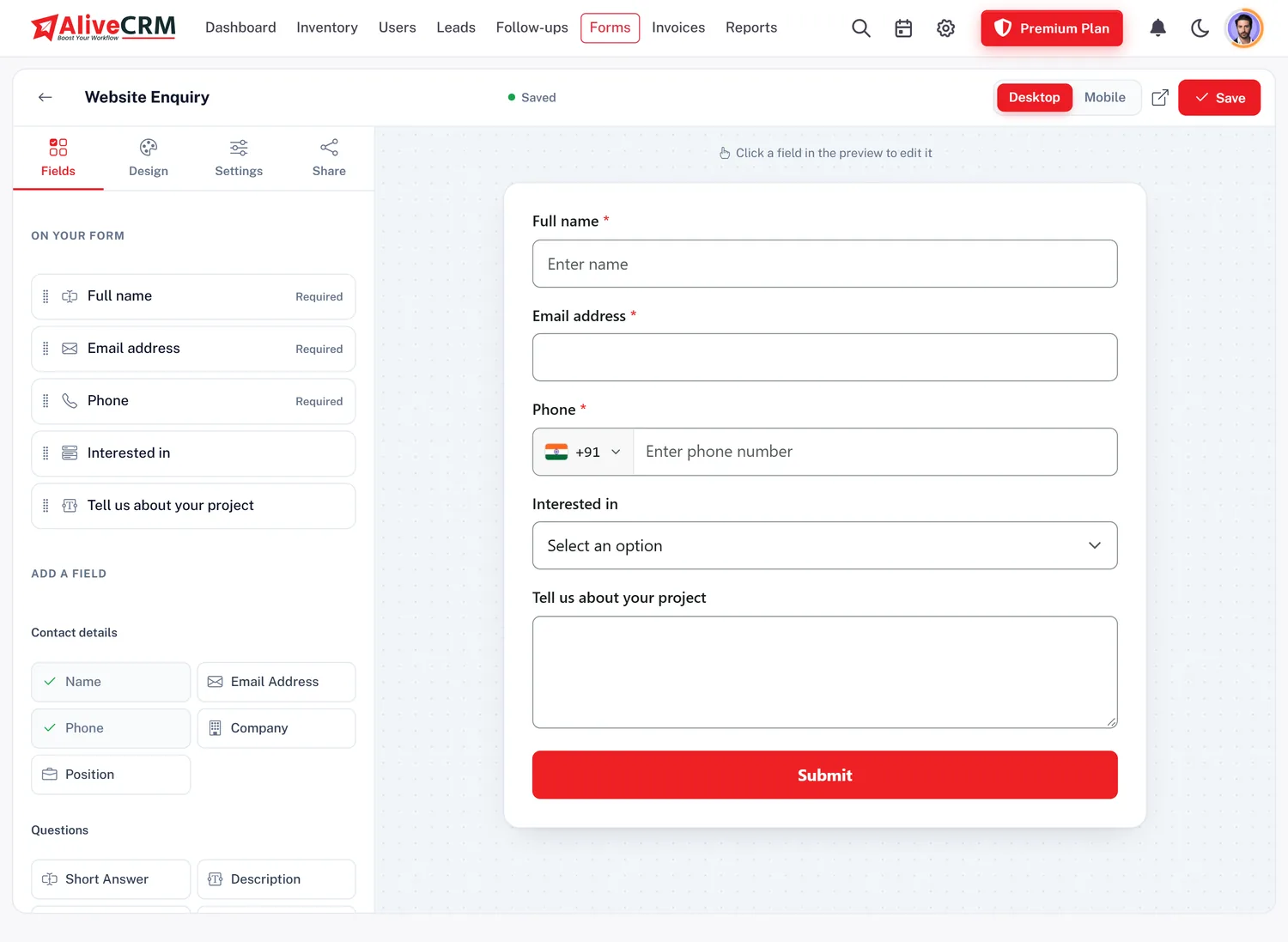
A Dealer and Bulk Order Form on Your Website

Create a form with fields for business name, GSTIN, city, quantity and delivery date, then add it to your Shopify, WooCommerce or custom site by pasting one script tag. Share the form link in Instagram bio and WhatsApp catalogues too. Enquiries from other tools can be posted to the form's webhook by your developer. WhatsApp and phone enquiries are added by hand with their source.

  • Business, GSTIN, city and quantity fields
  • One script tag on any store
  • Form link for Instagram and WhatsApp
See the Form Builder
A Dealer and Bulk Order Form on Your Website
Allocation

Dealers to Sales, Gifting to Key Accounts

On selected paid plans, set allocation per product. Corporate gifting can go to one key account manager, distributor applications to the regional sales head, and small bulk orders round-robin across the team. Sales staff with a "self only" role see only their own buyers, while founders see everything.

See Lead Assignment
  • Allocation for each product
  • Key account owner for gifting
  • Founders see every enquiry
GST Quotes

Trade Price Quotes With GST in INR

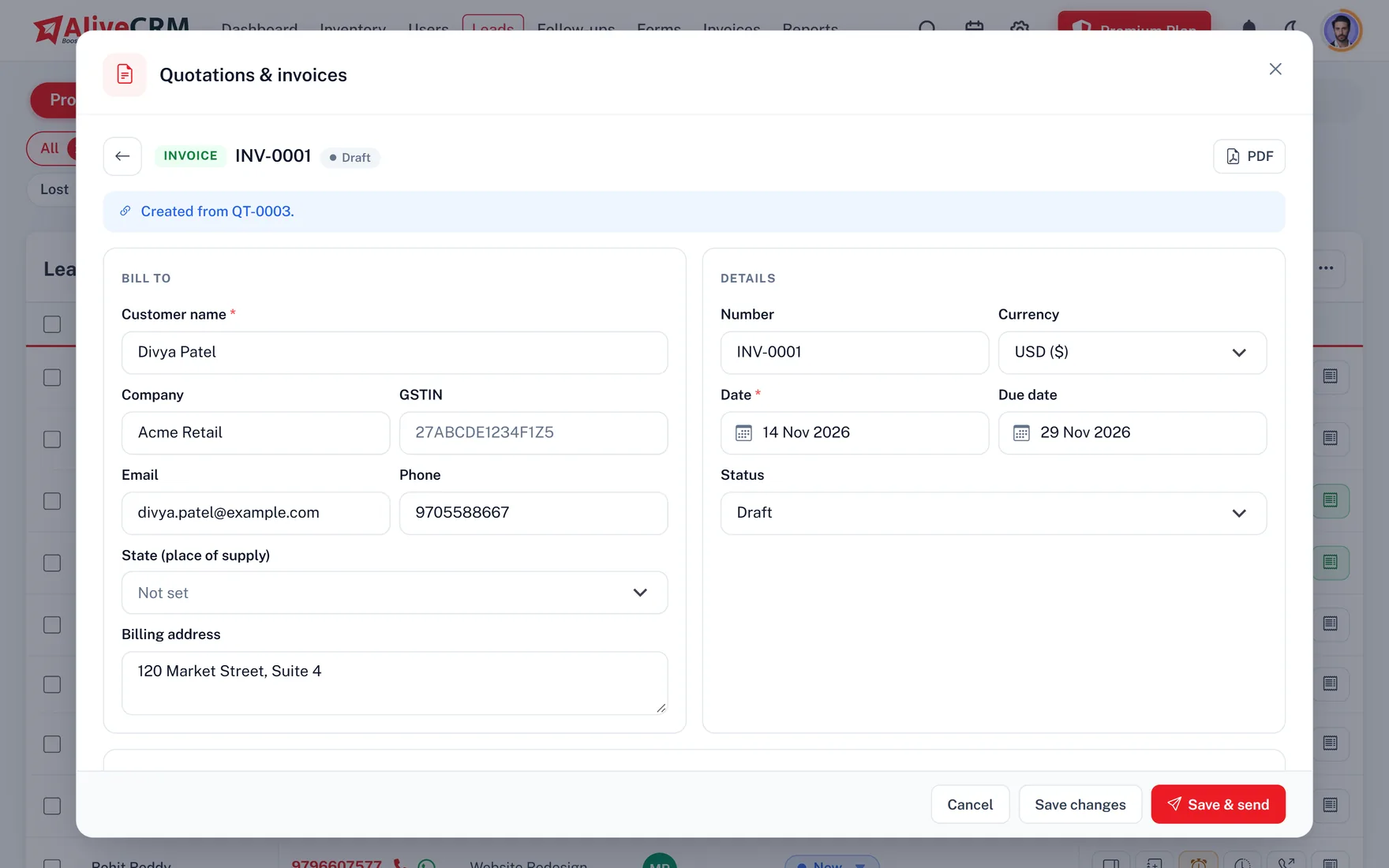
Quote from the Order with HSN codes, quantity discounts and GST per line, applied as CGST and SGST or IGST depending on the buyer's state. Export customers can be quoted in USD, AED, EUR or GBP. Convert the accepted quote into an invoice with optional financial-year numbering, record the advance and the balance, and print a UPI QR for payment.

  • HSN codes and GST per line
  • Financial-year invoice numbers
  • Deposit and balance payments
See GST Quotations
Trade Price Quotes With GST in INR
Follow-Up

Follow Up Until the Purchase Order Arrives

Bulk buyers need samples, approvals and two rounds of pricing. Set a follow-up date after each step and it appears on the Follow-ups page when due, with push alerts on the Android app. Open WhatsApp with a saved template, such as a sample dispatch update, straight from the lead. Repeat enquiries from the same number are flagged.

See WhatsApp Follow-Up
  • Follow-ups after samples and quotes
  • WhatsApp templates from the lead
  • Repeat buyers flagged
Reports

Which Products Do Dealers Ask For?

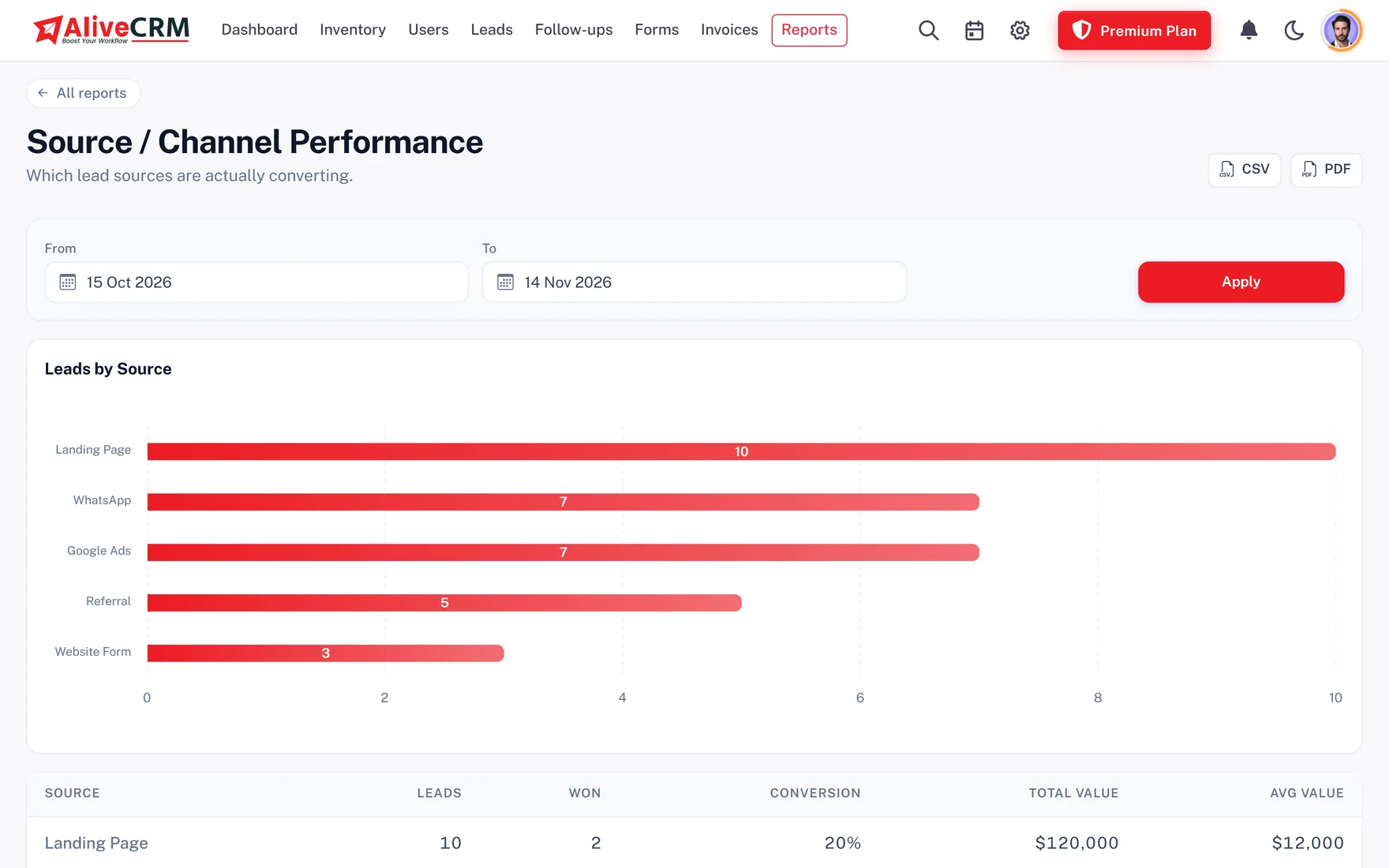
Advanced reports on selected paid plans count enquiries by product and category, compare sources such as Instagram, website and trade fairs, and show why deals were lost. Export the data to Excel to plan production before the festive season.

  • Enquiries by product and category
  • Source comparison
  • Excel export for planning
See Sales Reports
Which Products Do Dealers Ask For?
Who It Is For

Indian Brands and Sellers That Fit

D2C brands

Corporate gifting, reseller and bulk enquiries handled by a named person, not a founder's inbox.

Manufacturers and distributors

Dealer applications and trade orders tracked by product line and region.

Retail chains and showrooms

Walk-in and phone enquiries for large orders logged with the source and followed up.

Furniture and home decor

Custom size and project enquiries with measurements uploaded and GST quotes sent.

Honest limits

What AliveCRM Is Not

AliveCRM is not an online store, marketplace connector or inventory system. It does not take checkout payments, reduce stock, book couriers or sync with Shopify, Amazon or Flipkart. It does not send bulk WhatsApp broadcasts or email campaigns; WhatsApp opens a one-to-one chat from the lead. It is built for the enquiries your team must answer personally.

FAQ

Frequently Asked Questions

Can AliveCRM work with my Shopify or WooCommerce store?

You can embed AliveCRM forms on any store by pasting one script tag, and a developer can post enquiries to a form webhook. There is no native Shopify or WooCommerce app, and checkout orders stay in your store.

Can I quote dealers with GST?

Yes, on selected paid plans. Quotations carry HSN codes, discounts and GST per line, applied as CGST and SGST within your state or IGST for other states. You can also add the buyer's GSTIN through a form field.

Does AliveCRM manage stock or warehouse inventory?

No. The product catalogue holds codes, prices and categories for linking enquiries. Stock levels, dispatch and returns stay in your inventory or store software.

Can I send WhatsApp messages to all my resellers at once?

No. AliveCRM opens a WhatsApp chat with one buyer at a time, using a saved template. It is not the WhatsApp Business API and does not send broadcasts.

Can I quote export buyers in dollars?

Yes. Quotations and invoices can be issued in INR, USD, AED, EUR or GBP, so the same team can handle domestic dealers and overseas buyers.

Can I import my dealer list from Excel?

Save the sheet as CSV using the import template and upload up to 2,000 rows per file. Name, email and phone are required. Leads can be exported back to Excel, CSV or PDF anytime.

Do Instagram and IndiaMART enquiries come in automatically?

Not directly. Share your AliveCRM form link in Instagram and WhatsApp so buyers fill it themselves, and add enquiries from other portals by hand or by CSV import. A developer can also post them to the form webhook.

How is pricing charged for Indian brands?

Plans are billed monthly or yearly in INR after a 7-day free trial, with no card needed to start. See the pricing page for the current plans and limits.

Never Miss a Bulk Order Again

Start a 7-day free trial with no card needed, add your top products and see INR plans on the pricing page.

Book a demo

See forms, leads and follow-ups set up for your team on a live call. Leave your details and we will reach out to pick a time.