


CRMFeature

Lead Assignment Software for Indian Sales Teams

Every enquiry gets a named sales executive. Let a rule share new leads fairly, reassign when someone is on leave, and always know who is responsible.

The short answer

How does lead assignment software work for an Indian sales team?

Lead assignment software makes sure each enquiry has one accountable person. In AliveCRM a new web-form lead gets an owner as it arrives, either from an auto-assignment rule where your plan includes it, or by going to the company admin. Anyone with permission can assign or reassign a lead by hand, and the new owner is notified in the app straight away.

In many Indian offices, the owner or a coordinator forwards enquiries on WhatsApp and hopes someone calls. A sales team CRM India businesses can trust replaces that with a name on every lead and a record of every handover.

When assignment matters most

  • Leads from ads arrive faster than one person can share them out.
  • An executive is on leave during a festival rush.
  • Each project or service has its own specialist team.
  • A city team changes hands and open leads must move.
How It Works

From New Enquiry to Named Executive

Ownership is set on arrival and can change whenever plans change.

  1. 01Enquiry Arrives
  2. 02Rule Picks Owner
  3. 03Owner Notified
  4. 04Reassigned if Needed
Ownership

A Named Owner on Every Lead

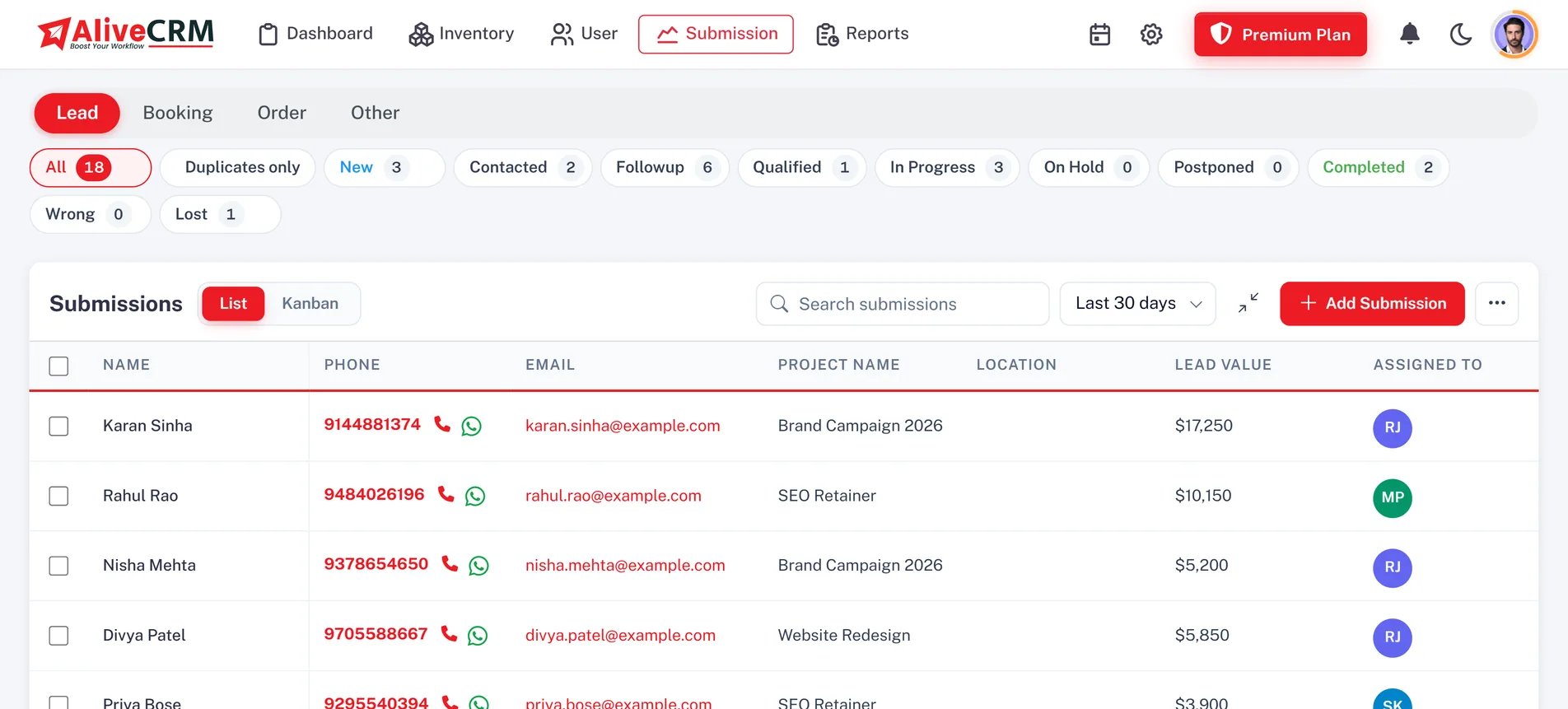
Your company account holds your whole team, and each lead is assigned to the user responsible for it. Add a second assignee when a deal needs a senior person or a technical expert. Owners appear as avatars on the lead and in the list, and you can filter by assigned user to see how many open enquiries each executive is carrying before the morning meeting.

  • One or more assignees per lead
  • Owner avatars in the list
  • Filter by assigned user
See lead management in India
A Named Owner on Every Lead
Rules

Auto-Assignment Rules That Share Leads Fairly

On selected paid plans, choose how new web-form leads are shared for each submission type: round-robin, least busy, balanced, random, a fixed person, or off for manual assignment. Each product, project or service can have its own pool of eligible members, which is tried first. A builder can send each project's enquiries to that project's team, and an IT agency can keep app enquiries with its app specialists.

See project management
  • Round-robin, least busy, balanced, random or fixed
  • Item pool tried first
  • Admin receives leads when rules are off
Manual

Reassign When Plans Change

Move a lead to someone else when an executive is out, a territory changes or a customer needs a specialist. Reassignment is done one lead at a time, the new owner gets an in-app notification and a push alert on the Android app, and every note and status change stays on the lead, so nobody has to call the customer and ask them to repeat themselves.

See CRM notifications
  • Reassign any lead at any time
  • New owner alerted in-app and on mobile
  • Notes and history stay put
Access

Roles Decide Who Assigns and Who Sees What

Custom roles set view, create, edit, delete and manage permissions for each module, so you choose who can assign leads and who only works their own list. The "self only" option limits an executive to the leads assigned to them, and self-only users cannot pass leads to others. For owners worried about customer data walking out with an employee, this is the control that matters.

See user management
  • Custom roles per module
  • "Self only" lead visibility
  • Admins always see every lead
Who It Is For

Who Needs Clear Lead Ownership

Real estate sales teams

Send each project's enquiries to the executives who handle that site, so buyers speak to someone who knows it.

IT and software agencies

Route website, app and custom software enquiries to the right specialists automatically.

Vehicle and equipment dealers

Share walk-in and website enquiries across the showroom team with a least busy rule.

Owners protecting their data

Self-only access means each executive sees their own leads, not the full customer list.

Honest limits

What Lead Assignment Does Not Do

There is no bulk reassign; manual assignment works one lead at a time. Auto-assignment rules cover new web-form leads only, so leads you add by hand or import keep the owner you set. There is no branch module; teams are organised through roles and assignment pools. If a fixed-person rule points at someone who has been deactivated, AliveCRM falls back to round-robin across the pool so new leads are not left unassigned.

FAQ

Frequently Asked Questions

Can new leads be shared equally among my sales executives?

Yes, where your plan includes auto-assignment. Round-robin passes new web-form leads to each eligible executive in turn, and least busy sends the next lead to whoever has the fewest open ones. Balanced and random options are also available, or you can fix one person or switch rules off and assign by hand.

Can different projects or services go to different teams?

Yes. Give each product, project or service its own pool of eligible members. When a lead arrives for that item, AliveCRM tries its pool first. A builder can keep each project's enquiries with its site team, and a coaching institute can route each course to its own counsellors.

Can employees only see the leads assigned to them?

Yes. Turn on the "self only" option in a role and users with that role see only their own leads. They also cannot reassign leads to others. Admins always see every lead, and you can give team leaders a role that lets them view and reassign within the wider team.

What happens to leads when an employee resigns?

Deactivate the user and reassign their open leads to the rest of the team. Notes and status history stay on every lead. If a rule pointed at that person as the fixed owner, it falls back to round-robin across the pool, so new enquiries keep flowing to active members.

Can I assign many leads at once?

Not at the moment. Manual assignment is one lead at a time. For steady volume, an auto-assignment rule shares new web-form leads for you, so most teams only reassign by hand to cover leave, festival rushes or a deal that needs a specialist.

How does the executive know a lead is theirs?

They get an in-app notification as soon as the lead is assigned, by a rule or by hand, and a push alert on the Android app. The lead also shows up in their own filtered list, so the first call can happen while the customer is still waiting.

Give Every Enquiry a Named Owner

Start a 7-day trial, no card needed, invite your sales team and assign your first leads. INR pricing for every plan.

Book a demo

See forms, leads and follow-ups set up for your team on a live call. Leave your details and we will reach out to pick a time.