

CRMFeature

Service Booking and Enquiry CRM for Indian Service Businesses

List the services you offer and tag every booking request or quote enquiry with the right one, so the person who calls back knows the job before they dial.

The short answer

How can a CRM handle service bookings and enquiries?

By linking every request to the service it is about. In AliveCRM each service has a record with price, duration and category, its own enquiry or booking form and its own team. A request for AC servicing or a GST filing consultation arrives tagged with that service and reaches the people who deliver it. It is CRM for small business India's service firms can run without a separate booking tool.

Service businesses live on how fast they call back. A note that only says "wants service, call him" in a notebook or on a personal phone wastes the first two minutes of every call and sometimes the whole job.

The cost of a vague service enquiry

  • The call back starts with "what were you looking for?"
  • Quotes take longer because nobody knows the scope.
  • Requests reach someone who does not do that service.
  • You cannot tell which services bring paid work.
How It Works

From Service Page to Booked Job

The service stays on the lead from the first request to the booking.

  1. 01Service Page
  2. 02Booking Form
  3. 03Service Lead
  4. 04GST Quote
  5. 05Booked
Services

A Record for Each Service You Offer

Each service has a name, price, duration, category and active or inactive status. A clinic can list consultation, physiotherapy session and health check-up; a CA firm can list company registration, GST filing and audit. The service sits in the same CRM as your leads, so whoever picks up a request sees its price and duration without opening another list.

See product enquiry management
  • Price and duration per service
  • Categories for grouping
  • Active and inactive status
Forms

A Booking or Enquiry Form per Service

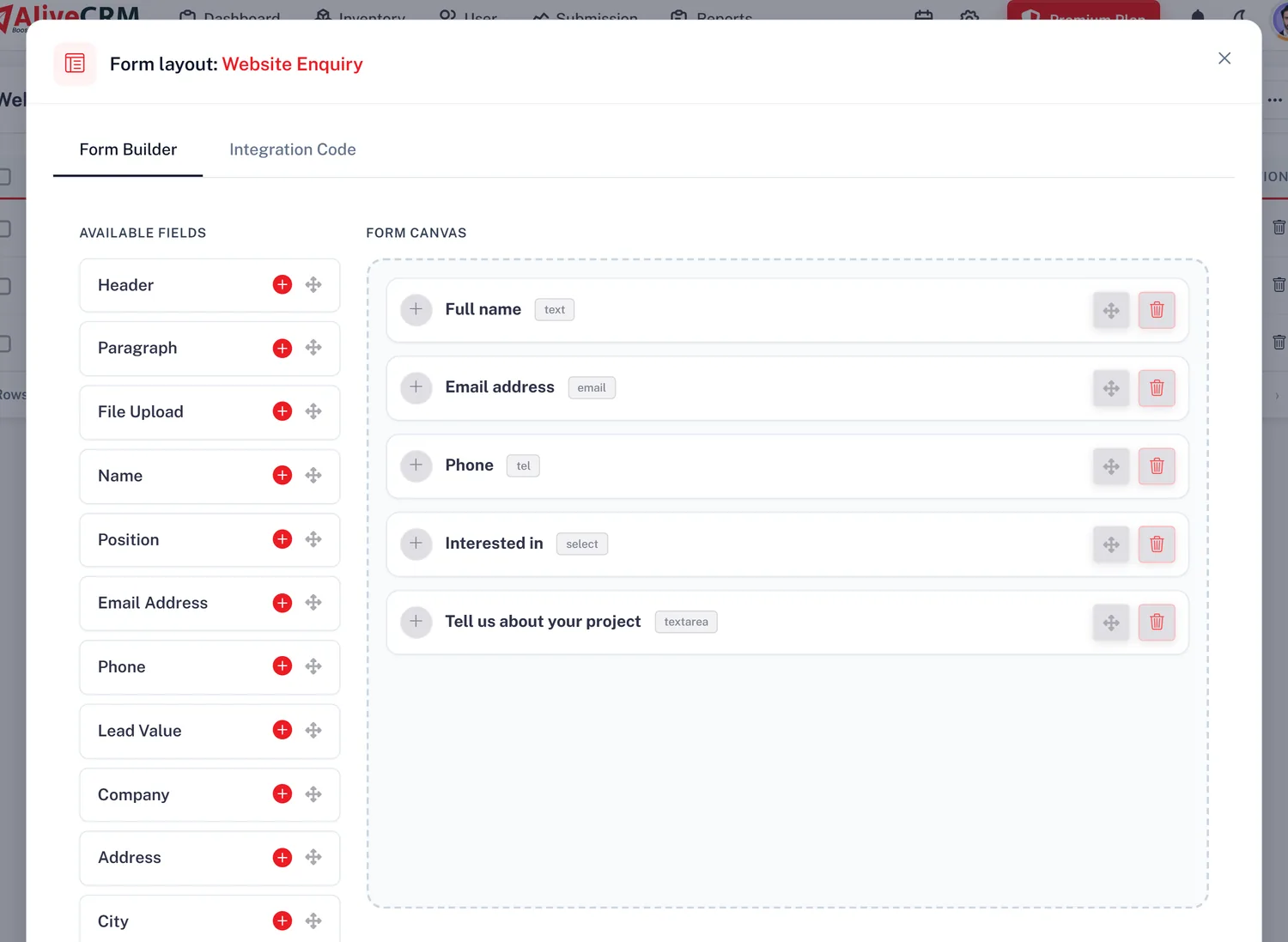
Put a form on each service page and it is linked to that service, whether the visitor wants a price or a slot. Add a date and time field for a preferred visit time, or a file upload so a customer can send photos of a leaking pipe or a damaged panel. Customers can write in Hindi or any regional language and the text is saved as typed.

  • One form per service
  • Service shown on every lead
  • Date, time and file upload fields
See the form builder
A Booking or Enquiry Form per Service
Team

The Right Technician or Consultant

Set a team on each service. With auto-assignment, included on selected paid plans, its requests are shared within that team by round-robin, least busy, balanced, random or a fixed person, or left for you to assign. An RO repair goes to the RO technician and a tax notice query goes to the right CA, and you can reassign by hand.

See lead assignment software India
  • Team per service
  • Assignment rule per service
  • Manual reassignment any time
Quote and Report

Send a GST Quote, Then See What Sells

On plans that include quotations, build a quote from the lead in rupees with line items and one GST line, download the PDF with your GSTIN and bank details, and convert it into an invoice when the job is confirmed. With advanced reports on selected paid plans, the Product Catalog report shows bookings per service, so you know which services earn and which only bring questions.

  • GST quotations from the lead
  • Booking count per service
  • Products and services in one report
See GST quotation and invoice CRM
Send a GST Quote, Then See What Sells
Who It Is For

Indian Service Businesses That Work This Way

Home services and repairs

AC, RO, pest control and plumbing requests sent to the right technician with photos attached.

CA and consulting firms

Registration, filing and advisory enquiries linked to each service, with a proper quote before work starts.

Clinics and wellness centres

Consultation and treatment enquiries tagged by service, so staff know what the patient wants before calling.

Solar and installation firms

Site survey and maintenance contract requests routed to the right engineers with a follow-up reminder.

Honest limits

What Service Management Does Not Do

This is not an online appointment system. Customers cannot pick a free slot from live availability, there is no job dispatch or technician tracking, and AliveCRM does not send booking confirmations; the only automatic customer email is a thank-you when someone submits your form. Selected paid plans include a team calendar, but lead reminders are set on each lead rather than placed on that calendar, and calendar events are not linked to leads.

FAQ

Frequently Asked Questions

Can customers book a time slot online?

They can suggest a preferred date and time on your booking form, and it is saved on the lead. There is no live slot availability, so your team confirms the time on a call or WhatsApp and sets a reminder on the lead for the visit or appointment.

Does AliveCRM send booking confirmations by SMS?

No. AliveCRM does not send SMS to customers, and apart from a thank-you email when someone submits your form, it does not message them for you. Confirm bookings yourself on a call or with the WhatsApp tap-to-chat button on the lead. Reminders go to your own team as in-app and mobile push notifications, and as SMS to team members on plans that include it.

Can I send a GST quote for a service enquiry?

Yes, on plans that include quotations. Build it from the lead with line items, a discount and one GST line, download the PDF with your GSTIN and bank details, and convert it into an invoice once the customer agrees. The quote stays linked to the enquiry.

Can each technician see only their own jobs?

Yes. Give the technicians' role self-only access and they see only the leads assigned to them, on the web and in the Android app. The owner and supervisors see everything. Call tracking on Android logs calls made from the app.

How is this different from product management?

Services carry a price and a duration and are delivered by your people. Products carry a SKU and stock and are sold as items. Use services for work you perform, products for things you sell, or both if you do each, with separate forms and teams.

Is pricing in INR?

Yes. Indian companies see and pay AliveCRM pricing in rupees. Every new account starts with a 7-day trial with no card needed. Features such as auto-assignment and quotations are on selected paid plans.

Tag Every Booking With Its Service

Start a 7-day trial with no card needed, add your services and build a form for each. Pay in rupees when you upgrade.

Book a demo

See forms, leads and follow-ups set up for your team on a live call. Leave your details and we will reach out to pick a time.