CRMProduct, Project & Service Management CRM for India

Manage Products, Projects, Services & Sales Enquiries in One CRM

Stop keeping offerings in one Excel file and enquiries in another. List your products, projects and services in AliveCRM, group them into categories, choose the executives who handle each one, and website enquiries reach them already tagged.

The short answer

What Does Inventory Mean in AliveCRM India?

Most Indian SMEs sell more than one thing. An IT company offers websites, mobile apps and ERP work. A distributor carries several product ranges. A maintenance firm does installation, AMC and repairs. In AliveCRM, inventory is that list of offerings, kept next to your leads so every enquiry says what the customer wants.

Think of it as a sales catalogue, not a stock register. It does not keep a GST stock register, deduct stock on a sale or manage godowns. It tells your team what each enquiry is about and who should call back.

In one account you get

  • Product, project and service records, Active or Inactive.
  • Categories and sub-categories for each type.
  • A set of executives and a routing method per offering.
  • One enquiry form per offering, and reports by offering.
The Problem

Still Maintaining Products and Services in Different Excel Files?

As offerings and staff grow, a sheet per team stops working. These are the usual signs.

One list per person

Each executive keeps a personal copy, and no two copies agree.

Leads with no offering

A WhatsApp or website lead arrives, and nobody knows if it is for the app or the website.

The owner allots every lead

Leads wait in a group chat until the owner decides who takes them.

Duplicate product codes

Two items share a code, and the wrong model gets quoted.

No category structure

Broad services and specific packages are mixed in one long column.

Month-end guesswork

Counting enquiries per service means merging sheets by hand.

Setup

Set Up an Offering Once, Then Let Enquiries Flow

Five steps per offering, and every website enquiry afterwards follows them on its own.

  1. 01Create the Offering
  2. 02Choose a Category
  3. 03Select Executives
  4. 04Embed Its Form
  5. 05Enquiry Assigned
What You Can List

Products, Projects and Services for Indian Businesses

Pick the record type that matches how you sell. Many companies use all three.

Products

For distributors and manufacturers: unit, SKU, price in rupees, size, colour, weight, brand, vendor, a photo and a stock figure you update.

Product and Dealer Enquiries

Projects

For builders, brokers and IT firms: locations, builder name, a project link and a category, one record per project.

Project and Property Enquiries
Product Codes

Keep Product Codes Unique Within Your Company

Give a product a SKU such as LAP-001 and AliveCRM will not let a second live product in your account use LAP-001 again. The SKU is optional, follows whatever format you already use, and is not created for you. Other businesses on AliveCRM keep their own codes, so there is never a clash between accounts. Add one product photo, JPG, PNG or WebP up to 2 MB, so executives pick the right model on a call.

Product and Dealer Enquiries
  • No repeated SKU in your account
  • Your existing code format
  • One photo per product
Categories

Organize Offerings Using Parent and Child Categories

A digital agency might set up Website Development with Corporate Websites, E-commerce Websites and Landing Pages under it, and Software Development with Custom Software, ERP and CRM Development. Categories can be kept for one record type or shared by all three, and go one level deep. Give a category a colour, an icon, default executives and the status new leads should start in, and its sub-categories pick those up.

Lead Statuses and Sources
  • Per type or shared
  • Main category plus sub-categories
  • Default executives and starting status
Executives

Configure Which Sales Executives Handle Each Offering

A performance marketing enquiry should not go to your web developer. For each offering, tick the executives who handle it, or select everyone. Handling an offering's leads is separate from editing the offering: a role still needs edit permission to change its price or team. Executives on a "Self only" role see the offerings they are part of.

Employee Roles and Permissions
  • Tick executives per offering
  • Lead handling separate from editing
  • Self-only staff see their offerings
Lead Distribution

Automatically Route Customer Enquiries to Eligible Employees

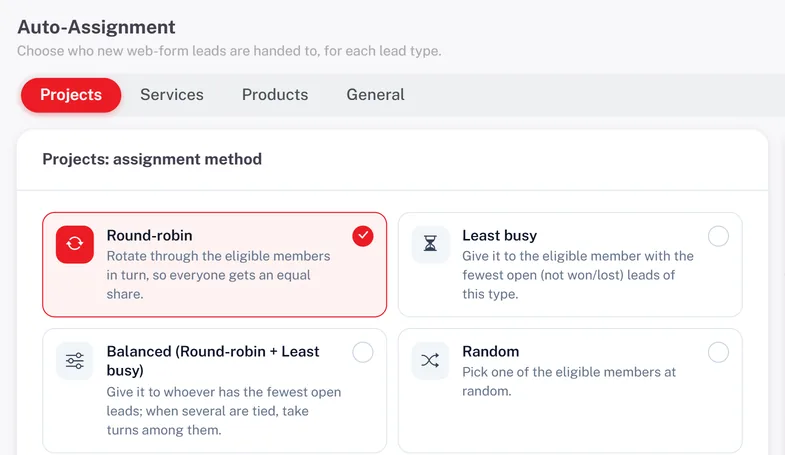
On plans with auto-assignment, each offering uses your company rule or a method of its own: round-robin, least busy, balanced, random, one fixed executive, all its executives together, or manual. Website development leads rotate among the website team while custom software leads keep a separate rotation. With nobody ticked, the category's default executives take over. This is rule-based, not AI matching, and it does not check attendance.

  • Own rotation per offering
  • Eight routing choices
  • Category executives as backup
Lead Assignment Software India
Automatically Route Customer Enquiries to Eligible Employees
Website Forms

Capture Different Customer Requests Through Dedicated Website Forms

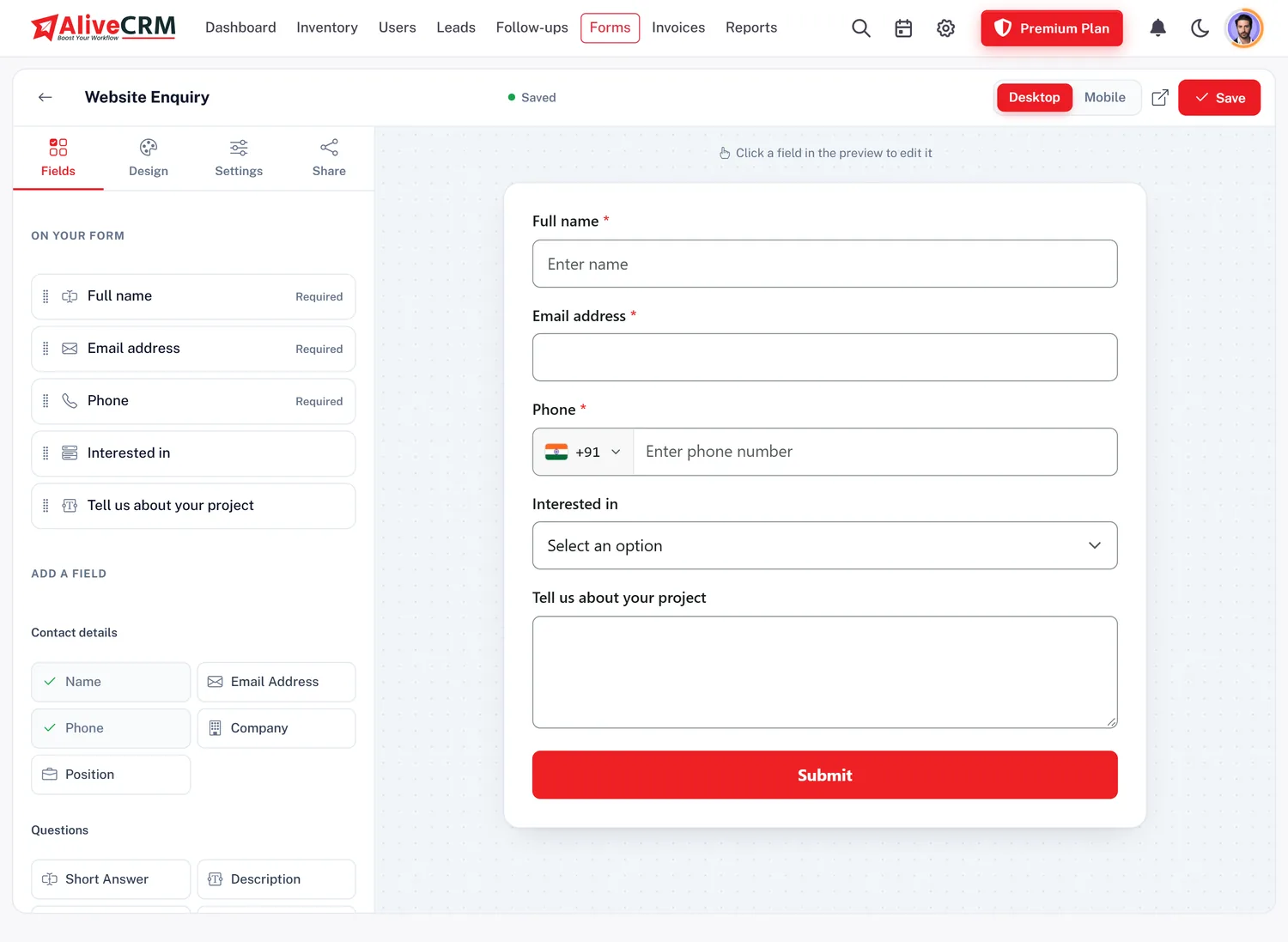
Build a form for each offering and embed it on that page of your website or landing page. A builder can run one form per tower, and a software company one per development service. Each submission becomes a lead carrying the offering name and goes straight to its executives. Mark an offering Inactive and its form stops accepting enquiries with a polite notice.

  • A form for every offering
  • Embed on any website page
  • Inactive offerings close their form
See the Form Builder
Capture Different Customer Requests Through Dedicated Website Forms
Lead Tracking

Review Customer Enquiries by Business Type

Leads are split into Projects, Services and Products tabs, with a General tab for walk-in or phone enquiries that are not tied to an offering. Executives update the status, write notes and set the next follow-up as their role allows. When you add a lead by hand after a call, choose its type and offering so it counts with the rest.

Customer Follow-Up Management
  • Separate tab per record type
  • Status, notes and reminders
  • Manual leads tagged too
GST Quotations

Prepare Sales Documents from Related Customer Leads

Once you know what the customer wants, raise a quotation in rupees on the same lead with line items, a discount and CGST and SGST or IGST, then convert it to a tax invoice. The offering on the lead shows what to quote for, but the lines are typed in by you, not copied from the product or service record.

GST-Ready Quotations and Invoices
  • Quotation on the tagged lead
  • GST split by place of supply
  • Lines typed, not copied
Permissions

Control Who Can Manage Your Products, Projects and Services

An office manager may need to add and price offerings, while a field executive only needs the leads given to them. Roles carry view, add, edit and delete rights for each of projects, products and services, with a separate right for managing categories. The same rules apply on the web and in the mobile app.

Employee Roles and Permissions
  • Rights per record type
  • Category management right
  • Same rules on web and app
App and Reports

Manage Offerings and Enquiries While Working on Mobile

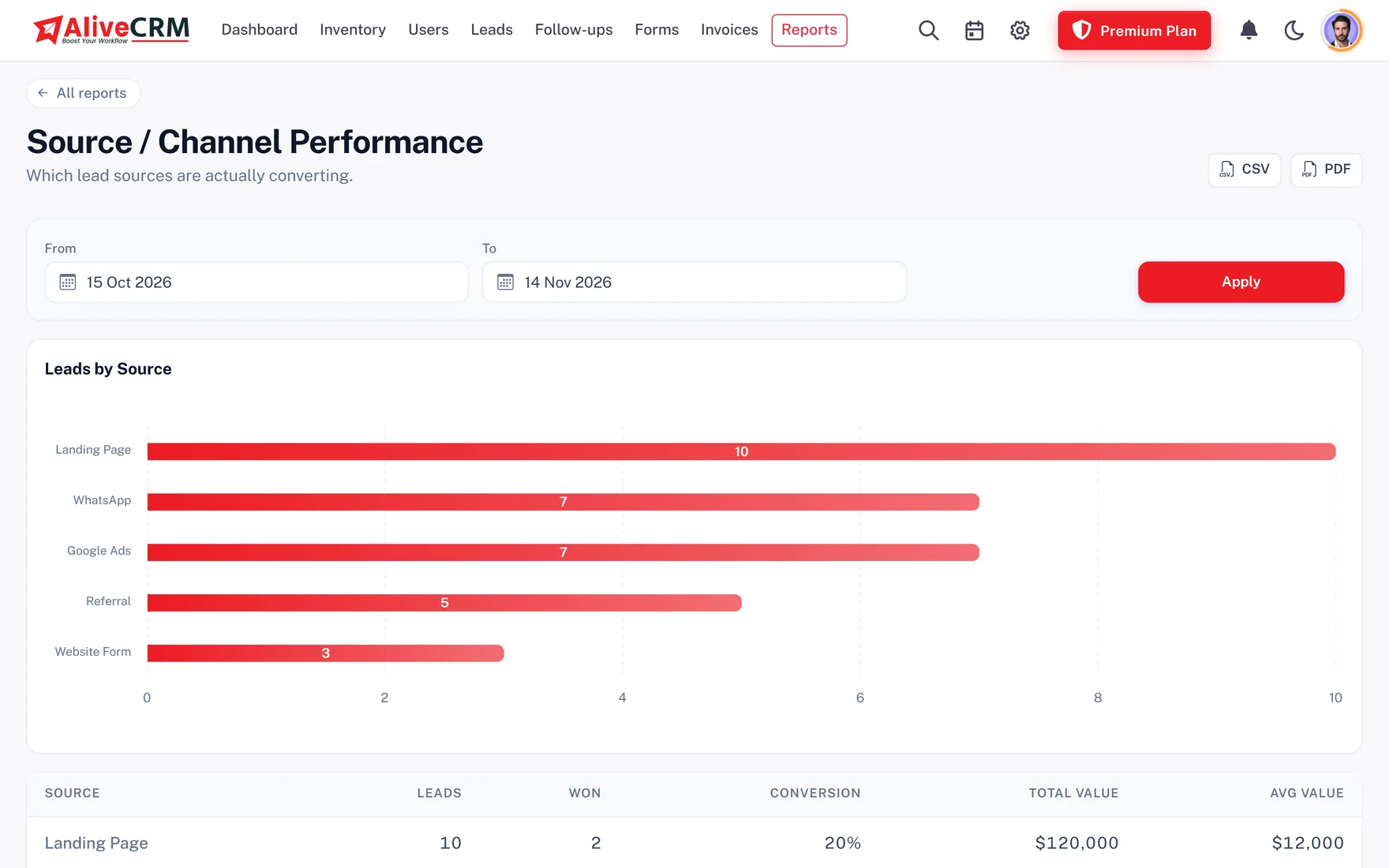
The Android app lets executives search and filter offerings, open their details, add or edit records, switch them Active or Inactive and create categories. The iOS app is coming soon. Owners get advanced reports on selected paid plans: enquiries per project, a product and service catalogue with price and lead count, and a category report with leads, wins and conversion, each downloadable as CSV.

  • Search, add and edit on Android
  • Per-project and catalogue reports
  • Conversion by category
Mobile CRM for India
Manage Offerings and Enquiries While Working on Mobile
Who Uses It

Product, Project & Service Management for Indian SMEs

IT and software companies

Websites, apps and ERP builds as separate offerings, each with its own pre-sales team.

Digital marketing agencies

SEO, Google Ads, branding and social media packages with a specialist per service.

CRM for Digital Agencies

Real estate businesses

One record per project or tower, each with its form and site-visit team.

Real Estate CRM

CA and consulting firms

Registration, audit and advisory services, each routed to the partner who handles it.

CRM for Consulting Firms
Honest limits

What This Module Does Not Do

AliveCRM is not billing, GST stock-accounting or warehouse software. The stock figure on a product is entered by hand and is never reduced on a sale or invoice. There is no godown or location stock, purchase entry, supplier ledger, barcode generation or scanning, reorder alert, batch number or marketplace sync.

Photos are for products only, one per product. You cannot bulk upload offerings from Excel or download them, and you cannot copy an offering. Projects are sales enquiries, not delivery plans with tasks or Gantt charts. The number of offerings you can keep depends on your plan, with products, projects and services counted together.

INR Plans

Explore Business Inventory Management with INR Plans

Plans for India are billed in rupees, monthly or yearly. Each plan sets how many offerings you can keep, and the 7-day trial lets you load real products, services and forms before paying. The pricing page lists what each plan includes.

View INR Pricing
  • Billed in INR
  • 7-day trial, no card needed
  • Offering limit set by plan
FAQ

Frequently Asked Questions

What is Inventory Management in AliveCRM India?

It is where Indian businesses list their products, projects and services, group them into categories and connect each one to its enquiries and sales executives.

Is AliveCRM suitable for an Indian product business?

Yes, for managing product enquiries and dealer leads. Keep products with codes, rupee prices and photos, and route each enquiry to the right executive. For billing and stock, keep your existing software.

Can IT companies manage different projects?

Yes. Keep each engagement or offering as its own project or service record, with its own form and team, so website and app enquiries never mix.

Can a digital agency manage multiple services?

Yes. Add SEO, ads, branding and social media as separate services with their own specialists and rotation.

Can I add images to my product records?

Yes, one photo per product in JPG, PNG or WebP, up to 2 MB.

Can I add project and service images?

No. Only products have a photo field today. Projects can carry a project link instead.

Can I create product categories and subcategories?

Yes. Make a main category and add sub-categories under it. Nesting stops at that one level.

Can I create separate categories for products and services?

Yes. Set each category to products, projects or services, or leave it shared by all three.

Does AliveCRM support unique product SKUs?

Yes. A SKU is optional, and once used it cannot be repeated on another live product in your account.

Can I use my own product SKU format?

Yes. Type codes in whatever pattern you already use, such as LAP-001. AliveCRM does not create codes for you.

Does AliveCRM generate barcodes?

No. It does not create, print or scan barcodes.

Can I monitor the number of items in stock?

Only as a figure you type and update on each product. It does not change when you sell, and there are no low-stock alerts.

Does it manage GST stock registers?

No. It is not accounting or stock software and keeps no stock register or ledger. Use your billing or accounting software for that.

Can I assign employees to different services?

Yes. Tick the executives who handle each service, and its enquiries go only to them.

Can all employees be eligible for an item?

Yes. Use Select all on the offering. If you leave it empty, the category's default executives are used, and then your company fallback list.

Can customer enquiries be assigned automatically?

Yes, on plans with auto-assignment, by round-robin, least busy, balanced, random, a fixed executive or all executives together. You can also switch it off and allot by hand.

Does every product or service have its own rotation?

Yes. Each offering keeps its own round-robin turn, separate from all others.

Can I connect a website enquiry form to a service?

Yes. Each form is tied to one product, project or service. Embed it on that service page and its leads arrive tagged.

Can I manage project leads separately from product enquiries?

Yes. Projects, Services and Products have separate tabs in the leads list.

Can I prepare a quotation from a project lead?

Yes, on plans with quotations. Create it on the lead with line items and GST, then convert it to an invoice. Lines are typed in, not copied from the project.

Can I add GST to invoices?

Yes. With the tax label set to GST, AliveCRM applies CGST and SGST or IGST by place of supply, and prints GSTINs and HSN/SAC codes.

Can I manage services from my phone?

Yes, on the Android app: search, add, edit and switch services Active or Inactive. The iOS app is coming soon.

Can I monitor product-related lead reports?

Yes, with advanced reports: a catalogue report with leads per product and service, a project report and a category conversion report, each exportable to CSV.

Is AliveCRM suitable for real estate enquiries?

Yes. Keep each project or tower as a project record with its own form and sales team, and track site visits as follow-ups.

Is pricing available in Indian Rupees?

Yes. Plans for India are billed in INR, monthly or yearly.

Can I try the module before subscribing?

Yes. The 7-day trial includes products, projects, services, categories and forms, so you can test it with your own offerings.


Organize Your Business Offerings and Manage Customer Enquiries in One CRM

List what you sell, decide who handles it, and let website enquiries find the right executive. Start a 7-day trial or book a demo.

Book a demo

See forms, leads and follow-ups set up for your team on a live call. Leave your details and we will reach out to pick a time.