CRMLead Management for Indian Businesses

Lead Management Software for Indian Businesses and Sales Teams

Bring website enquiries, old Excel sheets and every executive's phone contacts into one CRM, so each customer gets an owner, a callback date and a clear next step.

The short answer

What Is Lead Management Software and Why Do Indian Businesses Need It?

Lead management software is a shared system for recording customer enquiries, deciding which employee handles each one and tracking every call until the deal is won or lost. For most Indian SMEs the real job is simpler: stop losing enquiries between the website, the office phone, WhatsApp and the Excel sheet on the owner's laptop.

AliveCRM gives the owner one view of every enquiry while each sales executive works their own list of leads, statuses and callbacks. Enquiries can be tagged by product, project or service, so a builder, a coaching institute and an IT agency can each run the workflow their way.

You need a system when

  • You ask employees for updates on every enquiry.
  • Callbacks live in notebooks and phone reminders.
  • The same customer is entered twice with two spellings.
  • A leaving employee takes their leads with them.
How It Works

How an Enquiry Moves Through AliveCRM

Every step is saved on the same lead, so nothing depends on one person's memory.

  1. 01Enquiry Arrives
  2. 02Employee Assigned
  3. 03Customer Called
  4. 04Quotation Sent
  5. 05Won or Lost
The Problem

Are Your Sales Leads Still Managed in Excel and on Employees' Phones?

Manual records work when one person sells. Once a team shares the enquiries, the gaps show.

Leads spread across spreadsheets

Each executive keeps a separate sheet, so the owner never sees all enquiries in one place.

No one responsible

A website enquiry arrives at 9 pm and by morning nobody is sure who should call.

Missed callbacks

The customer said "call me on Monday", but the reminder was only in someone's head.

Status by phone call

To know where a deal stands, the owner has to ring the executive and ask.

Half the customer story

Notes sit in a diary, so the next employee repeats questions the customer already answered.

No picture of pending business

Managers cannot see how many enquiries are new, contacted, pending or closed this month.

One Dashboard

Manage All Your Business Leads From One CRM Dashboard

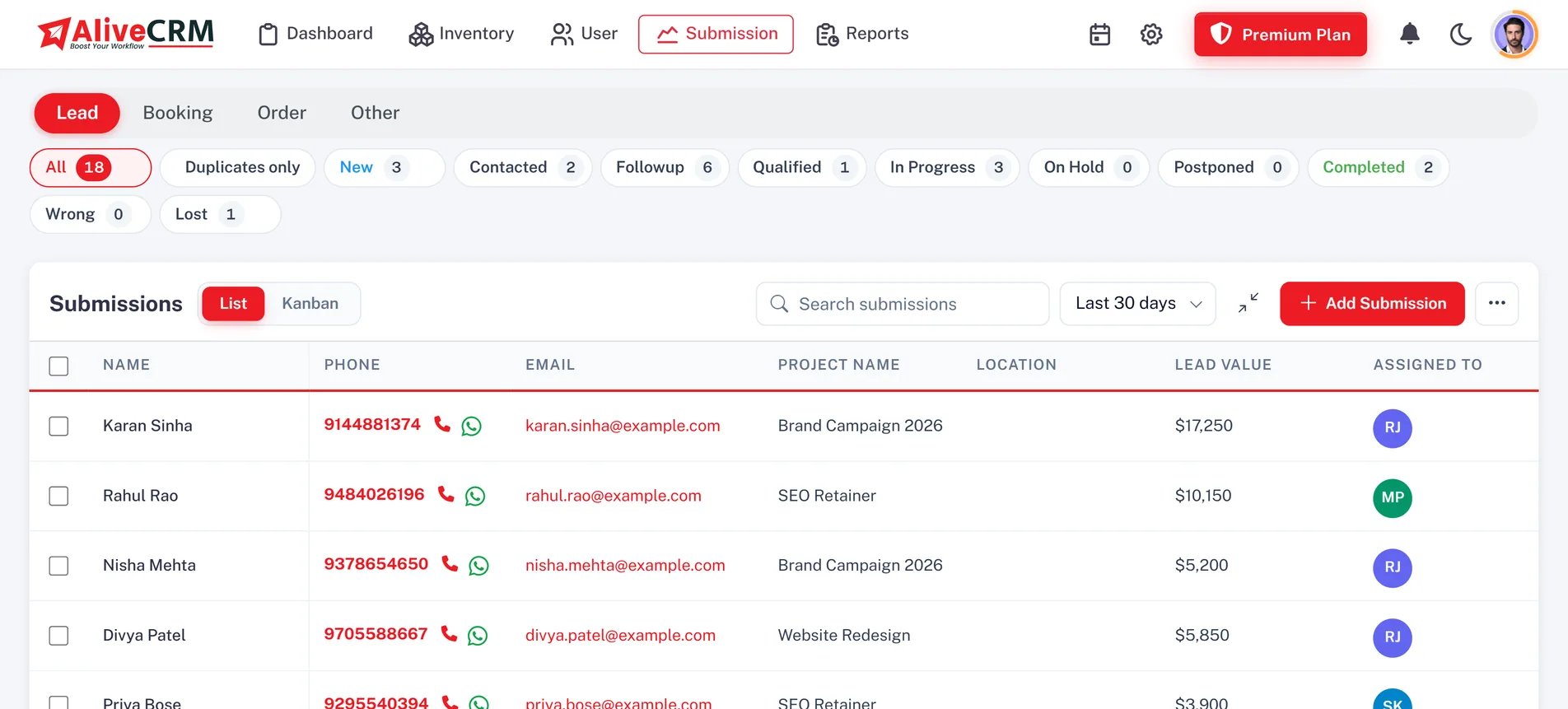
Every enquiry lands in a common company account with the customer's details, source, linked product, project or service, assigned employee and current stage. A sales manager in Mumbai and an executive in Pune open the same record. Filter by status, assignee, source, category or date to pull up last week's enquiries in seconds. Roles decide who can view, edit or export, and executives with "self only" access see just their own leads.

  • One shared record per enquiry
  • Filters by status, employee, source and date
  • Executives see only their own leads
See lead statuses and sources
Manage All Your Business Leads From One CRM Dashboard
Website Enquiries

Capture Customer Enquiries From Your Business Website

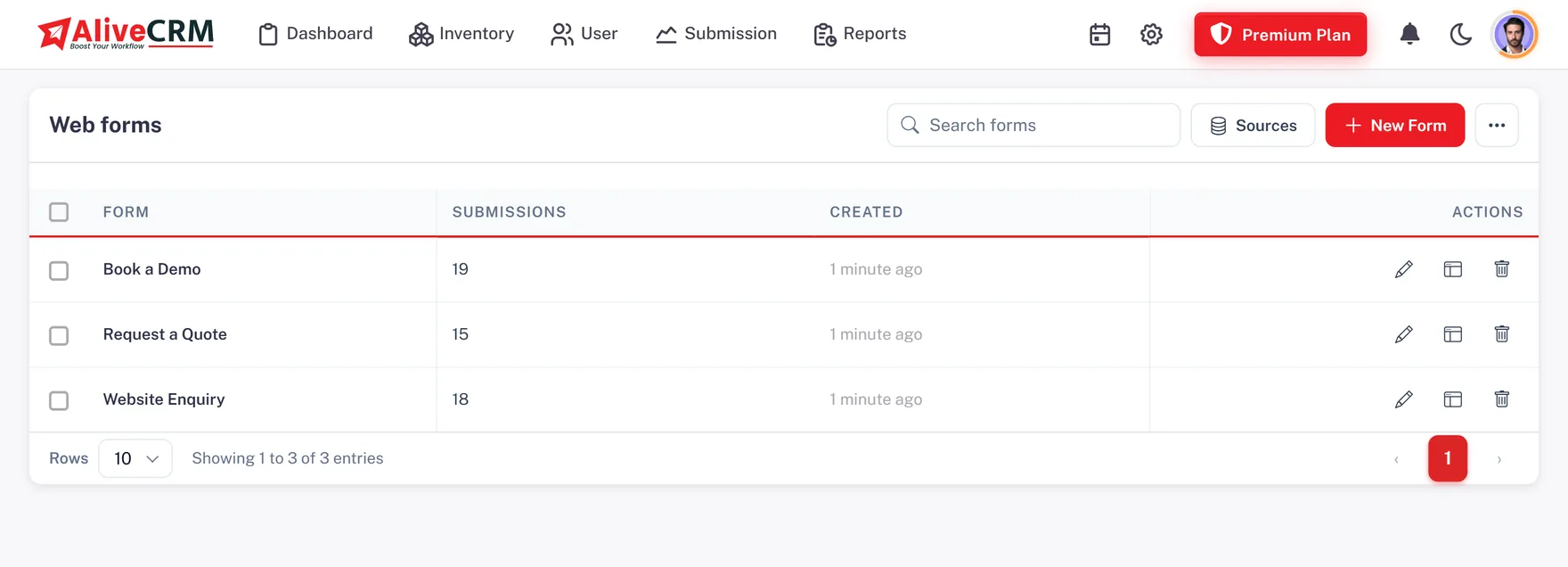
Create an enquiry form for each product or service, paste one tag on your website or landing page, and each submission arrives as a lead with its page and source. Add your Google Tag Manager code so Google and Meta ad conversions are counted. An IT company can keep separate forms for website development, mobile apps and ERP software, and auto-assignment can route each one to the right sales employee.

  • A form per product or service
  • Google Tag Manager for ad tracking
  • New enquiries routed to employees
See the website enquiry form builder
Capture Customer Enquiries From Your Business Website
Excel to CRM

Move Your Existing Excel Leads Into an Organised CRM

Most Indian businesses already have years of prospects in Excel or Google Sheets. Download the import template, paste your rows, save the sheet as CSV and upload up to 2,000 leads per file. The results screen lists what was created, possible duplicates and rows to fix. Then assign the imported leads, add notes and set callbacks like any other enquiry.

See CSV lead import
  • Save as CSV, 2,000 rows per file
  • Possible duplicates flagged
  • Export back to Excel, CSV or PDF
Enquiry Types

Organise Product Enquiries, Project Leads and Service Bookings

A property firm gets site-visit requests, a marketing agency gets campaign enquiries and an AC repair company gets service bookings. Keep separate stages for leads, bookings, orders and general enquiries, and group them with categories. A firm offering AC, electrical and maintenance work can create a category for each and send every booking to the technicians who handle it.

See service management
  • Lead, booking, order and general types
  • Categories and sub-categories
  • Category-based routing
Employee Assignment

Automatically Assign New Sales Leads to Your Employees

Assigning thirty enquiries a day by hand eats the morning. On selected paid plans, pick a rule per enquiry type: round-robin turn by turn, least busy, balanced, random, one fixed employee, or off so an admin assigns manually. Each project, product or service can have its own team. A builder can put three executives on one project and two on another, and enquiries rotate only within each project's team.

See automatic lead assignment
  • Round-robin, least busy, balanced, random
  • Fixed employee or manual by admin
  • A separate team per project or service
Callbacks

Manage Customer Callbacks Without Scattered Reminders

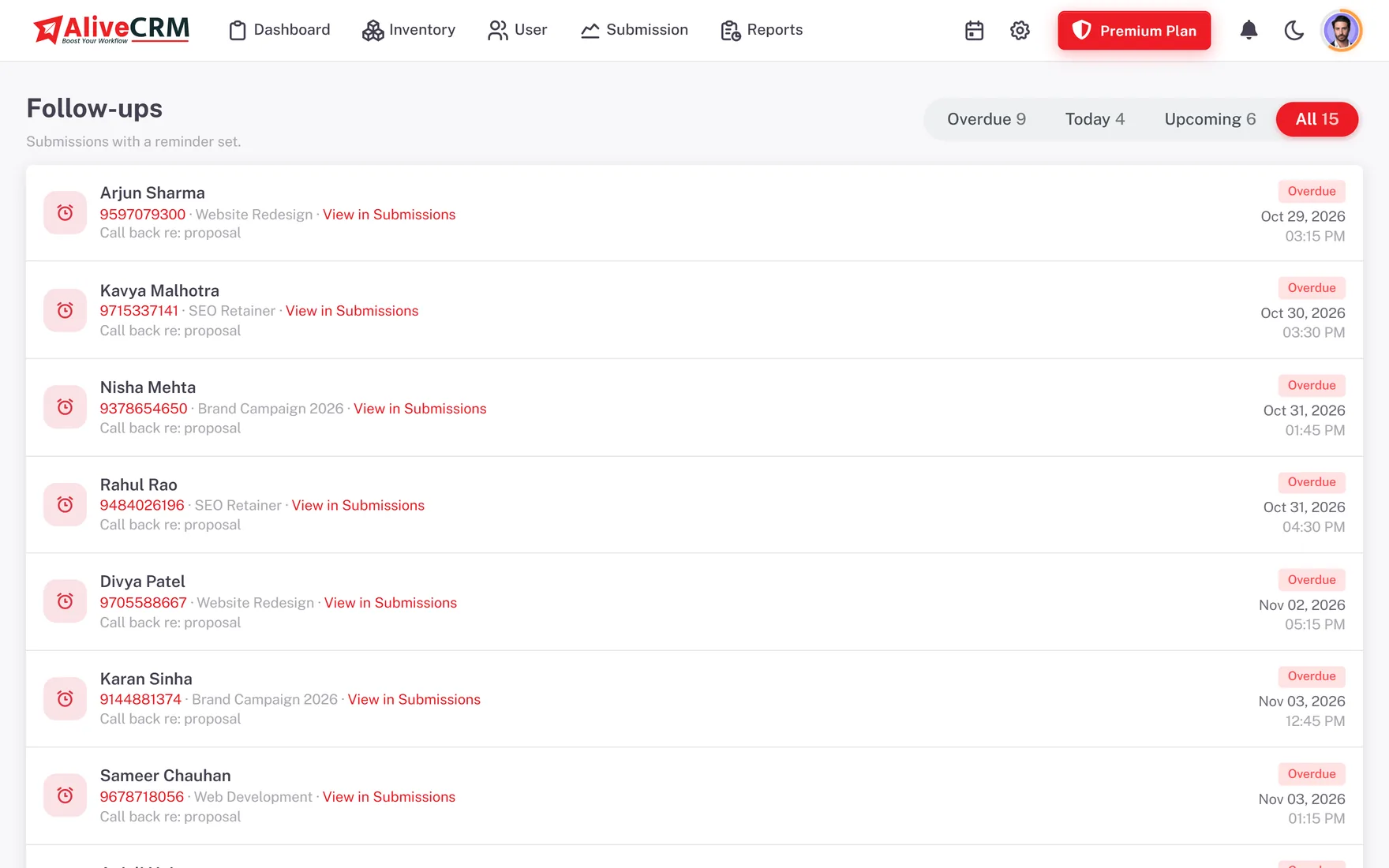
A customer wants a quotation, asks for a meeting or says "call me after Diwali". Set a reminder with a date, time and note on the lead, on selected paid plans, and the employee gets an in-app and push alert. The Follow-Ups page shows Overdue, Today and Upcoming callbacks. A coaching institute can note which course a parent asked about and schedule the next admission call before the batch fills.

  • Overdue, Today and Upcoming lists
  • Push alerts on the mobile app
  • Notes from every conversation
See follow-up reminders
Manage Customer Callbacks Without Scattered Reminders
Lead Status

Track New, Contacted, Pending and Closed Sales Enquiries

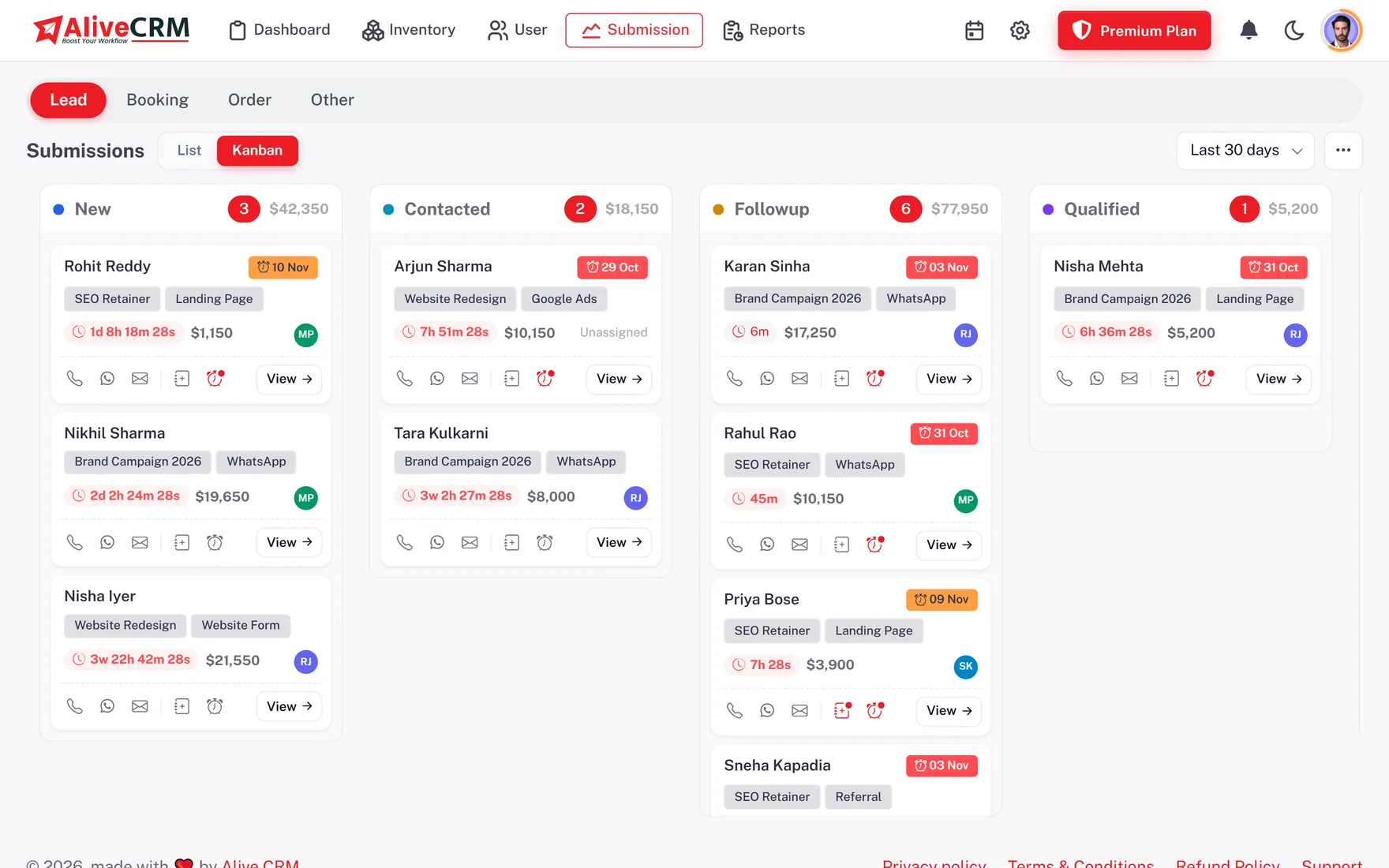
Set up the stages your team already talks in. A service business might use New Lead, Called, Requirement Received, Quotation Sent, Follow-Up and Closed. These are examples, not fixed defaults. Drag leads across the Kanban board or update them from the list, and every change records who made it and when.

  • Stages named in your own words
  • Kanban board and list view
  • Who moved what, and when
See the sales pipeline
Track New, Contacted, Pending and Closed Sales Enquiries
Contact History

Keep Lead Notes, Calls and WhatsApp Chats Organised

Before calling a customer again, an executive should know what was promised last time. Each lead shows the notes, status changes and a Contact History of call and WhatsApp taps. On plans with WhatsApp chat, a button opens the customer's chat in your own WhatsApp with a ready message; it is not the WhatsApp Business API, so there are no broadcasts. On the Android app, calls are matched to the call log for outcome and duration.

See WhatsApp lead follow-up
  • Tap to call from the lead
  • WhatsApp chat button with ready message
  • Android call outcome and duration
GST Quotations

Turn Customer Enquiries Into GST Quotations and Invoices

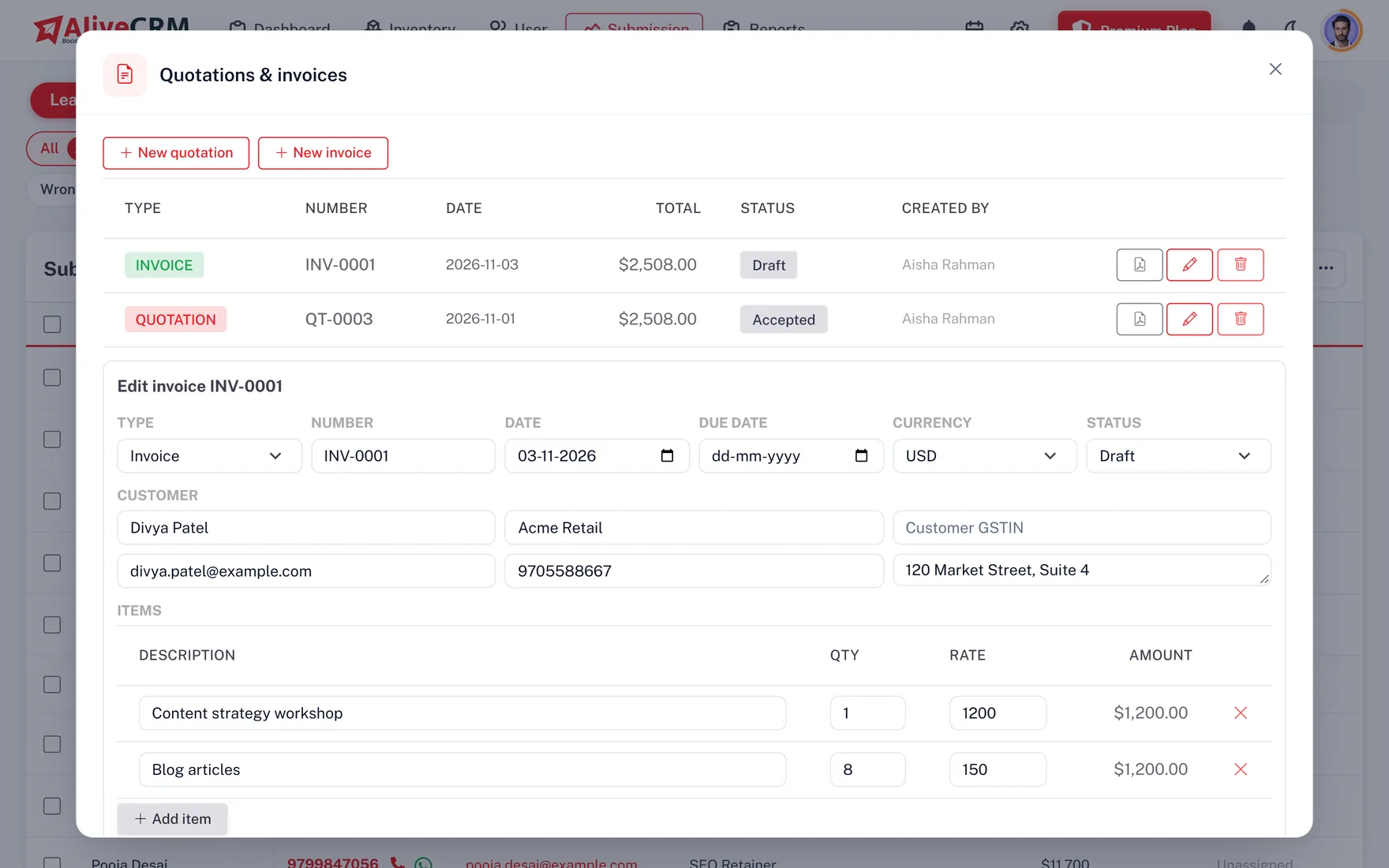
A software company gets a website enquiry, assigns it, notes the requirement and sends a quotation from the same lead. On selected paid plans, add line items, rates, a discount and one GST rate for the document. Your GSTIN, the customer's GSTIN, bank details and UPI ID print on the PDF. Convert the accepted quote into an invoice in one click. There is no central and state tax split or e-invoicing, so check what your accountant needs.

  • One GST rate per document
  • GSTIN, bank details and UPI on the PDF
  • Quote to invoice in one click
See quotations and invoices
Turn Customer Enquiries Into GST Quotations and Invoices
Reports

Monitor Lead Progress and Sales Employee Activity

Owners get answers without asking for a status update. The pipeline report is on every plan; advanced reports come with selected paid plans.

Enquiry pipeline

New enquiries, pipeline value and won value by stage for any date range, in rupees.

Lead source analysis

See which source, ad campaign or portal upload brings enquiries that actually convert.

Employee activity

Leads assigned, deals won and average response time for each sales executive.

Callback discipline

Which employees clear their reminders on time and which let them go overdue.

Project and category reports

Enquiries per project, product, service and category, to see what customers ask about most.

User logins

When each team member last logged in, so inactive accounts are easy to spot.

Field Sales

Manage Sales Leads During Customer Visits and Field Work

Property executives stand at sites, service technicians work at customer homes and sales staff travel between meetings. The AliveCRM Android app, on Google Play, keeps their leads with them: check the customer's details before a visit, update the status after it, tap to call or WhatsApp and set the next callback. Owners can glance at reports on the move. The iOS app is coming soon, without call log tracking.

See the mobile CRM app
  • Android app on Google Play
  • Update leads from the site
  • Push alerts for new enquiries
Industries

Lead Management Software for Different Indian Industries

Real estate

Property enquiries, site-visit requests and buyer follow-ups, each linked to the right project and team.

IT and software companies

Separate pipelines for website, app and custom software enquiries, with quotations from the lead.

Digital marketing agencies

Landing page enquiries for prospective clients, with GTM tracking and callback reminders.

Coaching and education

Course enquiries from students and parents, assigned to counsellors with admission follow-ups.

Service businesses

Repair, installation and maintenance bookings routed by category to the right technicians.

Small businesses

One list of customers and responsibilities instead of a WhatsApp group and an Excel file.

Why AliveCRM

A Connected Lead Workflow for Growing Indian Businesses

Enquiry forms, employee assignment, callbacks, stages, permissions, GST quotations and reports all work on the same lead record, so the owner and every executive see one version of the truth. AliveCRM is built by Alive Inc., a technology company headquartered in Navi Mumbai, for the way Indian sales teams actually work.

What it does not do

There are no direct connectors to property portals or B2B marketplaces, so those leads come in by CSV import or manual entry. Duplicate enquiries are flagged, not merged automatically. There is no AI lead scoring and no bulk WhatsApp messaging.

INR Pricing

Explore AliveCRM With INR Plans and a 7-Day Trial

Start a 7-day trial with no card: one user, one project, one form and the core lead workflow. When you are ready, choose a monthly or yearly plan priced in rupees, sized by users, forms and lead allowance. Applicable taxes are shown before you pay. Enquiries over your form limit are kept as locked leads until you upgrade, so none are lost.

See CRM pricing in India
  • Prices in INR
  • Monthly or yearly billing
  • 7-day trial, no card needed
FAQ

Frequently Asked Questions

Is AliveCRM suitable for small Indian businesses?

Yes. AliveCRM is built for SMEs with a handful of sales employees as much as for larger teams. You can start alone on the 7-day trial, add employees as you grow and pay in rupees for only the plan you need, with no consultant or setup project.

Can I import my existing Excel lead data?

Yes. Paste your rows into the import template, save it as CSV from Excel or Google Sheets and upload up to 2,000 rows per file. The results screen shows created leads, possible duplicates and rows with errors, so your old data moves across cleanly.

Can I automatically assign leads to employees?

Yes, on selected paid plans. Choose round-robin, least busy, balanced, random or a fixed employee for each enquiry type, and set which employees handle each project, product or service. With rules off, new enquiries go to an admin who assigns them.

Can employees see only their own leads?

Yes. Turn on the "self only" permission for a role and those employees see just the leads assigned to them. Owners and admins still see everything, and admins can keep individual notes private from other users.

Can I set customer callback reminders?

Yes, on selected paid plans. Add a date, time and note to any lead and choose who is reminded. The alert arrives in the app and as a push notification on Android, and the Follow-Ups page lists overdue, today's and upcoming callbacks.

Can I manage real estate enquiries?

Yes. Create each property project in AliveCRM, give it an enquiry form and a team of executives, and enquiries rotate among that team. Site visits, budgets and buyer notes stay on the lead, and the project report shows enquiries per project.

Does AliveCRM support WhatsApp?

On plans with WhatsApp chat, a button on the lead opens a chat in your own WhatsApp with a ready message, and the tap is logged. It is not the WhatsApp Business API, so it does not send broadcasts, run chatbots or message customers automatically.

Can I make calls from lead records?

Yes. Tap the phone button on any lead to call, and the tap is logged. On the Android app, AliveCRM reads the call log to record whether the call connected and how long it lasted, and caller ID shows which lead is calling.

Can I create GST quotations and invoices?

Yes, on selected paid plans. Quotations carry line items, a discount and one GST rate, with your GSTIN, the customer's GSTIN, bank details and UPI ID on the PDF. There is no central and state tax split or e-invoicing, so confirm your compliance needs first.

Can I monitor my sales employees?

Yes. Reports show leads assigned, deals won, response time and callback discipline per employee, plus when each user last logged in. The pipeline report is on every plan; employee and follow-up reports are advanced reports on selected paid plans.

Is there an Android and iOS app?

The Android app is available on Google Play and uses the same login and data as the web. The iOS app is coming soon; until then iPhone users can open AliveCRM in the browser. Call log tracking will stay Android only.

What happens when my lead limit is exceeded?

Nothing is lost. Enquiries over your form's lead allowance are saved as locked leads with details hidden, and they unlock as soon as you move to a plan with a higher limit.

Does AliveCRM support INR pricing?

Yes. Indian businesses see plans priced in rupees, billed monthly or yearly, with applicable taxes shown before payment. Every account starts with a 7-day trial that needs no card.

Does AliveCRM support different branches?

There is no separate branch module. Many businesses set up each branch as a category or project, give it its own team of employees for assignment, and use roles with "self only" access so each branch works its own leads.

Can customers send enquiries in Hindi or other Indian languages?

Yes. Forms accept any text, so an enquiry typed in Hindi, Marathi, Tamil or another language is saved on the lead exactly as written, and your team replies in whichever language suits the customer.

Is AliveCRM an Indian product?

Yes. AliveCRM is developed by Alive Inc., headquartered in Navi Mumbai. You can book a demo from any page to see the lead workflow with your own business example.


Manage Enquiries, Employees and Follow-Ups in One CRM

Move off scattered spreadsheets: capture website enquiries, assign them to employees, track every callback and send GST quotations from AliveCRM. Start a 7-day trial or book a demo.

Book a demo

See forms, leads and follow-ups set up for your team on a live call. Leave your details and we will reach out to pick a time.