Retail and E-commerce

CRM for Retail and E-commerce Teams Handling Order Enquiries

Bulk orders, trade requests and product questions that do not fit your checkout land in one list, linked to the product, with an owner and a follow-up date.

The short answer

Why would an online store need a CRM?

Your store handles the orders that go through checkout. A CRM for retail and e-commerce handles the ones that do not: a café asking for forty mugs at trade price, a company wanting branded gift boxes, a shopper who needs a size or delivery date confirmed before paying. AliveCRM records each of these under Products, linked to the product in your catalogue, assigns it to someone on the team and keeps the follow-up on track until it becomes a sale.

These enquiries are often the most valuable ones you get, and they are easy to lose. They arrive by contact form, email, phone and chat, sit with whoever saw them first and go quiet when that person is busy.

Enquiries a checkout cannot handle

  • Bulk and wholesale orders that need a custom price.
  • Corporate gifting with branding or delivery deadlines.
  • Custom or made to order products.
  • Pre-sale questions on stock, sizes, lead times or delivery.
How It Works

From Product Enquiry to Paid Invoice

Every step happens on one Order record, so nothing is retyped.

  1. 01Enquiry
  2. 02Product Linked
  3. 03Owner
  4. 04Quote
  5. 05Follow Up
  6. 06Paid
Catalogue

Order Enquiries Linked to Your Products

Add your products to the AliveCRM catalogue with names, codes and prices, and group them in categories such as Homeware or Gift Sets. When a customer asks about an item, the enquiry is saved as an Order linked to that product, so you can see at a glance which lines draw the most interest. The catalogue is a reference list for sales, not stock control: AliveCRM does not deduct stock or sync with your store's inventory.

See Product Enquiry Management
  • Products with codes and prices
  • Categories with one level of nesting
  • Enquiries linked to each product
Capture

A Bulk Order Form on Any Page

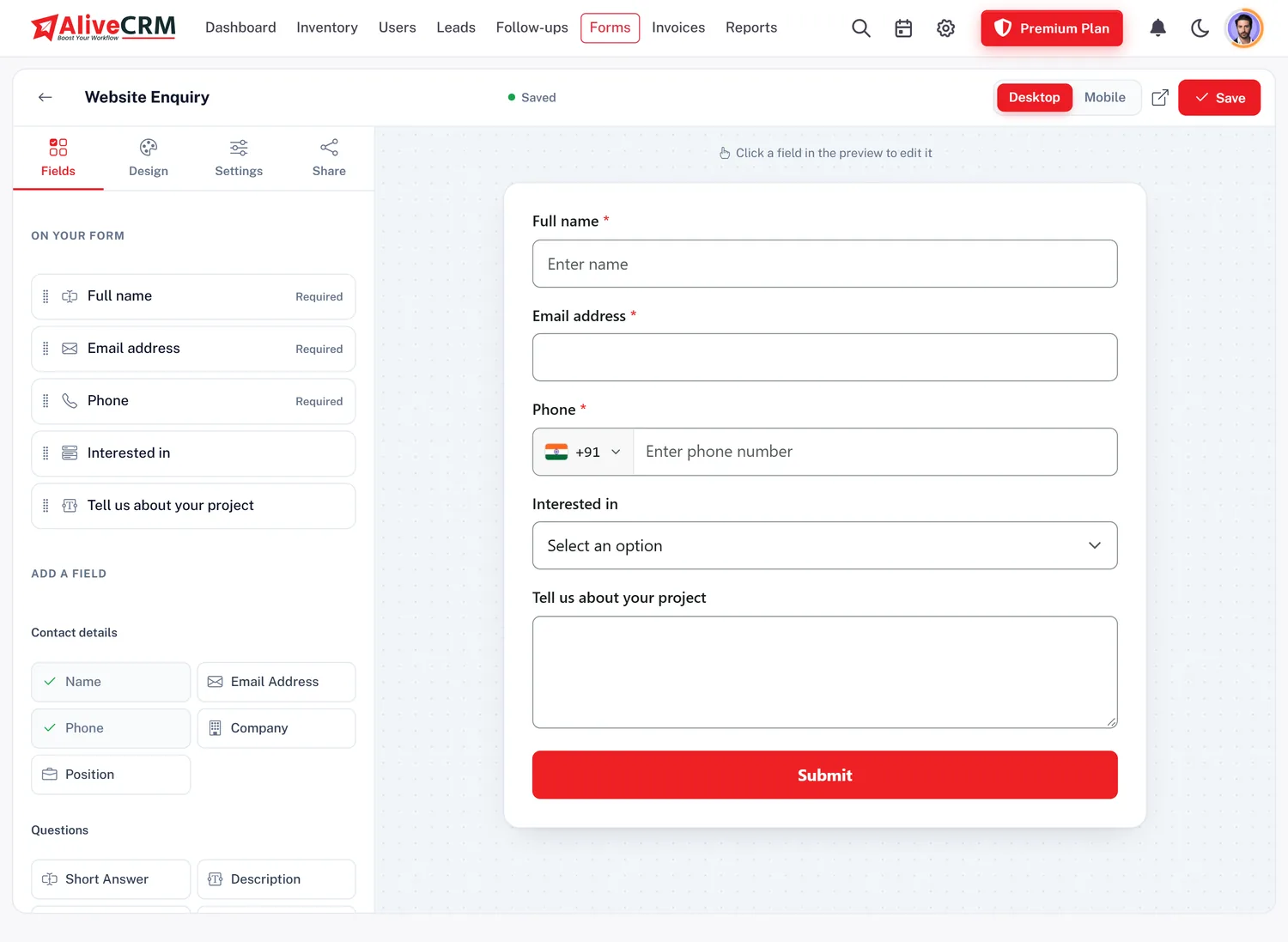
Build a trade or bulk order form with the form builder, with fields for company, quantity, delivery date and a file upload for artwork. Embed it with one script tag on your store's pages, through Google Tag Manager or as a shareable link. Developers can also post leads from other tools to a per-form webhook. There is no native Shopify or WooCommerce app; the form embed and the webhook are how enquiries arrive.

  • Quantity, delivery date and file fields
  • One script tag or Google Tag Manager
  • Per-form webhook for other tools
See the Form Builder
A Bulk Order Form on Any Page
Assign

Wholesale to One Person, Retail to Another

Set an assignment method for each product, on selected paid plans. Send every corporate gifting enquiry to your key account manager as a fixed owner, and share retail questions between the support team by round-robin. Managers see every order enquiry; a "self only" role keeps each salesperson to their own.

See Automatic Lead Assignment
  • Assignment per product
  • Fixed owner for key accounts
  • Self-only access for sales staff
Quote

Quote Trade Prices With Tax and Discounts

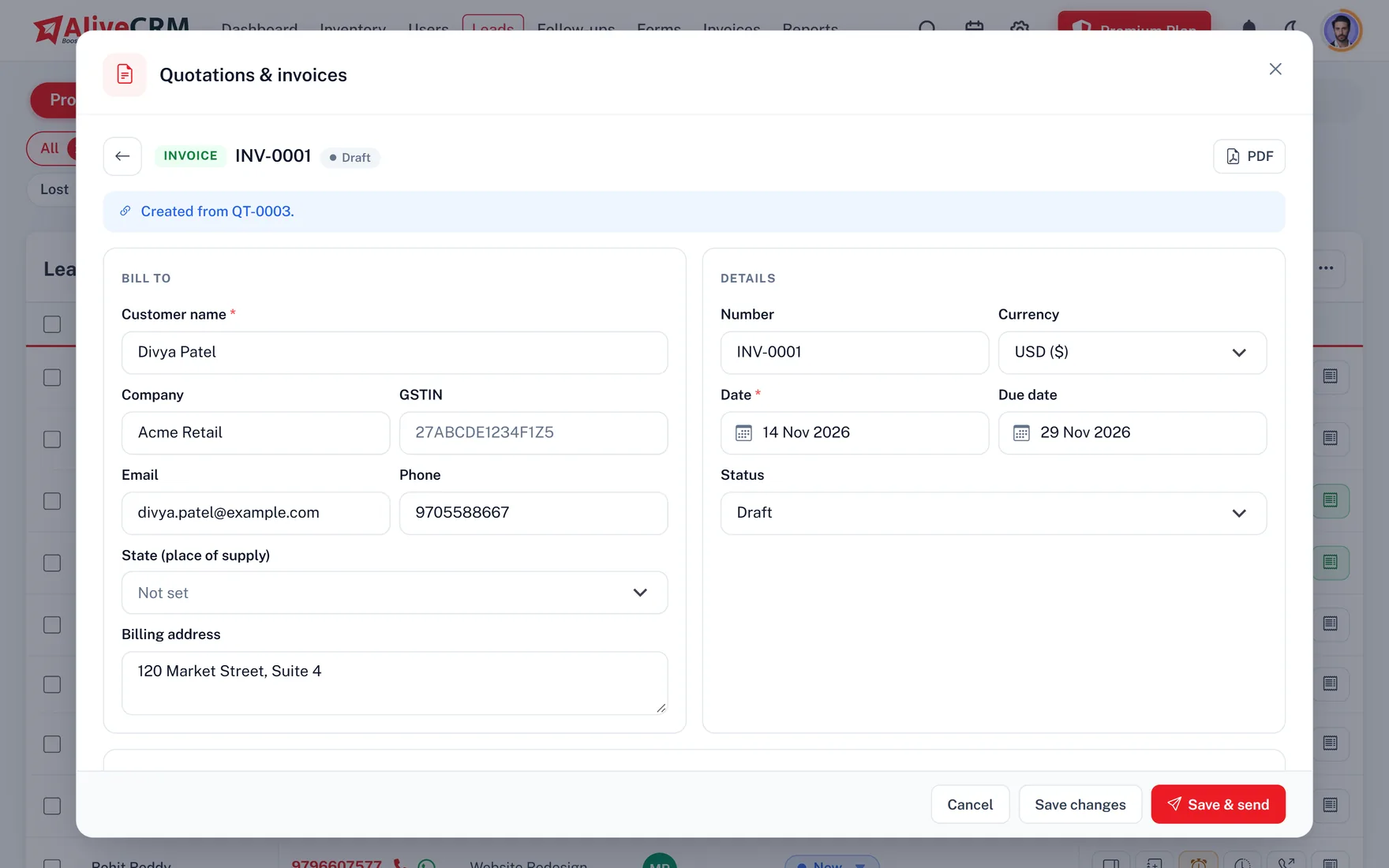
Build a quotation from the Order with line items, quantity discounts and tax per line. Send it as a PDF or by email, in INR, USD, AED, EUR or GBP. When the buyer agrees, convert the quote into an invoice, record an advance as a part payment and the balance later. A fully paid invoice marks the enquiry as Won.

  • Flat or percentage discounts
  • Five document currencies
  • Part payments and credit notes
See Quotations and Invoices
Quote Trade Prices With Tax and Discounts
Follow Up

Chase the Order Before the Buyer Goes Elsewhere

Set a reminder on each enquiry and it appears on the Follow-ups page under Today when it is due, with an in-app and mobile push alert for the owner. Tap to call or open a WhatsApp chat with a saved template, and every tap is kept in Contact History. Duplicate enquiries from the same buyer are flagged so two people do not quote the same order.

See WhatsApp Lead Follow-Up
  • Reminders with push alerts
  • WhatsApp templates for common replies
  • Duplicate enquiries flagged
Report

Know Which Products Drive Bulk Demand

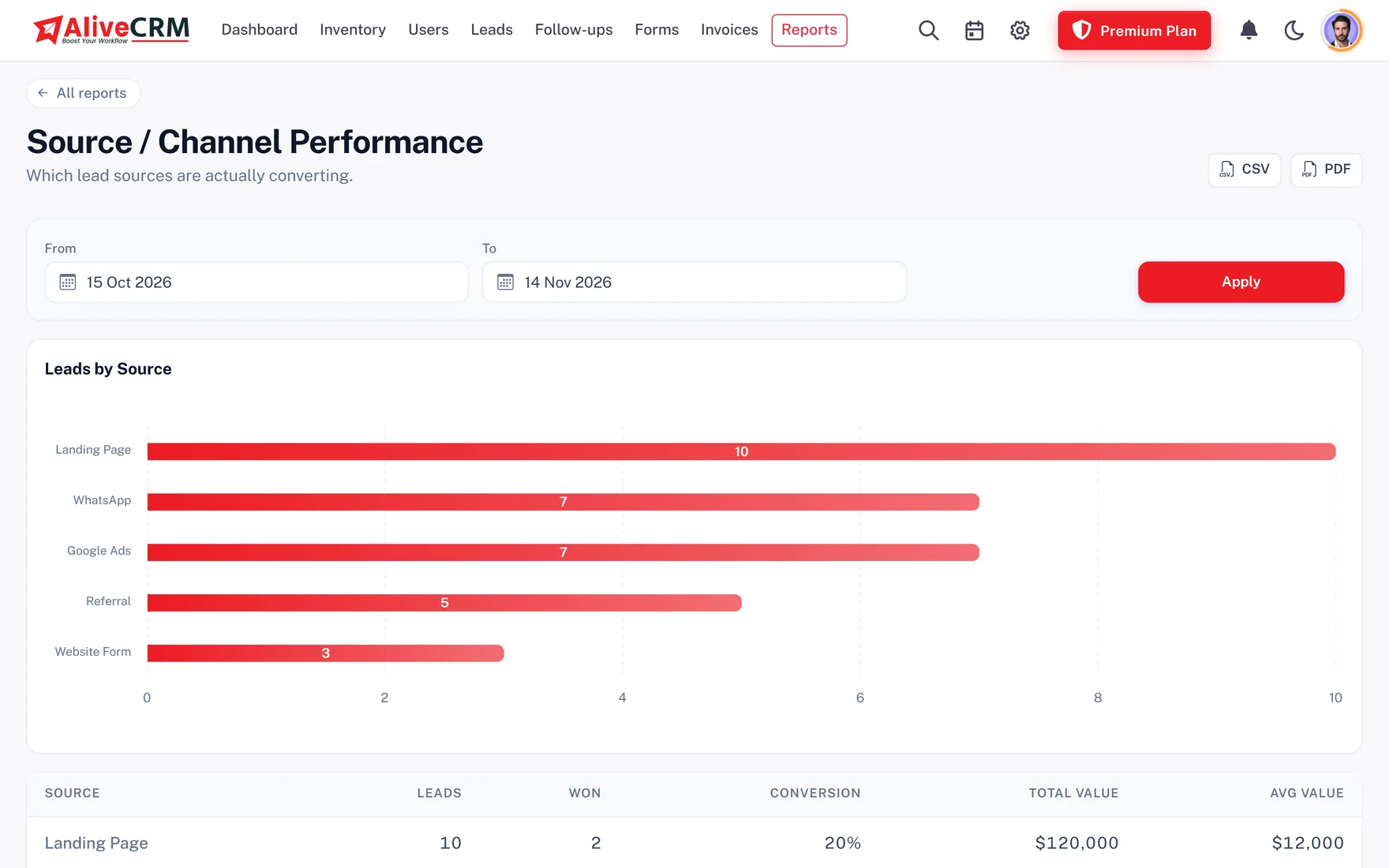
Advanced reports, on selected paid plans, count enquiries by catalogue item and category, compare forms and sources, and show why deals were lost. Export the lead list to Excel, CSV or PDF to share with your buying team when you plan the next range.

  • Enquiries per product and category
  • Source and form performance
  • Excel, CSV and PDF export
See CRM Reports
Know Which Products Drive Bulk Demand
Who It Is For

Retail Teams That Fit AliveCRM

Online and physical stores

Bulk, trade and special order requests handled alongside the everyday checkout.

Direct to consumer brands

Corporate gifting and wholesale enquiries quoted with tax and followed up by a named owner.

Distributors and wholesalers

Dealer and retailer enquiries linked to product lines, with a quote sent from the same record.

Furniture and made to order

Custom sizes and finishes captured on the form, with artwork or measurements uploaded by the buyer.

Honest limits

What AliveCRM Does Not Do for Retail

AliveCRM is not a store, a cart or an order management system. It does not process checkout payments, deduct stock, track shipments or sync with Shopify, WooCommerce or marketplaces. It does not send email campaigns or abandoned cart messages. It handles the enquiries that need a person: the conversation, the quote and the follow-up.

FAQ

Frequently Asked Questions

Does AliveCRM connect to Shopify or WooCommerce?

Not with a native app. You embed an AliveCRM form on your store pages with one script tag, and a developer can post leads from other tools to a per-form webhook. Checkout orders stay in your store; AliveCRM handles the enquiries that need a person to reply.

Can AliveCRM manage my stock?

No. The product catalogue holds names, codes, prices and categories so enquiries can be linked to items, but AliveCRM does not deduct stock or sync inventory levels. Keep stock in your store or warehouse system.

Where do product enquiries go in AliveCRM?

AliveCRM sorts leads into four types: Projects, Services, Products and General. Product enquiries go under Products and are linked to an item in your catalogue. Each type has its own list of statuses, so your order pipeline can use stages like Quoted, Deposit Received and Dispatched.

Can I quote in more than one currency?

Yes. Quotations and invoices can be issued in INR, USD, AED, EUR or GBP, with line items, discounts and tax on each line. Convert an accepted quote into an invoice, then record part payments as they arrive.

Can I import my existing customer list?

Yes, from a CSV file of up to 2,000 rows using the import template. If your list is in Excel, save it as CSV first. You can also export leads to Excel, CSV or PDF at any time.

Can different team members handle wholesale and retail enquiries?

Yes. On selected paid plans, set an assignment method for each product: a fixed owner for corporate gifting, round-robin across the support team for retail questions. A "self only" role keeps each person to the enquiries assigned to them.

Can AliveCRM send marketing emails to past buyers?

No. AliveCRM has no email campaign or automation tool. It sends quotations and invoices by email and reminds your team to follow up, but newsletters and promotions belong in your email marketing service.

Stop Losing Bulk Orders in the Inbox

Start a 7-day free trial with no card needed, add your top products and embed a bulk order form today.

Book a demo

See forms, leads and follow-ups set up for your team on a live call. Leave your details and we will reach out to pick a time.