


Enquiry Form Builder

Online Form Builder for Enquiry Forms That Go Straight to Your CRM

Make enquiry, callback and booking forms in minutes without a developer. Share them on your website, WhatsApp or Instagram, and every reply lands as a lead with an executive.

The short answer

Why not just use Google Forms?

Google Forms is free and easy, and many Indian businesses start there. But the responses go to a sheet that nobody owns. There is no executive allotted, no reminder to call back, no status to update. A month later, the sheet has 400 rows and nobody knows which ones became customers.

A good enquiry form for Indian customers is short. Name, mobile number and one question about what they want is often enough. Customers on mobile data and small screens leave long forms half filled, and an executive can collect the rest on the first call.

AliveCRM is a website lead form builder joined to a CRM. Every response becomes a lead with an owner and a callback, so the form is the start of a sales process, not the end of a data entry job. It is built for enquiry forms, not surveys.
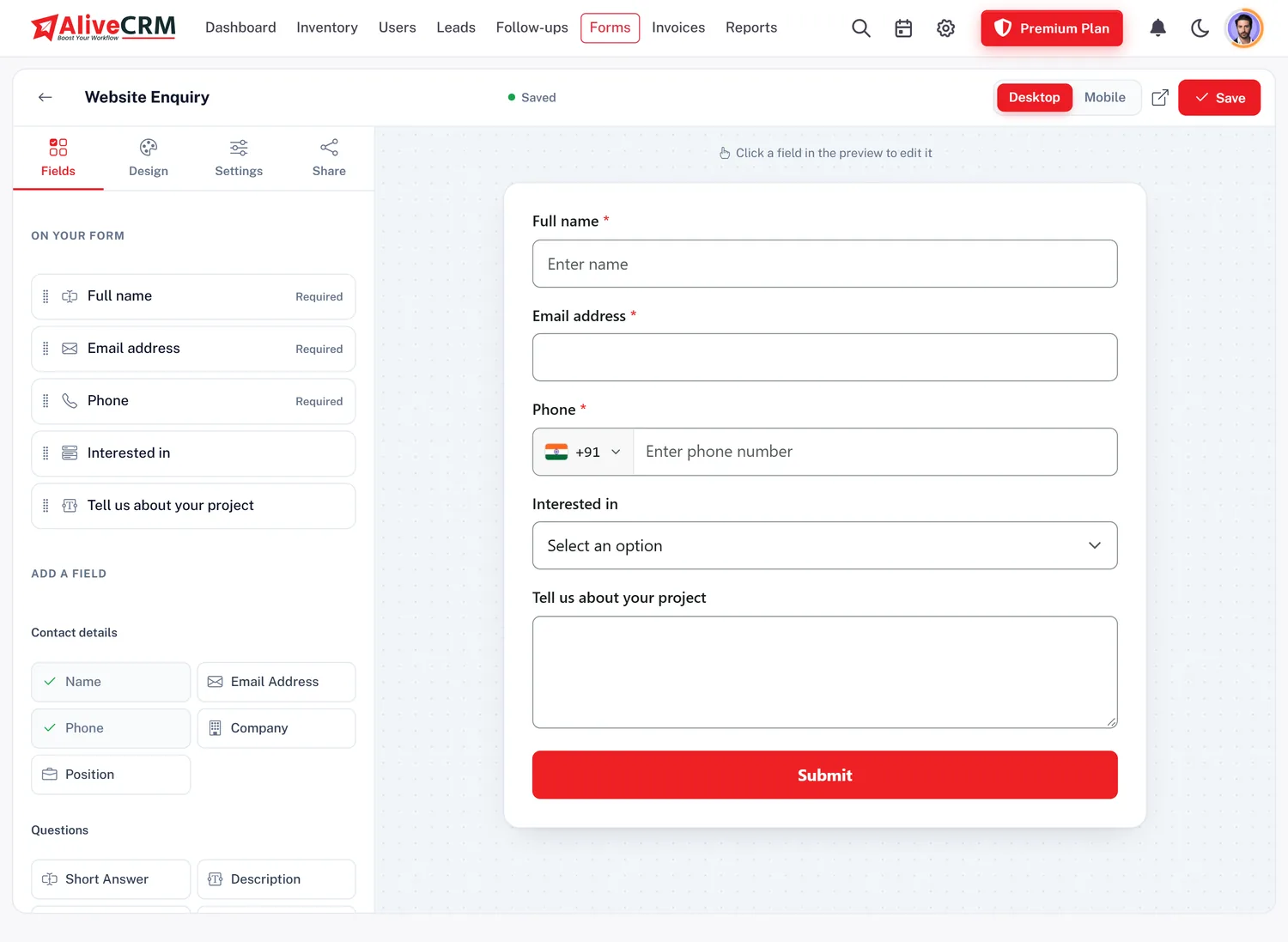
How It Works

Three Steps to a Live Enquiry Form

Most forms go live in under fifteen minutes.

  1. 01Pick Fields
  2. 02Add Your Logo
  3. 03Copy Code
  4. 04Leads Arrive
Fields

Fields Indian Customers Expect

Drag in name, mobile number, email, company, city, state, pin code, address and a description box. Add a dropdown for projects, courses or services, radio buttons for budget ranges, a date and time picker for visit or appointment requests, and a file upload for documents or photos.

  • Mobile, city, state and pin code
  • Dropdown, radio and checkbox
  • Date-time and file upload
See Form Builder Features
Fields Indian Customers Expect
Your brand

Your Logo, Your Message

Show your company logo on the form and set its size and position. Write a heading such as "Get a callback in 10 minutes" and a short note below it, aligned the way you like. After submission, show a thank-you message or send the customer to your own page, such as a brochure download.

See Website Lead Capture
  • Logo with size and position
  • Heading and note alignment
  • Thank-you or redirect
Share

Publish on Your Site or Share as a Link

Copy the script tag into your website or WordPress page, or into Google Tag Manager. If you do not have a website, or want enquiries from social media, copy the form link and share it in WhatsApp groups, status, Instagram bio, Facebook posts or SMS. Every response goes to the same CRM.

See WordPress Integration
  • Website and WordPress embed
  • Form link for WhatsApp and Instagram
  • One CRM for every channel
Who It Is For

Forms Indian Businesses Build

Site visit request

Project, preferred date and budget, routed to the site team.

Admission enquiry

Student name, class or course and parent's mobile number.

Service booking

Service needed, address, pin code and preferred time slot.

Quotation request

Product, quantity and GSTIN for a B2B quote.

Honest limits

What This Form Builder Is Not For

It is not a survey, quiz or exam tool, and it does not collect payments on the form. Forms are not available as a separate free product: they come with your AliveCRM account, free for the 7-day trial and then on a paid plan. The number of forms and leads per form depends on the plan.

FAQ

Frequently Asked Questions

Is the online form builder free?

It is free to use during the 7-day AliveCRM trial, with no card. After that it continues on any paid INR plan, with the number of forms set by the plan.

Can I use the form without a website?

Yes. Every form has its own link. Share it on WhatsApp, Instagram, Facebook or SMS, and responses arrive as leads.

Can I ask for a pin code and city?

Yes. The builder has address, city, state, country and zip fields, so you can collect a full Indian address or just the pin code and city.

Can customers upload documents?

Yes. Add a file upload field so customers can attach a floor plan, photo, requirement document or ID.

Where do responses go?

Into your AliveCRM lead list as leads, allotted to an executive by your rules. The admin gets an email for each one and the executive gets a push alert.

Can I have the form in Hindi or another language?

You can type your field labels, heading and note in any language. The AliveCRM app itself is in English.

How many forms can I create?

It depends on the plan. Each plan has a form limit and a leads per form limit, shown on the INR pricing page.

Can I embed the form in my WordPress site?

Yes. Paste the script tag into a custom HTML block on any page. No plugin is needed, and the form resizes to fit the page.

Can one form cover several projects or courses?

Yes. Add a dropdown listing them. The customer picks one, the lead records it, and each project or course can follow its own allotment rule so the right executive gets the enquiry.

Do customers need to log in to fill the form?

No. Customers simply open the form on your website or from the shared link, fill it and submit. Only your team logs in to AliveCRM.

Build Your Enquiry Form Now

Start the 7-day trial with no card and share your first form link on WhatsApp today.

Book a demo

See forms, leads and follow-ups set up for your team on a live call. Leave your details and we will reach out to pick a time.