


Lead Capture India

Website Lead Capture Software for Indian Businesses

Every website enquiry, form link reply and campaign lead saved as a CRM lead with an owner, not as an email in someone's inbox. Even the enquiry that comes in at midnight.

The short answer

How do Indian businesses lose website enquiries?

Usually in the gap between the form and the phone call. The website sends an email, the email sits in an inbox that one person checks, and by the time someone copies it into Excel the customer has spoken to two other vendors. In competitive markets like property, education and home services, that gap is the whole sale.

Speed matters more in India than most markets, because customers often fill forms on several websites at once. A website enquiry called back in five minutes is far more likely to become a meeting than one called the next day. Capture is only useful if it leads to that first call.

AliveCRM closes the gap. Its enquiry forms save each submission straight into the CRM as a lead, with the page and campaign it came from, an executive allotted by your rules and an alert on their phone. The lead capture software and the CRM are the same product.
How It Works

Website Enquiry to Executive in Seconds

No copying from email, no forwarding on WhatsApp.

  1. 01Website Form
  2. 02Lead Saved
  3. 03Executive Allotted
  4. 04Phone Alert
  5. 05First Call
Forms

Enquiry Forms Built for Indian Customers

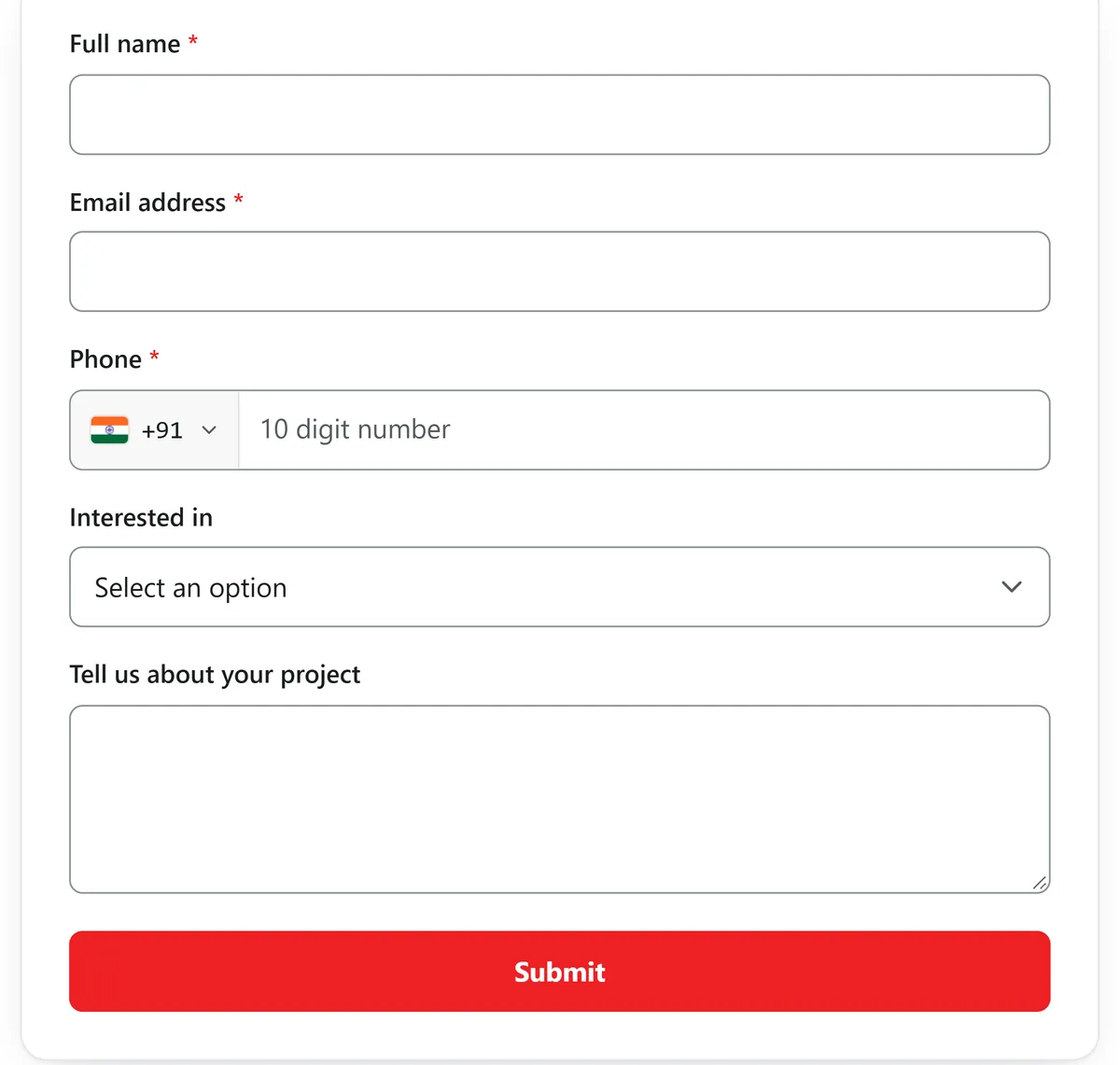
Add the fields your customers expect: name, mobile number, email, city, state, budget as a lead value, and a dropdown for the project, course or service. Add your logo, a short line in the header and a thank-you message. Ask only what you need, because every extra field costs enquiries on mobile.

  • Mobile number, city and budget fields
  • Dropdown for your offerings
  • Logo and thank-you message
See the Form Builder
Enquiry Forms Built for Indian Customers
Everywhere

Website, WordPress and WhatsApp Links

Paste one line of code into your website or WordPress page, or add it through Google Tag Manager. For customers who never visit your site, share the hosted form link in WhatsApp status, Instagram bio, Facebook posts and SMS campaigns. Every route ends in the same lead list.

See WordPress Lead Capture
  • One script tag for any website
  • WordPress without a plugin
  • Shareable link for social and WhatsApp
Other sources

Portal and Campaign Leads Through the Webhook

Each form has a webhook address. If your developer, an automation tool or a lead source can post enquiry data to a URL, those leads arrive in AliveCRM with the same allotment rules. There are no direct connectors for IndiaMART, Justdial or property portals, but a CSV export from any of them can be imported.

Read: Portal Enquiries to CRM
  • Webhook URL on each form
  • Same allotment rules apply
  • CSV import for portal exports
Speed

An Executive and an Alert for Every Enquiry

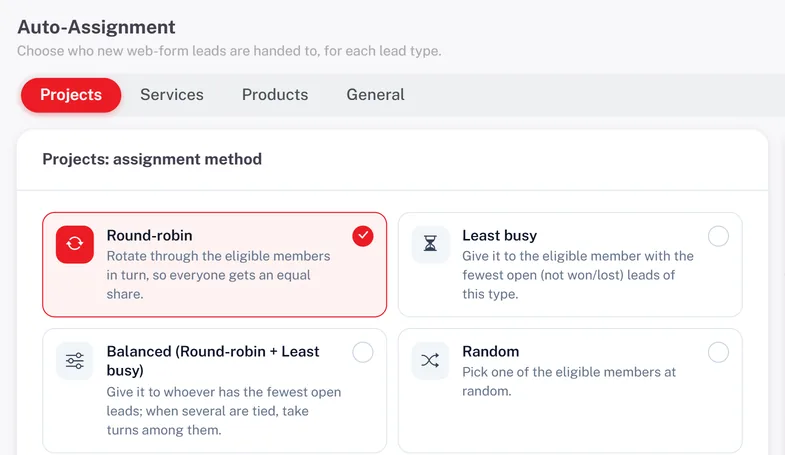
The moment an enquiry lands, AliveCRM allots it in turn, to the least busy executive, evenly, at random or to a fixed person for that project. The executive gets a push alert and the admin gets an email. On plans with SMS, a text alert goes to the team as well.

  • Instant allotment
  • Push alert to the executive
  • SMS alerts on selected plans
See Lead Assignment
An Executive and an Alert for Every Enquiry
Who It Is For

Who Captures Leads With AliveCRM

Property developers

A form on each project page, allotted to that project's site team.

Real Estate CRM

Digital marketing agencies

Landing page forms for client campaigns, tracked by source.

Agency CRM

Institutes and academies

Course enquiry forms that reach a counsellor in seconds.

Education CRM
Honest limits

What AliveCRM Does Not Capture

AliveCRM does not connect directly to Facebook lead ads, Google lead forms, IndiaMART, Justdial, 99acres or MagicBricks. It does not read enquiries from your Gmail or capture missed calls on a virtual number. Use the webhook where a source supports it, or CSV import for exports.

FAQ

Frequently Asked Questions

How do I add an enquiry form to my website?

Build the form in AliveCRM, copy its script tag and paste it into your page. On WordPress paste it into the page editor using a custom HTML block. Your web developer can also add it through Google Tag Manager.

Can I use the form without a website?

Yes. Every form has a hosted link you can share on WhatsApp, Instagram, Facebook or SMS. Submissions arrive as leads just like website enquiries.

Can AliveCRM capture leads from IndiaMART or Justdial?

There is no direct connector. If you have a way to post their enquiries to a webhook, they can go to the AliveCRM form webhook. Otherwise export them as CSV and import.

Can I capture leads from Facebook ads?

Send ad traffic to a landing page with an AliveCRM form, or share the hosted form link in the ad. A direct Facebook lead ads connector is not available.

Will I know which campaign brought the lead?

Yes. Use a separate form for each campaign or landing page, and each lead keeps its form and source. The form and source reports show which ones convert.

What if a customer fills the form twice?

Both are saved and the second is flagged as a possible duplicate, so an executive can check it rather than losing a genuine repeat enquiry.

Is there a limit on enquiries?

Each plan sets a number of forms and leads per form. Leads above a form's limit are kept but locked until you upgrade, so no enquiry is lost.

Who gets notified about a new enquiry?

The allotted executive gets an in-app and push alert, the admin receives an email, and on plans with SMS the team can also get a text alert.

Can I add the form to my Google Business Profile?

You can share the hosted form link in your profile posts and website link, and enquiries from it arrive as leads with the source you set.

Capture Every Website Enquiry

Start the 7-day trial with no card, put a form on your busiest page and watch the next enquiry arrive with an owner.

Book a demo

See forms, leads and follow-ups set up for your team on a live call. Leave your details and we will reach out to pick a time.