


Sales Team CRM India

Sales CRM in India for Teams That Sell by Phone and WhatsApp

Indian sales happens on calls and WhatsApp. AliveCRM keeps every call, chat and promise on the lead, so the sales head sees the real pipeline and executives see what to do next.

The short answer

What should a sales CRM do for an Indian team?

For most Indian companies, a sale is a series of calls and WhatsApp messages, often a site visit or demo, then a quotation with GST. A sales CRM has to fit that rhythm. It should log calls without extra typing, make the next callback impossible to forget and put the quotation one step away from the lead.

It also helps the sales head plan. When every lead has a stage and a next date, the Monday meeting becomes a review of facts: how many site visits or demos are fixed this week, which quotations are pending and which executives need help with overdue callbacks.

AliveCRM is a sales pipeline CRM for India that does this on the web and on Android. Executives tap to call or WhatsApp from the lead, the Android app reads the call duration from the phone log, and the sales head can review every executive's pipeline and overdue callbacks from one screen.
How It Works

An Indian Sales Cycle in AliveCRM

Every step is recorded on the lead itself.

  1. 01Enquiry
  2. 02First Call
  3. 03WhatsApp Details
  4. 04Visit or Demo
  5. 05GST Quotation
  6. 06Payment
Calls and chats

Every Call and WhatsApp Logged on the Lead

Tap the phone icon to call, or the WhatsApp icon to send a saved template such as your brochure message. Each tap is added to Contact History. On Android, AliveCRM also reads whether the call was incoming or outgoing, how long it lasted and whether it connected, so a two second missed call is not counted as a conversation.

See Call Tracking
  • Tap to call and WhatsApp templates
  • Call duration from the phone log
  • Contact History per lead
Pipeline

A Pipeline With Your Own Stages

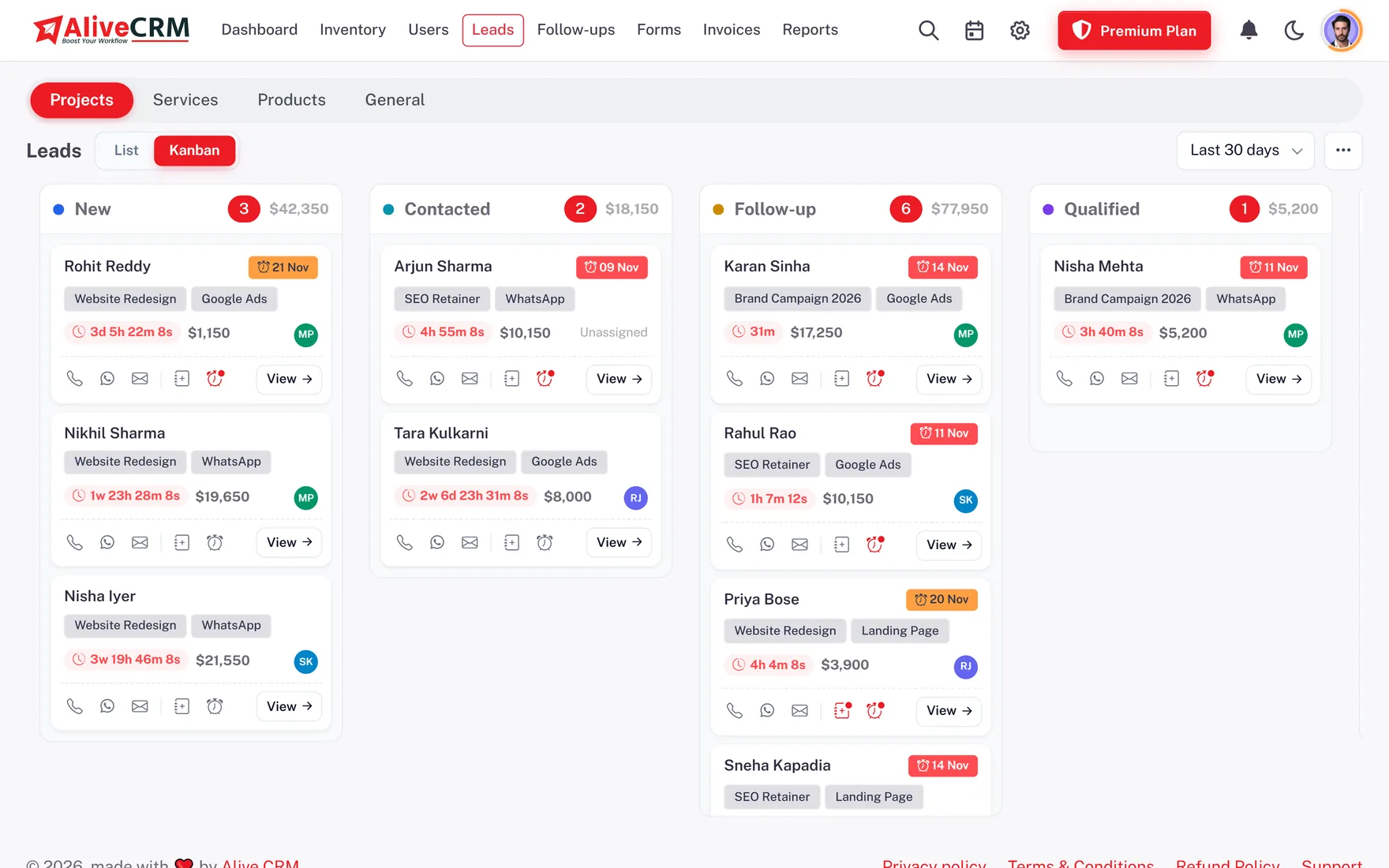
Create stages like Interested, Demo Fixed, Quotation Sent, Negotiation and Order Confirmed, and see them as a list or a Kanban board. Mark lost deals with reasons such as Price Too High or Bought From Competitor, and the lost reasons report will show you where you are losing.

  • Custom stages with colours
  • Kanban board and list
  • Lost reasons you define
See the Sales Pipeline
A Pipeline With Your Own Stages
Callbacks

No Promised Callback Forgotten

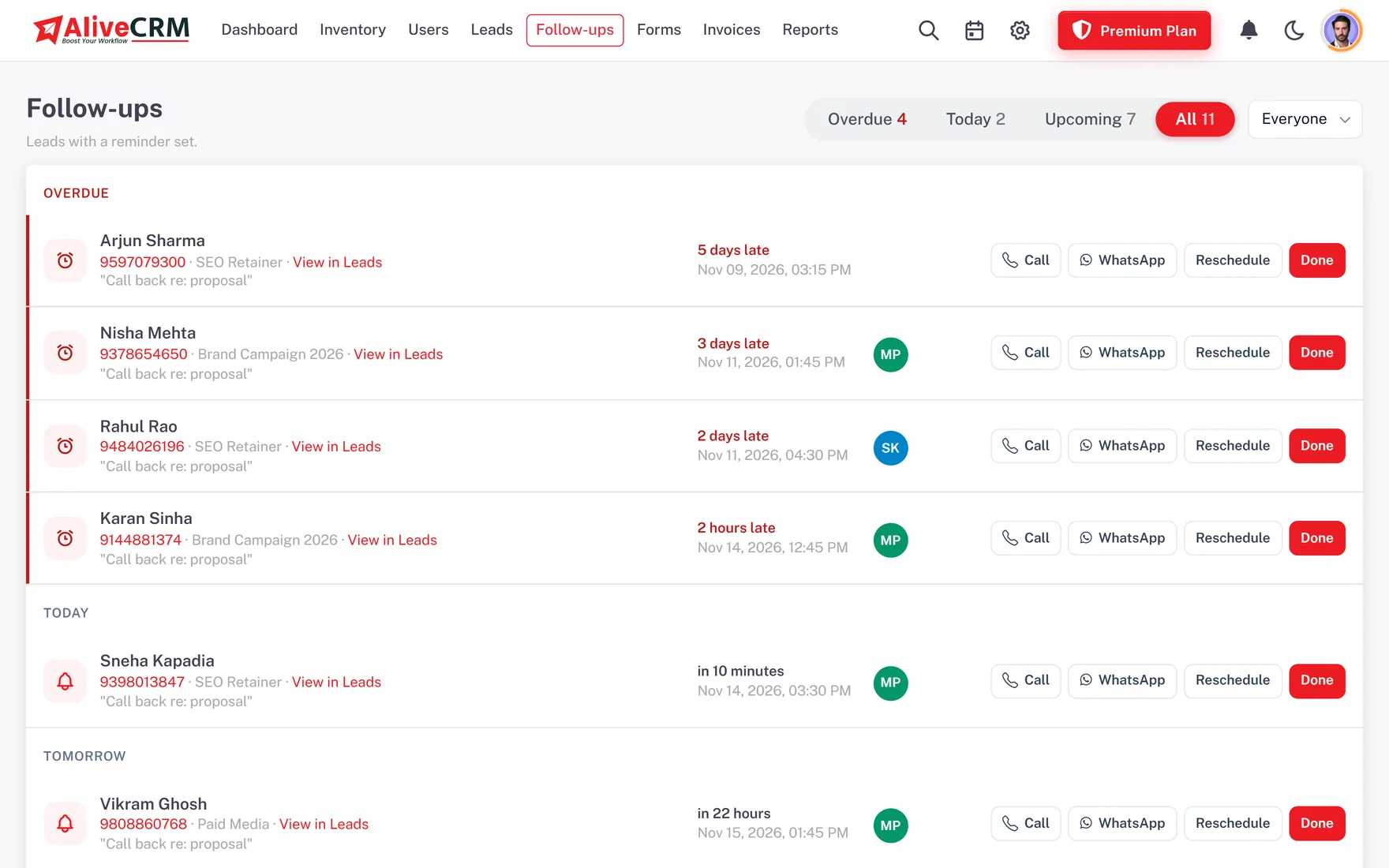
When a customer says call me after Diwali or next Monday, the executive sets a follow-up with a note. It appears on their Today list on that date with a push reminder, and if missed it moves to Overdue. Marking it done saves the outcome, so the next call starts where the last one ended.

  • Dated callbacks with notes
  • Overdue list for the sales head
  • Outcome saved on each callback
See Follow-Up Reminders
No Promised Callback Forgotten
Quotation

GST Quotation in Two Minutes

On selected paid plans, the executive builds the quotation on the lead with HSN codes and GST, and AliveCRM works out CGST and SGST or IGST from the place of supply. Share it as a PDF, by email or as a link on WhatsApp. When the customer accepts, convert it into an invoice.

Read: GST Quotation Format
  • HSN codes and line-wise GST
  • Share as PDF or link
  • Quote converts to invoice
For the sales head

What the Sales Head Sees Every Morning

Overdue callbacks

Which executives have pending calls, and how many.

Executive performance

Leads, wins and losses per person over any date range.

Source performance

Which source brings leads that actually convert.

Follow-up discipline

How often each executive completes callbacks on time.

Honest limits

What AliveCRM Does Not Do

AliveCRM does not dial numbers automatically, record calls or run an IVR. Call tracking works on Android only. WhatsApp uses chat links and templates, not the Business API, so bulk messages and chatbots are not included. There is no deal probability or forecasting, and no branch or manager hierarchy module.

FAQ

Frequently Asked Questions

Is AliveCRM good for telecalling teams?

It suits teams that call leads from their own phones. Executives tap to call from the lead, and the Android app logs call direction and duration. It is not a predictive dialer and does not record calls.

Can I see how many calls each executive made?

Yes. Calls started from the lead are logged in Contact History, and on Android the duration and outcome are read from the phone log. The user activity and sales rep reports summarise activity per person.

Can executives send quotations from their phone?

Quotations are available in the AliveCRM app on selected paid plans, and they can be shared as a PDF or a link, including on WhatsApp.

Can I stop executives seeing each other's leads?

Yes. Give the sales executive role self only access and they see only their own leads. The sales head and admin see everyone.

Does AliveCRM calculate GST?

Yes. Quotations and invoices apply GST per line item and split it into CGST and SGST within the state or IGST across states. E-invoicing and GST filing are not included.

Is there an iPhone app?

The iOS app is coming. Today the Android app is on Google Play, and iPhone users can use the web app in the browser.

How is the sales CRM priced?

Plans are charged in INR per company per month or year, and differ by number of employees, forms and features. See the INR pricing page.

Can I try it with my real team?

Yes. The 7-day trial needs no card and includes the paid features except SMS alerts, so you can invite executives and work real enquiries.

Can I customise the sales stages?

Yes. Name the stages your team uses, give them colours and keep separate lists for enquiries, bookings and orders. Edit the lost reasons too.

Give Your Sales Team One Shared Pipeline

Start a 7-day trial with no card, invite your executives and see INR plans when ready.

Book a demo

See forms, leads and follow-ups set up for your team on a live call. Leave your details and we will reach out to pick a time.