CRMProducts, Projects & Services

Organize Products, Projects & Services in One CRM

Keep the products you sell, the projects you take on and the services you offer in the same CRM as your leads. Sort them into categories, give each one a team, and every enquiry arrives tagged with the item it is about and lands with the right person.

The short answer

What Is Inventory Management in AliveCRM?

Inventory in AliveCRM is the list of things your customers enquire about. A product company keeps products, a software house keeps projects, a consultancy keeps services, and many businesses keep all three. Each item sits in a category, has its own team and its own enquiry form, so a lead never arrives as an anonymous name and number.

It is built for organizing offerings and routing the enquiries they bring in. It is not warehouse or stock-control software: there are no stock movements, purchase orders or suppliers to manage.

What the module covers

  • Products, projects and services, each with an Active or Inactive status.
  • Categories by type, with one level of sub-categories.
  • A team and an assignment method for every item.
  • Enquiry forms tied to one item each, and reports per item.
Common Challenges

Stop Managing Different Enquiries in Disconnected Lists

When a business sells several things, enquiries get hard to sort without one shared list of what it offers.

Offerings kept in spreadsheets

Product details, prices and codes live in a file only one person keeps up to date.

Enquiries without context

A new lead says "interested", and the rep has to call back just to learn what in.

Manual hand-offs

A manager reads every lead to decide which specialist should take it.

Inconsistent names

Three people spell the same service three ways, so nothing groups cleanly.

No view per offering

Nobody can say which product or service brought in the most enquiries last month.

Quotes typed from memory

The rep pricing a deal has to look up what the customer asked about first.

How It Works

From Item to Assigned Enquiry

Set an item up once, and every enquiry it brings in carries the item from the first minute.

  1. 01Add the Item
  2. 02Pick a Category
  3. 03Choose Its Team
  4. 04Link a Form
  5. 05Lead Arrives Tagged
  6. 06Right Person Follows Up
Three Item Types

Products, Projects and Services Side by Side

Each type keeps the fields that suit it. Use one, two or all three.

Products

Name, unit, an optional SKU, price, category, size, colour, weight, brand, vendor, one image and a stock number you keep.

See Product Enquiry Management

Projects

Name, locations, builder or vendor name, a project URL and a category, for work you sell one engagement at a time.

See Project Enquiry Management
SKUs and Images

Identify Products with Company-Level Unique SKUs

A SKU, or stock keeping unit, is the code you use to tell products apart. In AliveCRM the SKU is optional and uses your own format, and two of your live products cannot share one. Another company on AliveCRM can use the same codes without any clash, because each account checks only its own. Each product can also carry one image, JPG, PNG or WebP up to 2 MB, so the team can tell similar models apart at a glance.

See Product Enquiry Management
  • Your own SKU format
  • Unique within your company
  • One image per product
  • Not generated automatically
Categories

Organize Items with Parent and Child Categories

Create categories for products, for projects, for services, or shared by all three. Each category can have one level of sub-categories, for example Software Development, then Web Applications and CRM Development. A category has a colour and icon, and can carry assignees and a starting status that new leads take. Sub-categories inherit those settings, and filtering by a parent also finds items in its sub-categories.

See Lead Statuses and Sources
  • Typed or shared categories
  • One level of sub-categories
  • Colour, icon and starting status
  • Assignees used as a fallback team
Team per Item

Connect Products and Services with the Right Team Members

Not everyone sells everything. Pick a team for each item, everyone with Select all or just the specialists. A web design agency can give website enquiries to one group and app enquiries to another. Being on an item team does not let someone edit the item; that still needs a role with edit rights. On roles set to "Self only", people see the items whose team they are on.

See Roles and Permissions
  • Whole team or selected people
  • Team separate from edit rights
  • Self-only roles see their own items
Item-Based Routing

Route Enquiries by the Product, Project or Service

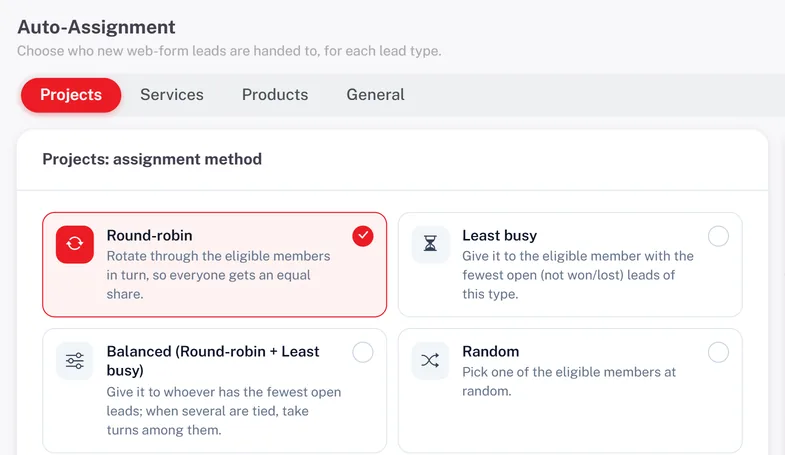
Each item can follow the company assignment rule or set its own: round-robin, least busy, balanced, random, a fixed person, the whole team at once, or off for manual assignment. Every item keeps its own round-robin rotation, so web design leads rotate separately from SEO leads. If an item has no team, AliveCRM uses its category assignees, then the rule fallback list, then all active users. Auto-assignment is included on selected paid plans.

  • Company rule or a method per item
  • Separate rotation for every item
  • Fallback to category assignees
  • Reassign by hand any time
See Automatic Lead Assignment
Route Enquiries by the Product, Project or Service
Forms per Item

Capture Enquiries for Specific Products, Projects and Services

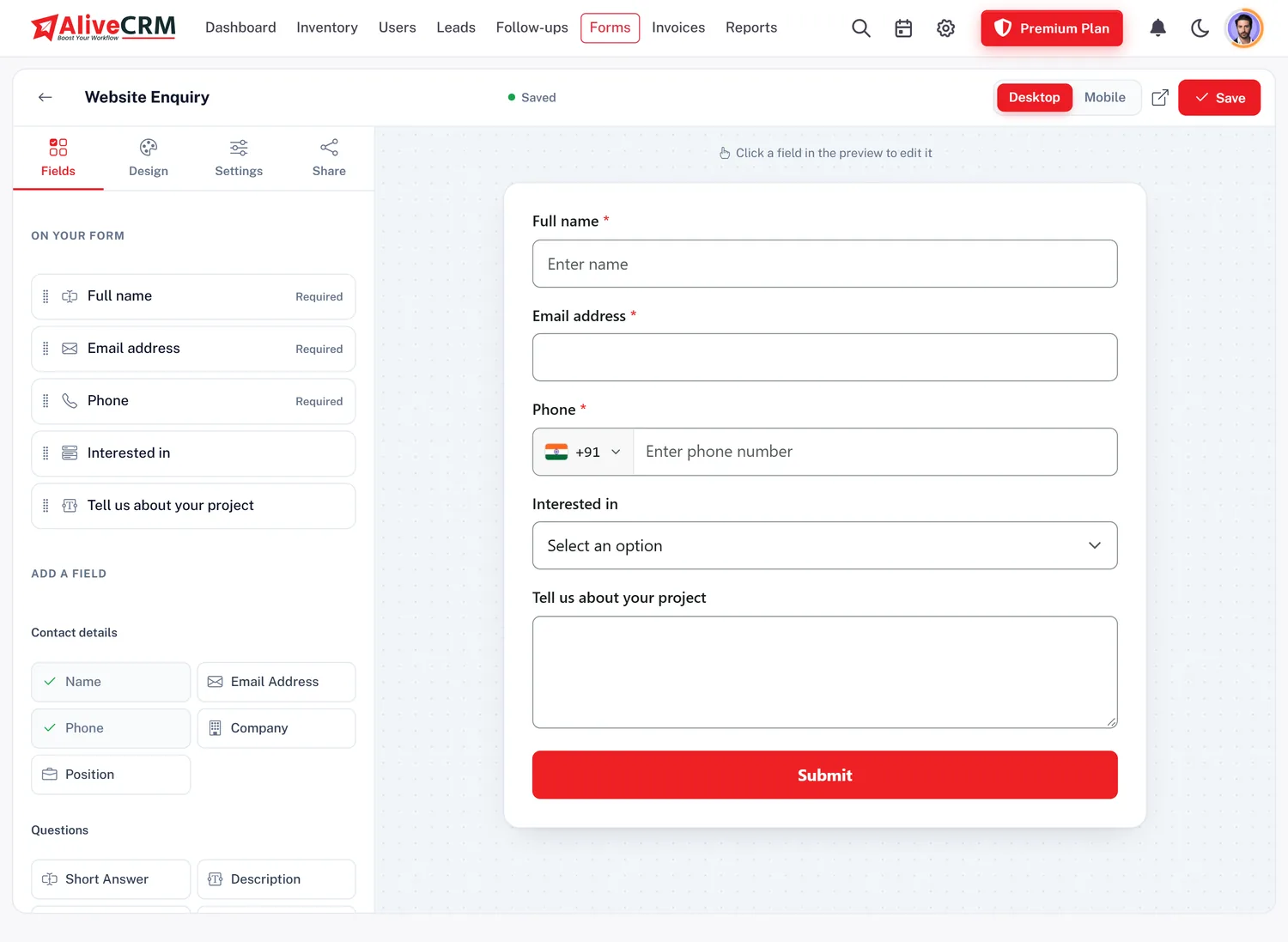
Every lead capture form you build is linked to one product, project or service. Put the form on that item's page and each submission becomes a lead already tagged with the item, then goes through its routing. If you set the item to Inactive or delete it, its form stops taking enquiries and tells visitors the item is no longer available, so nothing lands on an offering you have withdrawn.

  • One item per form
  • Leads arrive tagged
  • Inactive items stop their forms
See the CRM Form Builder
Capture Enquiries for Specific Products, Projects and Services
Enquiry Types

Manage Different Enquiry Types Within One CRM

The leads list has a tab for Projects, Services and Products, plus General for enquiries not tied to an item, which appears once you have some. The item shows on every lead, and you can filter by category. A lead added by hand after a call can be given its type and item too, so phone enquiries sit beside form enquiries with the same notes, statuses and follow-up reminders.

See Lead Management Features
  • Tabs per item type
  • Item shown on every lead
  • Filter by category
  • Type and item on manual leads
Quotations

Connect Business Enquiries to Quotations and Invoices

When an enquiry turns into a request for price, build a quotation on the same lead, convert it into an invoice when the customer agrees, and record payments against it. The lead tells the rep which item the customer asked about. Lines are typed in rather than pulled from the item, so check prices on the quote before you send it.

See Quotations and Invoices
  • Quote on the tagged lead
  • Convert to invoice
  • Lines entered on the quote
Roles

Control Who Can Manage Products, Projects and Services

Roles set view, create, edit and delete rights separately for projects, products and services, and a separate permission controls who manages categories. A sales rep can work the leads for an item without being able to change its price, team or category. Every item and category belongs to your company account only.

See User Management
  • View, create, edit, delete per type
  • Separate category permission
  • Company data kept separate
Reports and Mobile

Review Enquiries by Item and Manage Inventory on Mobile

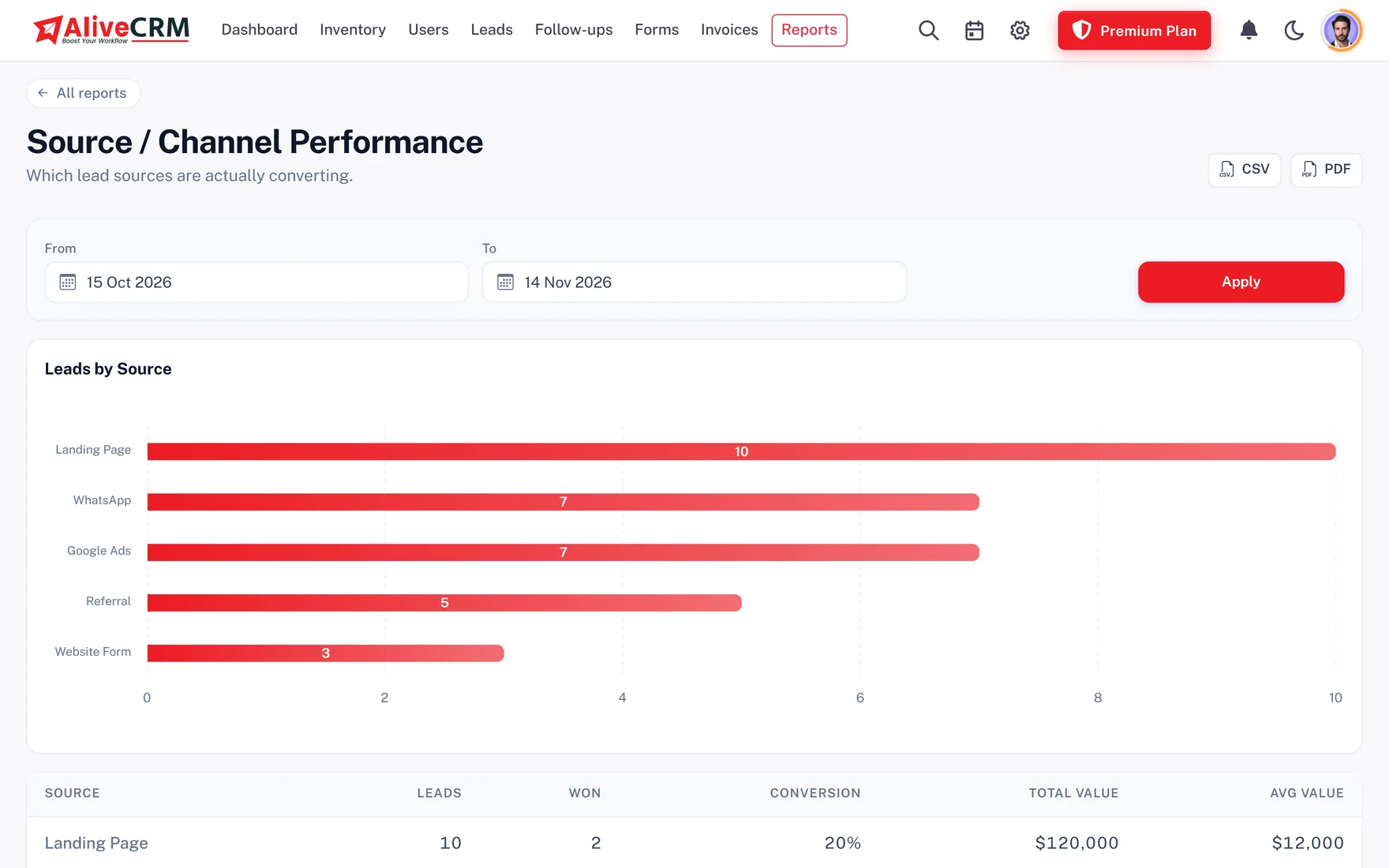
Three advanced reports, included on selected paid plans, look at inventory: the project report with leads per project, the product catalog report with products and services by category, price and lead count, and the leads by category report with leads, wins and conversion. Each exports to CSV. On the Android app you can browse, search and filter items, add and edit them, change their status and add categories. The iOS app is coming soon.

  • Project and product catalog reports
  • Leads, wins and conversion by category
  • CSV export
  • Add and edit items on Android
See CRM Reports
Review Enquiries by Item and Manage Inventory on Mobile
Use Cases

Products, Projects & Services Management for Different Businesses

IT and software companies

Web, app and custom software work kept as projects or services, each with the developers who scope it.

Marketing agencies

SEO, paid ads, branding and social media kept as services, each with its own specialists.

CRM for Digital Agencies

Professional service firms

Advisory, implementation and support services, each routed to the right consultant.

CRM for Consulting Firms

Service providers

Installs, repairs and maintenance, with a team per service and a reminder on every enquiry.

CRM for Service Businesses

Growing small businesses

Several offerings in one CRM, with roles that grow with the team.

CRM for Small Business
Honest limits

What Inventory in AliveCRM Does Not Do

This is a catalog of offerings for managing enquiries, not stock control. The stock number on a product is a figure you type in; it does not go down when you sell. There are no warehouses, stock locations, suppliers, purchase orders, barcodes, low-stock alerts, batch or serial tracking, or stock valuation, and no marketplace sync.

Only products carry an image, one each. Items cannot be imported or exported as a CSV file, or duplicated, and quotation lines are not filled from the item. Projects here are enquiries to win, not delivery plans, so there are no tasks, timesheets or Gantt charts. Your plan's inventory limit counts products, projects and services together.

Pricing and Trial

Explore Product, Project & Service Management with AliveCRM

Every plan includes inventory, with a limit on how many items you can keep, and the 7-day trial lets you set up real products, categories, teams and forms before you decide. Pricing shows monthly and yearly options and what each plan includes.

View CRM Pricing and Compare Plans
  • 7-day trial, no card needed
  • Item limit set by your plan
  • Monthly and yearly billing
FAQ

Frequently Asked Questions

What is Inventory Management in AliveCRM?

It is the module where you keep your products, projects and services, with their categories, teams and enquiry forms, so every lead is tied to the item it is about and reaches the right person.

Does AliveCRM manage products?

Yes. Each product has a name, unit, optional SKU, price, category, size, colour, weight, brand, vendor, one image, a stock number you keep and an Active or Inactive status.

Can I manage projects in the inventory module?

Yes, as items people enquire about: a name, locations, a builder or vendor name, a project URL and a category. It does not plan delivery work such as tasks or timelines.

Can I manage business services?

Yes. A service has a name, price, duration, category, vendor and locations, plus its own team and enquiry form.

Does AliveCRM support product images?

Yes, one image per product, JPG, PNG or WebP up to 2 MB. Projects and services do not have an image field.

Can I create custom categories?

Yes. Create as many as you need in Settings, each with a name, colour, icon, optional assignees and an optional starting status for new leads.

What are typed categories?

A category can belong to products, projects or services, so each picker only shows the ones that fit. A category can also be shared by all three types.

Can I create parent and child categories?

Yes, one level deep: a top-level category can have sub-categories, and those cannot have their own. Sub-categories inherit the parent's colour, icon, assignees and starting status.

Does each product need a unique SKU?

A SKU is optional. When you give one, no other live product in your company can use the same SKU.

Can two different companies use the same SKU?

Yes. The check is per company account, so your codes never clash with another business on AliveCRM.

Does AliveCRM generate SKUs automatically?

No. You type the SKU in your own format, for example a range prefix and a number.

Can I assign products to particular employees?

Yes. Each item has a team. Choose everyone with Select all or pick the people who should receive its enquiries.

Can projects and services have their own team?

Yes. All three item types have a team and their own assignment setting.

Can website forms be linked to products?

Yes. Every form is linked to one product, project or service, and leads from it arrive tagged with that item.

Can incoming product enquiries be assigned automatically?

Yes, on plans with auto-assignment. Each item follows the company rule or its own method: round-robin, least busy, balanced, random, a fixed person, the whole team, or off.

Does each item have its own round-robin rotation?

Yes. Every item keeps its own position in the rotation, so leads for one service never move the turn order for another.

Can I manage product orders and service bookings?

Yes, as enquiries. Product, project and service leads have their own tabs in the leads list, with statuses, notes and reminders. AliveCRM does not take online orders or payments.

Does AliveCRM track stock quantities?

Products have a stock number you can type and update, but it does not change when you sell. There is no stock tracking, valuation or low-stock alert.

Can it manage warehouses and suppliers?

No. There are no warehouses, stock locations, suppliers or purchase orders. Products can record a vendor name only.

Does AliveCRM include barcode scanning?

No. There is no barcode scanning or printing.

Can I create quotations from related leads?

Yes, on plans with quotations. Build the quote on the tagged lead and type the lines; they are not filled in from the item.

Does AliveCRM include inventory reports?

Yes, as advanced reports: leads per project, products and services by category with price and lead count, and leads, wins and conversion by category. Each exports to CSV.

Can I manage inventory records on mobile?

Yes, on Android: browse, search and filter items, add and edit them, change their status and add categories. The iOS app is coming soon.

Can I try Inventory Management before buying?

Yes. The 7-day trial includes inventory, teams and forms, so you can set up your own items first. After that, your plan sets how many items you can keep.


Keep Your Business Offerings and Customer Enquiries Connected

Add your products, projects and services, set their categories and teams, and let every enquiry arrive tagged and assigned. Start a 7-day trial or book a demo.

Book a demo

See forms, leads and follow-ups set up for your team on a live call. Leave your details and we will reach out to pick a time.